Adding files (progress reports, assessments, IEPs) to individual student profiles





Hello,
Our files on Google Drive are a total mess--it has become increasingly difficult to locate older files, and our counselors/clinicians have resorted to keeping hard copies of documents because it's more reliable than getting lost somewhere on the drive.
This is our first year on Blackbaud. I know there is a student profile option to upload documents, but I wonder has anyone moved completely to the Blackbaud cloud for storing student documents?
I just wonder about organizational purposes and access/restrictions. For instance, we have clinicians (speech therapists, OT, ET) who wonder if there could be a “clinical folder/section" that they would have access to for things like assessments, clinical progress reports, etc.,--and if there could be “school side” that would be things like report cards, transcripts, applications.
We haven't delved too much yet into the cloud-storing prospect of Blackbaud, but wanted to see how others' experiences are.
Thanks!
Comments
-
@Nathan Ong We are attempting to move completely away from hard copies of cumulative files and store as much as we can in Files and Forms in Core. Generally, it works OK, but the biggest problem we have is that only one file is allowed for each file type. This is fine for things like test results (we just have “1st grade results”, “2nd grade results”, etc.) with one file per type, but it becomes an issue with things like attendance warning letters, medical notes, updated custody agreements, and so on that can have multiple relevant files of the same file type.
We've been asking Blackbaud for years to allow for uploading of multiple files to the same file type, and it hasn't happened yet. Additionally, it is impossible to download an entire cume file in one click. You have to download each individual file and merge them all together in Adobe or Preview to make it a single file. It's doable, but it takes a non-negligible amount of time to make it happen.
Overall, I'd say it's probably more worth it than not, you just have to know that there are some minor annoyances you'll have to work around.
0 -
@Nathan Ong, I would echo @Brian LeBlanc in that adding the files to Core has worked relatively well for us. The bulk import tools make uploading large groups of PDFs from standardized test scores relatively easy, and adding individual files for students is straightforward. I would encourage you to be strategic about what files you keep in Core so that it doesn't become a dumping ground for everything. Brian is correct in that you only get one file for each file category you create which can sometimes be a limitation, but I find it keeps down on the file glut. For example, with standardized test scores, we have the option to export a cumulative report that appends their new test scores to the end of their previous ones, so we have been replacing the file we upload to Core with this new one so that we only have one file present at a time. We have opted to use Official Notes as well as Messages, both of which are archived on the student record, to keep track of a lot of the recurring things like attendance, conduct, etc that would otherwise generate a lot of Core files. We try to use Core for the very high level important individual files versus anything repeating or frequent.
0 -
@Brian LeBlanc Thank you! I presume when creating a folder and creating number of file names, you are referring to that only one kind can be uploaded? For instance if we had something like IEP files under a School folder, but want to have student's IEP from 2020-2021, 2021-2022, etc. We would only be able to upload one document, unless we create another file name like IEP 2?
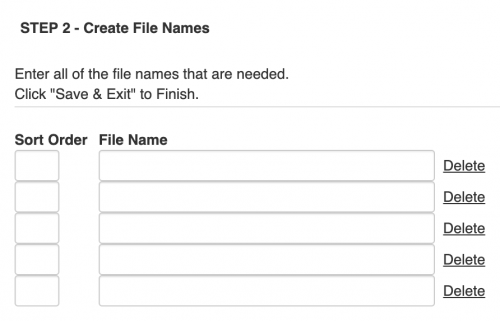
If that's the case I can see that being a hindrance if we want to be uploading files regularly. If my understanding is right, maybe having an “IEP folder" in that example and uploading multiple IEP documents that way? I just wonder if the # of file names could be updated after it's created.
Thanks again!
0 -
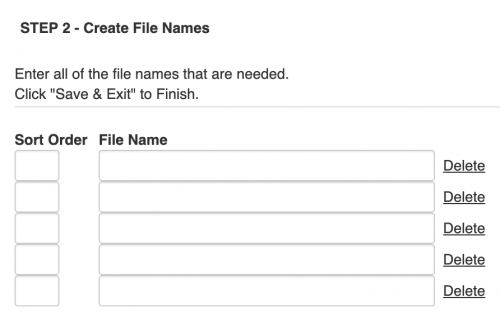
@Geoffrey Goodfellow I see, thank you for the reply! We would want to upload things like progress reports, IEPs, assessments, and those would be recurring kind of documents. But if it's limited to one file in that way I see it as being more useful for those individual types like medical documents, student applications etc. – I see that you can choose multiple # of files so am presuming if under a School folder, File name - IEP means I could only upload one IEP document? Wonder if a workaround could be having an IEP folder and doing IEP 1, IEP 2, etc.
 0
0 -
@Nathan Ong, Yes, I believe you would need to have placeholders for the maximum number of documents of any one type that you expect to receive. You do have the option of adding more later should you ever need more for a particular student.
0 -
I see that you can choose multiple # of files so am presuming if under a School folder, File name - IEP means I could only upload one IEP document? Wonder if a workaround could be having an IEP folder and doing IEP 1, IEP 2, etc.
Yep, that's exactly the workaround we use. It's an annoyance, to be sure, but it does work. Another option would be to download the old file, merge it with the new one, and upload the merged file to the existing file name. (If you have a Mac, Preview makes this very easy.)
To @Geoffrey Goodfellow's point, you can (and likely will) add more file names, and you can do so as they become necessary, so you don't necessarily have to have all your bases covered from the start. The number of file names you can add is unlimited, although they're in kind of a weird place: Core>Bulk Upload>Manage user files.
0





Categories
- All Categories
- New YourCause Community TEST
- New SKY Community TEST
- New Grantmaking TEST Community
- New Altru Test Community
- New bbcon Community - TEST
- 12 Blackbaud Agents for Good™
- New Raiser's Edge NXT Community
- 7 Blackbaud Community Help
- 218 bbcon®
- 1.4K Blackbaud Altru®
- 409 Blackbaud Award Management™ and Blackbaud Stewardship Management™
- 1.2K Blackbaud CRM™ and Blackbaud Internet Solutions™
- 16 donorCentrics®
- 361 Blackbaud eTapestry®
- 2.7K Blackbaud Financial Edge NXT®
- 680 Blackbaud Grantmaking™
- 598 Blackbaud Education Management Solutions for Higher Education
- 3.3K Blackbaud Education Management Solutions for K-12 Schools
- 952 Blackbaud Luminate Online® and Blackbaud TeamRaiser®
- 85 JustGiving® from Blackbaud®
- 7K Blackbaud Raiser's Edge NXT®
- 3.9K SKY Developer
- 257 ResearchPoint™
- 123 Blackbaud Tuition Management™
- 165 Organizational Best Practices
- 247 Member Lounge (Just for Fun)
- 40 Blackbaud Community Challenges
- 37 PowerUp Challenges
- 3 (Closed) PowerUp Challenge: Grid View Batch
- 3 (Closed) PowerUp Challenge: Chat for Blackbaud AI
- 3 (Closed) PowerUp Challenge: Data Health
- 3 (Closed) Raiser's Edge NXT PowerUp Challenge: Product Update Briefing
- 3 (Closed) Raiser's Edge NXT PowerUp Challenge: Standard Reports+
- 3 (Closed) Raiser's Edge NXT PowerUp Challenge: Email Marketing
- 3 (Closed) Raiser's Edge NXT PowerUp Challenge: Gift Management
- 4 (Closed) Raiser's Edge NXT PowerUp Challenge: Event Management
- 3 (Closed) Raiser's Edge NXT PowerUp Challenge: Home Page
- 4 (Closed) Raiser's Edge NXT PowerUp Challenge: Standard Reports
- 4 (Closed) Raiser's Edge NXT PowerUp Challenge: Query
- 822 Community News
- 3.1K Jobs Board
- 57 Blackbaud SKY® Reporting Announcements
- 47 Blackbaud CRM Higher Ed Product Advisory Group (HE PAG)
- 19 Blackbaud CRM Product Advisory Group (BBCRM PAG)