Running and exporting APIs





I am new to developer.sky.blackbaud.com. I discovered how to get a list of my lists at https://developer.sky.blackbaud.com/docs/services/school/operations/V1ListsGet/console.
I'm wondering if there is a quicker method to running this and other APIs instead of going through the key and authorization steps, and then copying and pasting the results into a text editor or spreadsheet.
Comments
-
@Ivan Peev thank you very much for the help Ivan! I'll check it out.
0 -
@Jim Maier
You can use Microsoft Power Automate to automate on schedule (every 4 hours, every 12 hours, etc) to get the data from API (Power Automate has most of API available in the connector published) and then you can “process” the data however you wish (store into a SharePoint location, process into SQL Server on Azure, etc). This is the “low” code option for most org that wants to do something with API but not needing to a full fetch developer1 -
0
-
@Jim Maier
No, the link you referenced specifically is for triggering a “flow” (or you can call it a “program”/"subroutine"/etc). For example, I created a custom “action” (button" on a constituent record page on RE NXT, it is call “DELETE”. When clicked on, it “invoke a flow” I created, which is to delete the constituent record the action was clicked from. It includes various logic such as does the person who clicked has permission to delete the record, etc.Of course, if you want to have a “click” in RE NXT that invoke a flow, which export information and do something with it, you can allow the link too. (i.e. on Constituent record page on RE NXT, you want to get all open pledges of this constituent exported, you can create an action button “Export Open Pledge” and when clicked on, a flow will trigger and the flow will get a list of open pledges for this donor and email whoever clicked an excel attachment of these open pledges).
I'm not sure what you plan to do and your business use-case here, so it is hard to suggest/recommend.
0 -
@Alex Wong thanks for more clarification and education. I am wanting to create a flow that will execute this page and export the results to a csv or xlsx file.
0 -
@Jim Maier
Are you in Microsoft ecosystems? Meaning, do you have access/license to Power Automate?If you do, you can start with a Power Automate flow that triggers on schedule (assuming you want to have this being run on schedule). Then invoke the API you mention using the Send HTTP Request action

There was a post regarding how to use Send an HTTP request in community, I can't find it right now so you can try searching it up. It should work for School API too.
After you run the API and get the response in JSON array, you can Parse JSON, then add to an excel file using Excel connector.
0 -
How many records do you need to process? I'm asking because systems like Power Automate can become very costly because you pay based on the amount of data you have to process. Another shortcoming of the Power Automate system is that it is “single message” processing system, similar to the well-known BizTalk. Power Automate will be slow when processing thousands of records.
0 -
@Alex Wong thank you very much for your reply and valuable assistance. I'll look for the post.
0 -
@Ivan Peev thanks for writing. Only a few hundred once in a while.
0 -
@Ivan Peev
I do know MS have multiple pay struture, so what you said may be true as well.For my org, we use the Power Automate per user license which allows us to use all premium connectors. We do not get charged based on amount of data, rather, it is charged based on “action” within each flow. There are caps on actions which when we do go over, it does not charge us more, rather, we do get throttled on performance.
That said, I have dozens of Power Automate flows that process millions of records. I have a data warehouse that takes many “tables” of information from RE and FE: full constituent table (>400K), full gift table (>1.4M), full FE transaction table (~3M). There hasn't been any problem with “amount of data” for us.
Power Automate does not neccesarily process 1 record at a time, it really depends on the API (connector action) and how the “dev” person create the flow. You can make 1 call to an API endpoint that potentially brings back 5000 (limit for most API is 5000 a pop) records in a JSON object and you can process this 5000 records as a “single” action to pop into a csv. Although, it is possible that the flow was created in such a way that the flow process the 5000 records 1 at a time. Depending on business use case, you may need to process 1 at a time, sometime, but generally you can find a way to process all 5000 in 1 action.
@Jim Maier if I understand your need correctly, the API endpoint you planning use will give you an array of all the info in 1 action (API call), then you can process that JSON array into csv. We can talk about method of doing so after you have gotten started and able to make the API call to get the JSON data first.
0 -
@Alex Wong you are understanding correctly. I am trying to run this and export to CVS or xlxs. I could even use a JSON file to open within Power BI.
List of Lists as shown here:Returns a list of basic or advanced lists the authorized user has access to
Requires the following role in the Education Management system:- Platform Manager
Thanks for your continued help!
0 -
@Ivan Peev
I do know MS have multiple pay struture, so what you said may be true as well.For my org, we use the Power Automate per user license which allows us to use all premium connectors. We do not get charged based on amount of data, rather, it is charged based on “action” within each flow. There are caps on actions which when we do go over, it does not charge us more, rather, we do get throttled on performance.
That said, I have dozens of Power Automate flows that process millions of records. I have a data warehouse that takes many “tables” of information from RE and FE: full constituent table (>400K), full gift table (>1.4M), full FE transaction table (~3M). There hasn't been any problem with “amount of data” for us.
Power Automate does not neccesarily process 1 record at a time, it really depends on the API (connector action) and how the “dev” person create the flow. You can make 1 call to an API endpoint that potentially brings back 5000 (limit for most API is 5000 a pop) records in a JSON object and you can process this 5000 records as a “single” action to pop into a csv. Although, it is possible that the flow was created in such a way that the flow process the 5000 records 1 at a time. Depending on business use case, you may need to process 1 at a time, sometime, but generally you can find a way to process all 5000 in 1 action.
@Jim Maier if I understand your need correctly, the API endpoint you planning use will give you an array of all the info in 1 action (API call), then you can process that JSON array into csv. We can talk about method of doing so after you have gotten started and able to make the API call to get the JSON data first.
The amount of “actions” depends on the amount of data. More actions mean more cost to process data. Bringing 5000 records in one API call is not necessarily the issue. The issue is how many “actions” will be required to get the input data into the required layout by applying transformations, lookups, etc. For simple workflows, it might be relatively inexpensive, I agree. It might be useful if you can share how much you have paid per month to process millions of records and how many actions it took.
I have heard rumors Power Automate is actually a higher abstraction over another product called “Logic Apps”. And “Logic Apps” is based on the old BizTalk technology and therefore has the same major limitation where the data can only be processed one record at a time. I suspect the “throttling” you are referring to is based on the amount of BizTalk servers in the backend you are paying for. If you are using a low-cost plan, you are probably allocated a single server. That probably explains why your performance is drastically slower.
0 -
@Ivan Peev
For example, we have ~470K constituent code records. 1 flow that dumps all constituent codes into my Azure SQL Server instance, 5x a day (every 4 hours except late night) except Saturday. There are only 6 fields: id, constituent_id, date_added, date_modified, description, inactive.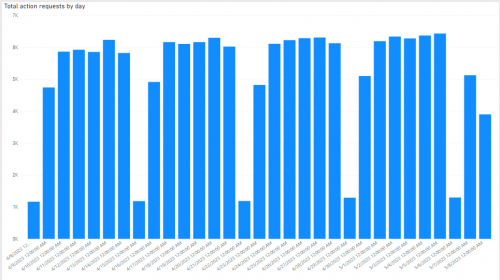
Above is the analytics on “Actions” per day in the last 30 days, you can see on days I do full 5x run, it net out to ~6-7K actions. As SKY API max allow 5000 records to be retrieved per “call”, the flow runs a total of 95 loops to get all ~470K constituent code records and dump into the Azure SQL Server database table. Each time the flow runs, it ran for ~12-13 minutes. Each of the 95 loops takes ~8 seconds to call SKY API to get 5000 records and dump into Azure SQL Server.
As for power automate's cost, like I mention, I have a Power Automate per user license, with non-profit pricing, so $5/month.
I have over 20 of such flows, to dump various data that can be dump 5x a day. Some of them is dumping iterative changes (i.e RE constituent table, RE gift table, FE transactions table, etc), some of them is doing full dump (i.e. RE constituent code table, RE campaign,fund,appeal,package tables, RE event table, RE costituent relationship table, etc). While probably best to “space” them out, I actually have them all run at the same time. (i.e first run of day is always 5AM, then every 4 hours).
I see no increase in our Power Automate flow license / billing, same $5/month.
The throttling I was speaking about is on the flow that uses SKY Webhook, where a “call” is made everytime a constituent record change/add/deleted, gift record change/add/deleted, etc. When we do a global change on constituent and affected hundred-thousands record, each record change is a webhook call to the flow, that's when we get throttled problem.
2 -
@Alex Wong
Thank you for the detailed post! I found the following FAQ page here, where they state the following:
“If the flow is set to the per user plan, then it gets the plan of its primary owner. If a user has multiple plans, such as a Microsoft 365 plan and a Dynamics 365 plan, the flow will use the request limits from both plans.”
So, it appears the complete solution cost is a little more complicated to estimate. How much they charge you monthly in your Azure plan? I believe there should be a detailed breakdown where you can see how much you have been charged for the volume of data being processed.0 -
We use other MS products and services, which I don't think is applicable for our discussion here.
We pay $5 per month on a Power Automate per user license for me, and pays ~$74 per month using 50 DTU option under Standard (Budget friendly) Service Tier for Azure SQL Server. But even then the ~$74 per month is for the Azure SQL's capacity and processing power, unrelated to Power Automate's usage. Others who's not familiar with SQL (or have no need to store the data for data warehousing purpose) can easily save the data into SharePoint (JSON to CSV/Excel) if data is to be “kept” or just process the data directly in Power Automate flow and then send as email attachment.
The original post's ask can be handled without dealing with a lot of cost.
0 -
@Jim Maier
If you opt to get started (or already did), you first need a developer account on Blackbaud and go through the steps to get started. Once you begin doing it in Power Automate, and if you hit any problem, you can come back to here and I can help further to finish your project.Your basic steps should be:
- manual trigger or automated at certain day/time for the flow to run
- Call the SKY API for list of lists
- JSON array will be returned
- Process the JSON into a CSV and save the CSV into SharePoint
- OR you can save the JSON dirctly into SharePoint
- (If you plan to use the data in Power BI, then you can create a Power BI to show the information, publish to the Power BI service)
- in the flow, you can then refresh the Power BI so it is always up to date with latest run without you lifting a finger.
0 -
We use other MS products and services, which I don't think is applicable for our discussion here.
We pay $5 per month on a Power Automate per user license for me, and pays ~$74 per month using 50 DTU option under Standard (Budget friendly) Service Tier for Azure SQL Server. But even then the ~$74 per month is for the Azure SQL's capacity and processing power, unrelated to Power Automate's usage. Others who's not familiar with SQL (or have no need to store the data for data warehousing purpose) can easily save the data into SharePoint (JSON to CSV/Excel) if data is to be “kept” or just process the data directly in Power Automate flow and then send as email attachment.
The original post's ask can be handled without dealing with a lot of cost.
I don't think the $5 per month you pay is for the computing resources you consume when running your Power Automate flows. Based on the documentation provided by Microsoft it appears the computing cost is attached to the Azure plan your user account is attached to. That's where the “actions” cost based on the amount of data processed should appear.
0 -
@Ivan Peev
I checked with my sys admin and was told we only pay $3.80 per month for a Power Automate per user plan license. (again we have varioues discount as non profit, so don't go by this exact amount). He also indicated to me that he saw no major increase in any of the MS/Azure invoices during the month when I started pulling additional millions of records from FE (FE transaction table has over 2M records)I think there is some misunderstanding you have with the licenses and its limitation, which there are a few link you can read more info:
https://learn.microsoft.com/en-us/power-platform/admin/power-automate-licensing/types#power-platform-requests-pay-as-you-gothis section specifically talks about you “can” link to Azure if the standard license you buy does not handle everything you need, which then you pay as you go over that limit. If you do not link to “Azure” then you will not be charge more, and will get throttle when going over too much (you do not get immediately throttle if only over by some).
Here you will see that for the PA per user plan has a 40K request limit
This page has a lot more info on the 40K request limit, what counts as a request (action and request appears to be same thing here). It gave a nice example how to count your action. It has no mentioning of if the action is processing small data (few KB) or big data (hundreds of MB), 1 action to call SKY API to get 5000 records, is treated the same as 1 action to call SKY API to get 10 records. The only thing that has any storage limits is dataverse, which I'm not using.
https://learn.microsoft.com/en-us/power-platform/admin/power-automate-licensing/types
FYI: for anyone else still reading this, it is not wise to use “action” to do something that could be done in an expression. For example, don't use an action to Format number, instead use expression formatNumber(). Using Format number action takes up an action, while formatNumber() expression does not.
0 -
@Alex Wong Hi, do you have a template you can share? I have no idea how to get started.
Jim
0 -
The cloud technology cost is pro-rated and based on used storage, network bandwidth and computing resources. From these three, the storage cost is the lowest cost. I don't think MS cloud solutions offer unlimited network bandwidth and computing resources for $5/month. That doesn't make any sense. We are also paying for Azure services and I can see a detailed breakdown of the utilized resources. We are being charged different amounts based on the amount of resources we have used every individual month.
0 -
@Ivan Peev
i'm not responsible for the MS/Azure bills, so I do not have access to the level of details you are talking about, although the sys admin probably won't mind showing it to me, however, I don't feel the need to go into details. All I'm saying is, we have tremendously increased usage of Power Automate with a lot of calls to get data from Blackbaud SKY API and then dumping into Azure SQL over the last year or so, and have yet to see a major increase in our bills.In all the links I sent that are related to Power Automate, there is not one that mention about network bandwidth or data usage that will cost an additional charge. That said, it sounds like you are simply saying “it shouldn't cost this little” without yourselves or someone you know actually footing a high bill for this service. If anyone (or yourselves) would like to go deeper, I'm not the one to continue this discussion, you can ask a MS rep (if you currently uses any MS service).
FYI: I am not advocating for MS here, I am just speaking to our situation using MS service and it has been pretty good for us.
0 -
@Ivan Peev
Power Automate does not offer unlimited network bandwidth and computing resources. There are limits, and ways to pay to overcome those limits. But the billing structure is quite different from Azure services, which use more of a pay-as-you-go model rather than a subscription-based model. If you're looking for a pay-as-you-go model for Power Automate, you should be looking at Logic Apps.It's true that Power Automate is a pretty good deal right now. I sometimes wonder if there will be changes in the future that will require more personal licenses or that will impose stricter limits on actions, but so far that hasn't happened.
0 -
@Alex Wong
Thank you for the time you have spent and the provided information! It was valuable.0 -
@Jim Maier
I definitely recommend looking into the Power Automate feasibility. Another simple option is using the PowerShell scripting module for the SKY API. I've been working on it little by little for quite a while and it has a number of endpoints (mostly for the School API). Once you authorize your script, it's only 1-2 lines of code to get a CSV and you can make it into a scheduled task.$SchoolList = Get-SchoolList -List_ID 30631 -ConvertTo Array
$SchoolList | Export-Csv -Path "C:\\ScriptExports\\school_list.csv" -NoTypeInformationYou can easily add error catching, logging, email alerting to PowerShell (example here). WinSCP also supports secure FTP upload with PowerShell for automatic rostering with systems that don't integrate directly with Blackbaud or another rostering system.
0 -
@Michael Panagos Thank you so much for this information. I will try to follow your directions and see if I can get something to work!
0 -
@Alex Wong
Would you be willing to share the flows that you built to pull data an put it into Azure SQL? I'm working on implementing the same thing at my organization and it is slow going.0 -
@Andrew VanStee
I do plan on sharing this process when I get the time to sit down and write it up as a post. stay tuned1













Categories
- All Categories
- New K-12 Community Home (TEST)
- New Higher Education Home Page (Test)
- New Impact Edge Community TEST
- New YourCause Community TEST
- New SKY Community TEST
- New Grantmaking TEST Community
- New Altru Test Community
- New bbcon Community - TEST
- 12 Blackbaud Agents for Good™
- New Raiser's Edge NXT Community
- 8 Blackbaud Community Help
- 222 bbcon®
- 1.4K Blackbaud Altru®
- 410 Blackbaud Award Management™ and Blackbaud Stewardship Management™
- 1.2K Blackbaud CRM™ and Blackbaud Internet Solutions™
- 16 donorCentrics®
- 361 Blackbaud eTapestry®
- 2.7K Blackbaud Financial Edge NXT®
- 687 Blackbaud Grantmaking™
- 603 Blackbaud Education Management Solutions for Higher Education
- 3.3K Blackbaud Education Management Solutions for K-12 Schools
- 954 Blackbaud Luminate Online® and Blackbaud TeamRaiser®
- 85 JustGiving® from Blackbaud®
- 7K Blackbaud Raiser's Edge NXT®
- 4K SKY Developer
- 258 ResearchPoint™
- 123 Blackbaud Tuition Management™
- 165 Organizational Best Practices
- 248 Member Lounge (Just for Fun)
- 40 Blackbaud Community Challenges
- 37 PowerUp Challenges
- 3 (Closed) PowerUp Challenge: Grid View Batch
- 3 (Closed) PowerUp Challenge: Chat for Blackbaud AI
- 3 (Closed) PowerUp Challenge: Data Health
- 3 (Closed) Raiser's Edge NXT PowerUp Challenge: Product Update Briefing
- 3 (Closed) Raiser's Edge NXT PowerUp Challenge: Standard Reports+
- 3 (Closed) Raiser's Edge NXT PowerUp Challenge: Email Marketing
- 3 (Closed) Raiser's Edge NXT PowerUp Challenge: Gift Management
- 4 (Closed) Raiser's Edge NXT PowerUp Challenge: Event Management
- 3 (Closed) Raiser's Edge NXT PowerUp Challenge: Home Page
- 4 (Closed) Raiser's Edge NXT PowerUp Challenge: Standard Reports
- 4 (Closed) Raiser's Edge NXT PowerUp Challenge: Query
- 829 Community News
- 3.1K Jobs Board
- 57 Blackbaud SKY® Reporting Announcements
- 47 Blackbaud CRM Higher Ed Product Advisory Group (HE PAG)
- 19 Blackbaud CRM Product Advisory Group (BBCRM PAG)