Card token api and payment api (Json format input file not valid)




Async Function GetTokenPayment(accessToken As String, skey As String) As Task(Of Boolean)
Dim paymentUrl As String = $"https://api.sky.blackbaud.com/payments/v1/cardtokens"
Dim jsonData As String = "{
""card_number"": ""4111111111111111"",
""expiration_date"": ""12/24"",
""cvv"": ""123"",
""cardholder_name"": ""John Doe"",
""billing_address"": {
""line1"": ""123 Main St"",
""city"": ""Anytown"",
""state"": ""NY"",
""postal_code"": ""12345"",
""country"": ""US""
}
}"
'Dim jsonObject As Newtonsoft.Json.Linq.JObject = Newtonsoft.Json.Linq.JObject.Parse(jsonData)
Using client As New HttpClient()
client.DefaultRequestHeaders.Authorization = New System.Net.Http.Headers.AuthenticationHeaderValue("Bearer", accessToken)
'client.DefaultRequestHeaders.Add("Bb-Api-Subscription-Key", skey)
Dim response = Await client.PostAsync(paymentUrl, New StringContent(
New JavaScriptSerializer().Serialize(jsonData), Encoding.UTF8, "application/json"))
'Dim response1 = Await client.PostAsync(paymentUrl, New FormUrlEncodedContent(jsonObject))
Return response.IsSuccessStatusCode
End Using
End Function
We are not getting proper response for the above card token api call , not sure whether the json file which are sending as parameter for this api is invalid or any other authorization header information is missing , Subcritpion key and access token are fine, we have tested those keys in payment configuration .
Please give us the correct json format file for card token and payment api
Comments
-
Hi @Sumathi Babu, rather than building the JSON manually, I would suggest that you create a class that contains the properties of the JSON, initialize the class, and set the values as needed. If you intend to use Newtonsoft, you can then simply serialize the object using `Newtonsoft.Json.JsonConvert.SerializeObject`.
Example:Create your class
Public Class CardTokenAdd
<Newtonsoft.Json.JsonProperty("exp_month")>
Public Property Exp_month As Integer<Newtonsoft.Json.JsonProperty("exp_year")>
Public Property Exp_year As Integer<Newtonsoft.Json.JsonProperty("is_backoffice")>
Public Property Is_backoffice As Boolean?<Newtonsoft.Json.JsonProperty("name")>
Public Property Name As String<Newtonsoft.Json.JsonProperty("number")>
Public Property Number As String……Omitted for brevity……….
End Class
Then using the class to build your request
Dim cardToken = New CardTokenAdd()
cardToken.Number = "4111"<omitted>
Using client As New HttpClient()
client.DefaultRequestHeaders.Authorization = New System.Net.Http.Headers.AuthenticationHeaderValue("Bearer", accessToken)
'client.DefaultRequestHeaders.Add("Bb-Api-Subscription-Key", skey)Dim json = Newtonsoft.Json.JsonConvert.SerializeObject(addCardToken)
Dim content = New Net.Http.StringContent(json)
Dim response = Await client.PostAsync(paymentUrl, New StringContent(content, Encoding.UTF8, "application/json"))'Dim response1 = Await client.PostAsync(paymentUrl, New FormUrlEncodedContent(jsonObject))
Return response.IsSuccessStatusCode
End UsingEven better, you can use API Client generators to create most of the code for you. You can pull these generated clients into your code, and outside of setting a few headers (authorization, bb-api-subscription-key), these can take care of most of the work for you.
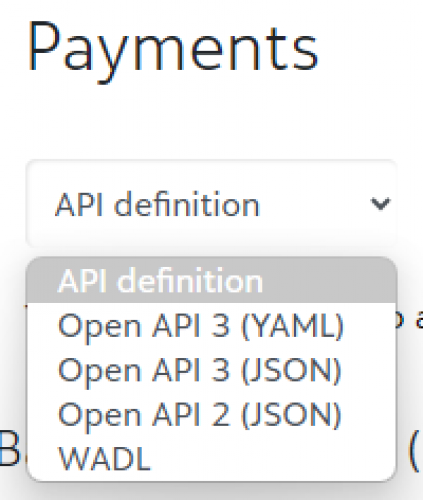
To use these, you'll download the OpenAPI definition from our API Reference pages (e.g. Payments API Reference, as illustrated in the screenshot below), and provide this to your client generator.
Native vb.net support looks pretty sparce for OpenAPI → Client generation, but you could reference a .NET client written in C# or convert the C# to vb.net. Google is a good resource here, but here's one from Microsoft: Get started with NSwag and ASP.NET Core | Microsoft Learn
 0
0




Categories
- All Categories
- New YourCause Community TEST
- New SKY Community TEST
- New Grantmaking TEST Community
- New Altru Test Community
- New bbcon Community - TEST
- 12 Blackbaud Agents for Good™
- New Raiser's Edge NXT Community
- 7 Blackbaud Community Help
- 218 bbcon®
- 1.4K Blackbaud Altru®
- 409 Blackbaud Award Management™ and Blackbaud Stewardship Management™
- 1.2K Blackbaud CRM™ and Blackbaud Internet Solutions™
- 16 donorCentrics®
- 361 Blackbaud eTapestry®
- 2.7K Blackbaud Financial Edge NXT®
- 680 Blackbaud Grantmaking™
- 598 Blackbaud Education Management Solutions for Higher Education
- 3.3K Blackbaud Education Management Solutions for K-12 Schools
- 952 Blackbaud Luminate Online® and Blackbaud TeamRaiser®
- 85 JustGiving® from Blackbaud®
- 7K Blackbaud Raiser's Edge NXT®
- 3.9K SKY Developer
- 257 ResearchPoint™
- 123 Blackbaud Tuition Management™
- 165 Organizational Best Practices
- 247 Member Lounge (Just for Fun)
- 40 Blackbaud Community Challenges
- 37 PowerUp Challenges
- 3 (Closed) PowerUp Challenge: Grid View Batch
- 3 (Closed) PowerUp Challenge: Chat for Blackbaud AI
- 3 (Closed) PowerUp Challenge: Data Health
- 3 (Closed) Raiser's Edge NXT PowerUp Challenge: Product Update Briefing
- 3 (Closed) Raiser's Edge NXT PowerUp Challenge: Standard Reports+
- 3 (Closed) Raiser's Edge NXT PowerUp Challenge: Email Marketing
- 3 (Closed) Raiser's Edge NXT PowerUp Challenge: Gift Management
- 4 (Closed) Raiser's Edge NXT PowerUp Challenge: Event Management
- 3 (Closed) Raiser's Edge NXT PowerUp Challenge: Home Page
- 4 (Closed) Raiser's Edge NXT PowerUp Challenge: Standard Reports
- 4 (Closed) Raiser's Edge NXT PowerUp Challenge: Query
- 822 Community News
- 3.1K Jobs Board
- 57 Blackbaud SKY® Reporting Announcements
- 47 Blackbaud CRM Higher Ed Product Advisory Group (HE PAG)
- 19 Blackbaud CRM Product Advisory Group (BBCRM PAG)