New Posting Method





Is anyone else having issues with the new method for posting transactions? The new export didn't contain all of the information I needed; when I figured out how to add that information to the Journal Reference field, it ran everything together in one field instead of in separate columns like it used to do. This is going to require a lot more manipulation before I can post, and introduces that much more opportunity for error.
Comments
-
@Sophia Caldera
If you go to the Post run history, the Export there has the file format you are used to seeing and use with the Journal Entry Batch add-in. We'll update the Export button from the Create batch screen to match the format as the other page. Apologies for the confusion. We certainly don't want to add extra steps with the new workflow.0 -
@Julia Meseck Where is Post run history?
0 -
@Sophia Caldera
Here is a quick rundown of the new Post to GL workflow:
Step 1: Filter the Post to General Ledger list for the transactions you want to post
You can filter by transaction type(s), transaction date, post date, fee/crediting for, deposit(s), and/or GL account(s).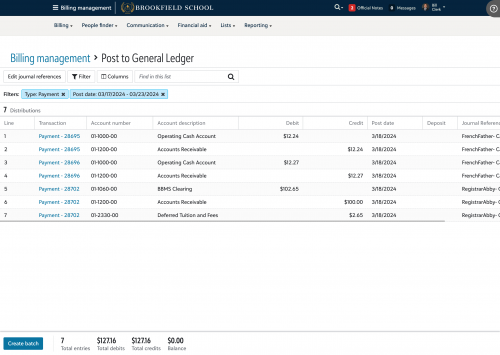
Step 2: Select “Create batch” to add these distributions to a new post batch
You will see a summary of the selected distributions before saving them to a batch.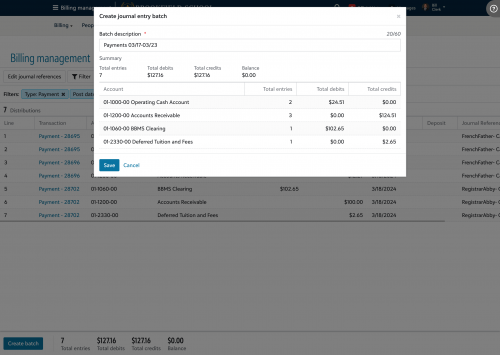
Note: If you are using the new Direct Post feature, you will instead see the option to “Submit” these distributions to an open journal entry batch in the General Ledger of Financial Edge NXT. This will allow you to make any final edits to the journal entry batch in FENXT before finishing the post process.
Once saved, you will see a success message with a direct link to the new batch you just created.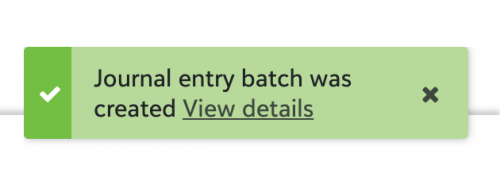
Step 3: Export the distributions for your General Ledger
If you aren’t using the Direct Post feature, you will need to use the Export here to download a csv for importing into your General Ledger. Once that is completed you will select “Mark as posted” to update the batch status to “Posted.”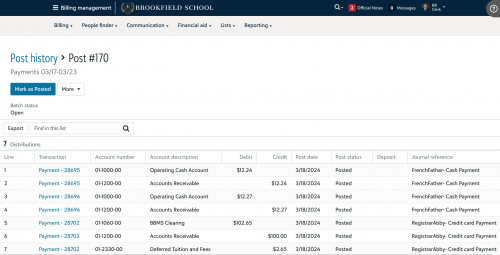
Note: If you are using the Direct Post feature, the status in Billing Management will automatically be updated once the journal entry batch has been posted in FENXT.
And you can find all your previous post batches by selecting “Work with previous post runs” from the Post to GL tile on the Billing Management Overview tab:
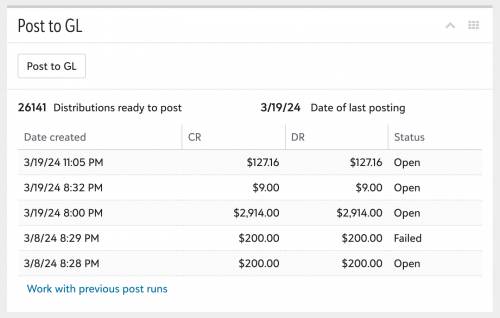 1
1 -
@John Quealy Can I export the list without creating a Journal Entry?
0 -
@Sophia Caldera While you cannot export before creating a batch, you can delete the batch if you decide to not complete the post process in your General Ledger for whatever reason. Once the batch is deleted, the distributions will show up again in the Post to General Ledger list.
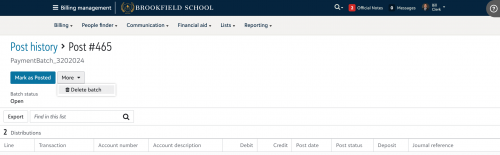 1
1 -
@John Quealy I have to say, this is more convoluted than the previous method. Also more likely to cause errors in posting, since I usually need to export payments several times to reconcile with Cashflow before posting.
0






Categories
- All Categories
- New K-12 Community Home (TEST)
- New Higher Education Home Page (Test)
- New Impact Edge Community TEST
- New YourCause Community TEST
- New SKY Community TEST
- New Grantmaking TEST Community
- New Altru Test Community
- New bbcon Community - TEST
- 12 Blackbaud Agents for Good™
- New Raiser's Edge NXT Community
- 8 Blackbaud Community Help
- 222 bbcon®
- 1.4K Blackbaud Altru®
- 410 Blackbaud Award Management™ and Blackbaud Stewardship Management™
- 1.2K Blackbaud CRM™ and Blackbaud Internet Solutions™
- 16 donorCentrics®
- 361 Blackbaud eTapestry®
- 2.7K Blackbaud Financial Edge NXT®
- 687 Blackbaud Grantmaking™
- 603 Blackbaud Education Management Solutions for Higher Education
- 3.3K Blackbaud Education Management Solutions for K-12 Schools
- 954 Blackbaud Luminate Online® and Blackbaud TeamRaiser®
- 85 JustGiving® from Blackbaud®
- 7K Blackbaud Raiser's Edge NXT®
- 4K SKY Developer
- 258 ResearchPoint™
- 123 Blackbaud Tuition Management™
- 165 Organizational Best Practices
- 248 Member Lounge (Just for Fun)
- 40 Blackbaud Community Challenges
- 37 PowerUp Challenges
- 3 (Closed) PowerUp Challenge: Grid View Batch
- 3 (Closed) PowerUp Challenge: Chat for Blackbaud AI
- 3 (Closed) PowerUp Challenge: Data Health
- 3 (Closed) Raiser's Edge NXT PowerUp Challenge: Product Update Briefing
- 3 (Closed) Raiser's Edge NXT PowerUp Challenge: Standard Reports+
- 3 (Closed) Raiser's Edge NXT PowerUp Challenge: Email Marketing
- 3 (Closed) Raiser's Edge NXT PowerUp Challenge: Gift Management
- 4 (Closed) Raiser's Edge NXT PowerUp Challenge: Event Management
- 3 (Closed) Raiser's Edge NXT PowerUp Challenge: Home Page
- 4 (Closed) Raiser's Edge NXT PowerUp Challenge: Standard Reports
- 4 (Closed) Raiser's Edge NXT PowerUp Challenge: Query
- 829 Community News
- 3.1K Jobs Board
- 57 Blackbaud SKY® Reporting Announcements
- 47 Blackbaud CRM Higher Ed Product Advisory Group (HE PAG)
- 19 Blackbaud CRM Product Advisory Group (BBCRM PAG)