Update a constituent custom field





I am trying to update a custom field via Power Automate.
If I ADD a custom field, the flow works fine. When I replace the Add with Update, it does not. It keeps replacing the input with body/value and giving me the following error:
InvalidTemplate
Unable to process template language expressions for action 'For_each' at line '0' and column '0': 'The template language expression 'outputs('Filter_for_YGNC')['body/value']' cannot be evaluated because property 'body/value' doesn't exist, available properties are 'body'. Please see https://aka.ms/logicexpressions for usage details.'.
Even if I change the input to body, it give this error and changes it back to body/value.
Why? How do I fix. The output in the previous step (filter) only returns a single result. I know it might be expecting more than one match, but why won't it work? Why does it keep changing its own inputs and then getting feisty about it?
Comments
-
@Liz DixonEversole
A few things that's unclear from your post, but I will try to answer and you can reply with more info and screenshot.- are you using flow new editor or old editor
- I have encounter bug with new editor before where the dynamic content selected is INCORRECTLY coded
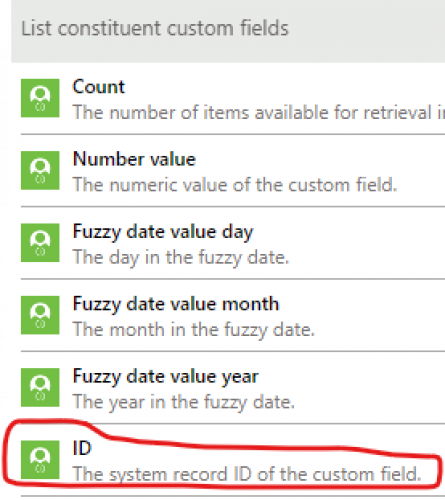
- for updating a custom field (assuming constituent custom field, but same idea if gift custom field), you need the custom field system record id, not the constituent system record id (see image below)
- since your post mention “filter”. I am assuming you are getting list of custom field then filter on if a certain category exist, if no, add new, if yes, get the custom field system record id to use in the update action.
- filter will give you an array, EVEN if your RE NXT custom field configuration is set to “unique” (allow only 1). So one way to deal with that is to use the first() expression to just take the first custom field from the filter array: @{first(body('Filter_array'))?['id']}
 0
0 - are you using flow new editor or old editor
-
@Alex Wong Thank you! Let me try the first selection and see if that helps. I am not sure if I am using the new or old interface… I can share the packaged flow with you, if that's helpful? Thanks again!
0 -
@Liz DixonEversole
don't need to share the package flow, you can use new/old editor anytime with the toggle that is on the upper right corner of editing screen. 0
0 -
@Alex Wong THANK YOU!!! I cannot believe that toggling to the old designer and adding the update part back in fixed this. I wish I had reached out to you last week. I have picking at this a little every day and could not figure out what was wrong with my logic. Hahaha. VERY APPRECIATED!!!!
0




Categories
- All Categories
- New K-12 Community Home (TEST)
- New Higher Education Home Page (Test)
- New Impact Edge Community TEST
- New YourCause Community TEST
- New SKY Community TEST
- New Grantmaking TEST Community
- New Altru Test Community
- New bbcon Community - TEST
- 12 Blackbaud Agents for Good™
- New Raiser's Edge NXT Community
- 8 Blackbaud Community Help
- 222 bbcon®
- 1.4K Blackbaud Altru®
- 410 Blackbaud Award Management™ and Blackbaud Stewardship Management™
- 1.2K Blackbaud CRM™ and Blackbaud Internet Solutions™
- 16 donorCentrics®
- 361 Blackbaud eTapestry®
- 2.7K Blackbaud Financial Edge NXT®
- 687 Blackbaud Grantmaking™
- 604 Blackbaud Education Management Solutions for Higher Education
- 3.3K Blackbaud Education Management Solutions for K-12 Schools
- 954 Blackbaud Luminate Online® and Blackbaud TeamRaiser®
- 85 JustGiving® from Blackbaud®
- 7K Blackbaud Raiser's Edge NXT®
- 4K SKY Developer
- 258 ResearchPoint™
- 123 Blackbaud Tuition Management™
- 165 Organizational Best Practices
- 248 Member Lounge (Just for Fun)
- 40 Blackbaud Community Challenges
- 37 PowerUp Challenges
- 3 (Closed) PowerUp Challenge: Grid View Batch
- 3 (Closed) PowerUp Challenge: Chat for Blackbaud AI
- 3 (Closed) PowerUp Challenge: Data Health
- 3 (Closed) Raiser's Edge NXT PowerUp Challenge: Product Update Briefing
- 3 (Closed) Raiser's Edge NXT PowerUp Challenge: Standard Reports+
- 3 (Closed) Raiser's Edge NXT PowerUp Challenge: Email Marketing
- 3 (Closed) Raiser's Edge NXT PowerUp Challenge: Gift Management
- 4 (Closed) Raiser's Edge NXT PowerUp Challenge: Event Management
- 3 (Closed) Raiser's Edge NXT PowerUp Challenge: Home Page
- 4 (Closed) Raiser's Edge NXT PowerUp Challenge: Standard Reports
- 4 (Closed) Raiser's Edge NXT PowerUp Challenge: Query
- 829 Community News
- 3.1K Jobs Board
- 57 Blackbaud SKY® Reporting Announcements
- 47 Blackbaud CRM Higher Ed Product Advisory Group (HE PAG)
- 19 Blackbaud CRM Product Advisory Group (BBCRM PAG)