With the many changes in NXT, does anyone know how to apply a recurring payment to a new pledge? I thought I saw it somewhere that it was possible but I can't figure out how that would work.
@Jolynn UyeharaYou cannot apply a recurring gift payment as a pledge payment, they are “conflicting” gift type.
@Alex Wong Thank you. That's what I thought but when you do a knowledge base search there are conflicting information which kind of leads to being able to. I thought it was mentioned at one of the recent product briefing seminars that there was a way but I must have misunderstood.
Would you have suggestions on a work around? We are starting a campaign and donors are starting to set up pledges but when they set up their gift online and select recurring gift I don't know how to apply it to the pledge. Also, those that already had recurring gifts in place and now want to do a pledge is asking that those payments be applied to the pledge. How would I make this happen?
Appreciate any tips you can share.
Thank you!
@Jolynn UyeharaI do remember the PUB mentioned, however, given the way RE record gift record, a recurring gift payment pays a recurring gift while pledge payment pays a pledge, there's no “intersect”.
So without too much details, I think the underlying working-ness of the pledge recurring option is either:
I don't believe this is something that is already available, so will likely need someone from Blackbaud to give the details. If it is, then maybe someone that is using it can explain better.
@Jolynn Uyehara
Hi Jolynn,
I just took a pledge and recurring gift class yesterday, I remember they mentioned there was a way to convert a recurring gift into a pledge.
If you haven't already set the pledge you want to apply the recurring gift to, that could be an option.
However, someone did ask about applying a recurring gift to an existing pledge and teacher confirmed what Alex had said. They are conflicting gift types. Recurring pay-cash and pay-cash.
@Jolynn Uyehara I had this happen before and I set a reminder to manually adjust the pledge down every month…clearly not ideal.
Blackbaud told me there is not currently a way for NXT donation forms to either create a pledge, or apply a pledge payment. Which really stinks. The Online Express donation forms can do this, but the regular processing of these gifts is a real headache.
Here's what I do:
This is a real hassle, and it is absolutely lost on me how or why this functionality has not been implemented yet.
@Beth Gallagher I'm circling back to my question because I just processed a new pledge but the donor set up his gift as a recurring gift through our donation page. So this is what I ended up doing but I'm not sure if this is the best way to go about doing it.
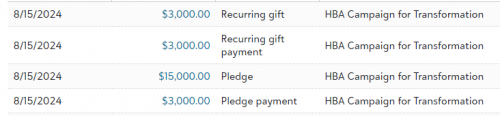
@Jolynn Uyehara Short, answer is yes, it's going to be annoying. It really depends on how your org reports pledges vs received. You cannot apply a recurring gift to a pledge because they are two different things. My workaround was to adjust the pledge in DB view down by the recurring gift received amount so as not to accidentally double count so the pledge is now $12K and there is a recurring gift payment of $3K, you shouldn't be double counting. And document, document, document. OR go back to your donor and nicely ask if you can set up the payments for them :-)
@Jolynn Uyehara: Do you have a good idea of what the donor's intent is? Does he want to have a pledge and a recurring gift? I think having a good idea of what the donor's intentions are would help. Looking at the screenshot, he made a payment on both the pledge and the recurring gift. What is the schedule for the recurring gift? Is it the same as the pledge schedule? It's going to be better to reach out to the donor and make sure you have a clear understanding of what they want to do before moving forward.
If you have to delete one of the pledge or the recurring gift, you should be able to reapply it to the other. I don't think you have to delete and re-enter the payments.
@Beth Gallagher I'm circling back to my question because I just processed a new pledge but the donor set up his gift as a recurring gift through our donation page. So this is what I ended up doing but I'm not sure if this is the best way to go about doing it.Pledge was made on giving page when donor set-up a recurring gift and put in the comments that he's making a pledge for $xxxxxxx dollars over the next 5 years.I set up his pledge in database viewFirst installment comes in as a recurring gift. I process that gift and then go back to the pledge to apply it. This is how it looks now. Is this going to create a mess of a report down the road?? (see below screen shot). This is so frustrating and confusing. I would think RENXT would be able to streamline this process to make it user friendly. Thank you for your help!
@Beth Gallagher @Dariel Dixon I think I am confused on this process so I may not even be asking the right questions. Let me try and explain as detailed as possible so you can let me know if I'm doing things correctly or if there is a better way. ?We are currently in a campaign and there are donors that go to our website to give. That is where they set-up their gift as a recurring gift. In the comment section they add a note to say they are pledging to give $xxxx amount over a certain period of time.
So that's where I am unsure on how to process it. I do want to record the pledge, BUT when the recurring payment comes in monthly, it processes as a recurring payment and not a pledge payment. So I then go and add in a pledge payment manually (to pay down the pledge) but do not post it. Is this the best and only way to record keep pledges and payments if the donor has already set-up his own recurring fit through our website?
I really appreciate your time and explanation to help guide me through this process.
I hope to meet you at BBCON!
Aloha,
Jolynn
@Jolynn Uyehara not sure I know how to help since capturing pledges in web view doesn't exist yet. I have only worked with online pledges through OLX. Do they indicate their pledge amount in general comments or a gift attribute you created to get all the information you need? I guess what you are doing is okay but seems like it could be very confusing to the next person if you when the lottery. I'd probably just capture the pledge amount in an attribute and leave the gift record to just contain the recurring payments but will let others chime in. Good luck!
@Jolynn Uyehara What we do at my school is just leave it as the recurring gift. You can enter an end date and it works the same as a pledge would. We also use GiveCampus for our giving pages so I can't transfer credit card information into RE to process the payments there. The other thing we do if we have set up the pledge prior to the donor setting up the recurring gift through our website, I will keep all of the payments as recurring gifts and then write off the amount on the pledge for the recurring payments received. For instance - a donor pledges $1,200 a year and then goes to the website and sets up a $100/month recurring gift. Since the recurring gifts are processed through GiveCampus, I will do a $300 write off on the pledge every three months and add a note saying the funds came from a recurring gift. That way the full pledge amount shows up on reports but it doesn't double count anything on cash in the door reports.
@Jolynn Uyehara I agree with @Julie VanErsvelde and others who suggested similar.
I just tested to be sure I was correct in thinking that gifts don't need to be posted to pull into life time giving and some gift reports. I entered a recurring gift, a pledge, a recurring pay cash, a pledge payment and another pledge payment for the recurring amount. All 3 of the incoming amounts pull into lifetime totals in web view regardless of post status.
So, marking as ‘do not post’ will not exclude $ at some point in your reports and you will be double counting every payment. That is going to be a mess really soon.
@Jolynn Uyehara: Let's start with the basics. You're using the terms in a way that not only confuses yourself, but also makes no sense. Let's see what you stated below.
We are currently in a campaign and there are donors that go to our website to give. That is where they set-up their gift as a recurring gift. In the comment section they add a note to say they are pledging to give $xxxx amount over a certain period of time.
This is a pledge. Straight up. There is no recurring gift here at all. A gift over a certain known amount of time or end date is a pledge, not a recurring gift. Pledges can have payments made on a schedule and automatically, but that does not make them recurring gifts. See this KB article.
So that's where I am unsure on how to process it. I do want to record the pledge, BUT when the recurring payment comes in monthly, it processes as a recurring payment and not a pledge payment. So I then go and add in a pledge payment manually (to pay down the pledge) but do not post it. Is this the best and only way to record keep pledges and payments if the donor has already set-up his own recurring fit through our website?I really appreciate your time and explanation to help guide me through this process.I hope to meet you at BBCON!Aloha,Jolynn
I here's the issue. The payment schedule is tied to the recurring gift at this point. This gift should have been entered as a pledge from the onset. But, in this case as you don't want to disturb the recurrence of the payments, I wouldn't enter the pledge at all. What for at this stage? You've already got payment for it, and it doesn't seem like the donor is going to be making 2 gifts whenever payments are due.(I think in the screenshot you have a pledge payment and a recurring gift payment. Did you enter one of those payments manually? If you have 2 payments, then there's not really a problem at all.) That said, you should contact the donor to get confirmation. Because a recurring gift does not have an end date, you're going to have to remember to terminate it manually when the payments are supposed to stop. You'll have to set a reminder and document the recurring gift heavily to note that this gift was supposed to end on date XYZ. It might be worthwhile to keep the pledge information on the record to help remind you of when to terminate the recurring gift.
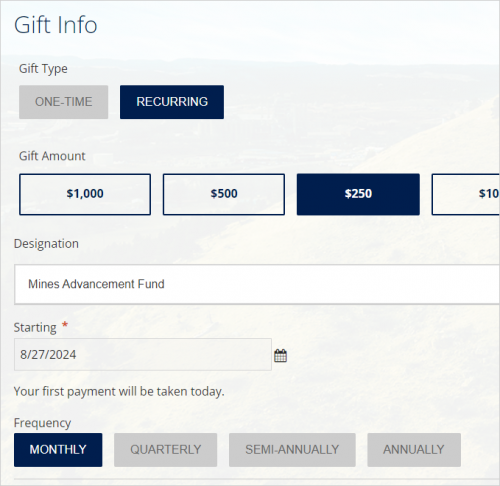
@Dariel Dixon I think the problem comes from donate pages like this. Where I would prefer to see the gift come in as a pledge, website calls it a recurring gift and our crowdfunding platform does the same thing. Don't really have choice to change. One of them has an end date in it somewhere even.
@JoAnn Strommen I agree that this is quite the conundrum. While the gift can have recurring payments, I think it is imperative that we as the professionals have a clear understanding that RE treats those two situations as two different types. TBH, I would really prefer that they would be entered by default as pledges instead of recurring gifts, as you can easily convert a pledge to a recurring gift, but not vice versa.
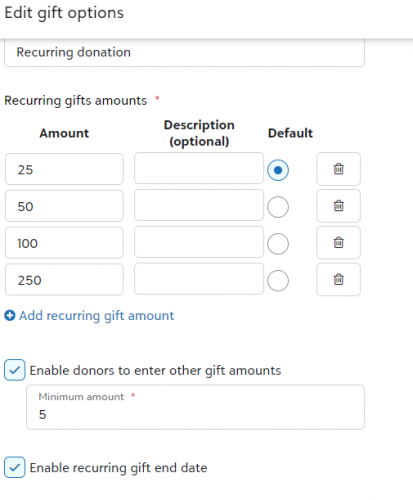
EDIT: I do think that allowing for end date options on recurring gifts would be a start. I know this is possible for NXT pages. I should also note that NXT allows you to change the label on the button as well.
@JoAnn Strommen? oh my. Thank you for testing that out. I'm so nervous about that when I have to run reports, giving totals, statements, etc. I hope I can clarify some things at BBCON!
@Beth Gallagher thank you. I think after reading everyone's suggestions, the safe way is to keep it as a recurring gift. I hope this is something Blackbaud is looking into with all the changes coming soon to webview. ?
@Jolynn UyeharaThis is what we do to honor the donor's intentions.
Book the pledge into RE as a pledge with an installment schedule. The donor either goes to the online form and enters a recurring gift that makes all the payments per the installment schedule, or they provide their credit card information and we configure the recurring payments per the schedule on our side. We don't keep the credit card information since that would violate PCI.
Each time a recurring gift payment is made, we write off the same amount from the scheduled pledge installment.
It's not pretty, and it causes some concern when looking at write-offs and having to explain it to the Business Office, but it's the best solution to reflect that the donor made a pledge of $##,### instead of a recurring gift of $### every month for five years. Those two things mean a big difference to most fundraisers.
I came across this discussion when trying to define to a colleague Recurring Gifts and Recurring Gift Pay-Cash vs simply gifts that recur (for instance, via a Recurring Batch of Cash gifts or a regularly-paid Pledge installment).
@Jolynn Uyehara What was your solution to your problem? Now that NXT allows for pledges in donation forms, that might steer your donors better, rather than them setting up a Recurring Gift but mentioning in a comment that they want to instead Pledge.