Getting record IDs from query API output to do other stuff with your queried data in Power Automate





I am so happy we have Query API now to help narrow the scope of our actions workflow (more than the available ‘list actions’ item). It took a while for me to figure out how to get the action ids in a useable manner, though. I'm sure my method is not as elegant as it could be (and I would love any tips for cleaning it up), but here is where I landed for now:
NB: my query outputs in RENXT are just a field I know will be blank--in the Query API outputs, this will result in the blank field and QRECID, with is the system ID I'm looking for. I renamed the blank field to X for simplicity in later expressions. My data table looks like this:
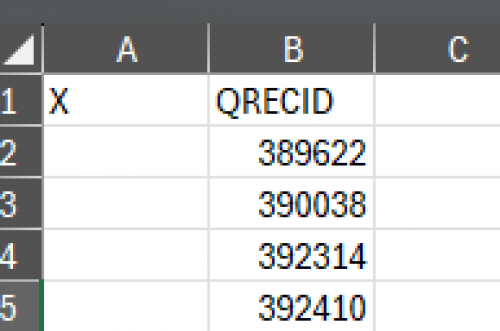
1. Use Ashely's workflow to get query results (Sharing my Power Automate template: Get Query results from the new Query API - Blackbaud Community)
2. After the ‘HTTP-Get query results’ action,
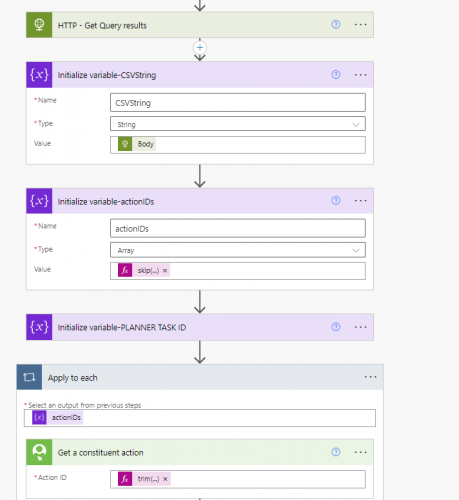
- Initialize a string variable ‘CSVString’. For a value, use the HTTP action body
(@{body('HTTP_-_Get_Query_results')}) - Initialize an array variable ‘actionIDs’ for value, use this expression as the value:
@{skip(split(replace(replace(variables('CSVString'), '"', ''), 'X,QRECID', ''), ','), 1)}
this will get a list of IDs with a line break (try as I might, I could not remove the line breaks in the formula, so those are removed in the next step) - Create an Apply to Each item with the actionIDs as the apply to each value
- My flow is looking for actions, so I created a ‘Get a constituent action’ item with this value for the Action ID:
@{trim(item())}
Here is an image showing this piece of the flow:
Comments
-
@Nicole Holt
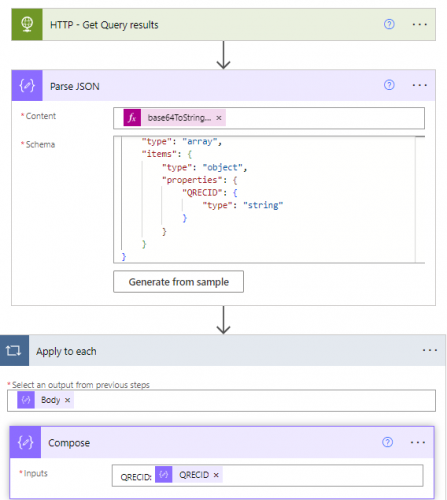
a simplification:when you execute the query, you can use output of JSON, so you can save some processing time and action.
After the HTTP - Get Query results, you can immeidately get into the apply to each where you can access the QRECID property of the json in the get constituent action.
I was going to provide some expression you can use, but looks like power automate website is down…………..
0 -
@Nicole Holt
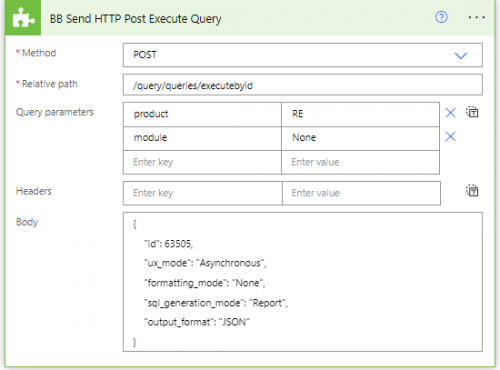
{
"id": 63264,
"ux_mode": "Asynchronous",
"formatting_mode": "None",
"output_format": "JSON",
"sql_generation_mode": "Report"
}using output_format=JSON as output will remove the need to do the extra “manipulation” of the CSV string.
Also, if all you want is the QRECID, then you can run the query with sql_generation_mode=Report, which will give you ONLY the QRECID.
I see you are assigning the body of the download (HTTP - Get Query reuslts) to a String variable, which “decodes” the data for you, but you don't need to and “could” save steps (no need to initialize the variable and set the variable for CSVString) by using the base64ToString() expression on the $content in the body of the download step.
@{base64ToString(body('HTTP_-_Get_Query_results')?['$content'])}
 2
2 -
@Alex Wong, this is brilliant. I tried using Parse JSON and just could not figure out how to get it to work (hence my moderately ridiculous workaround). I get smarter every time I read one of your answers. Thanks!!
0 -
@Nicole Holt
Don't know if you are using new designer of flow or old, but I found a problem with the old designer, where when I put:@{base64ToString(body('HTTP_-_Get_Query_results')?['$content'])}
into the Parse JSON action, it will display the “base64ToString” (as below).

but after saving and reload the flow for editing, it changes to:
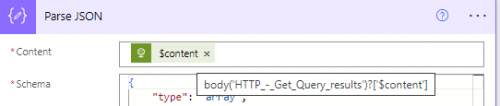
even when you mouseover the dynamic content, it only show: @{body('HTTP_-_Get_Query_results')?['$content']}
however, if you do Peak Code, you will see it is actually the full expression of base64ToString(body('HTTP_-_Get_Query_results')?['$content'])
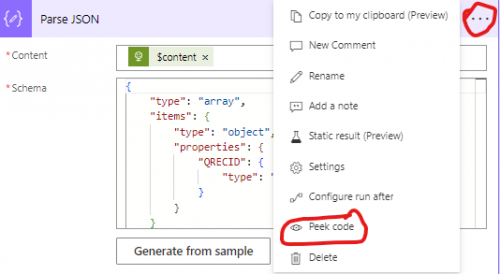
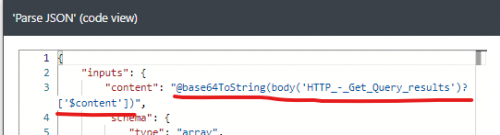
this doesn't normally happen, I think has to do with the dynamic content having a special symbol: $content.
just be aware of this, and if in doubt (or if your flow fails) check Peak Code, you might want to put the correct expression as Note in the Parse JSON action for future reference.
2 -
@Nicole Holt
Not ridiculous at all, you got your flow to work the way you want it to is all that matters, then finding ways to make it more efficient is icing on the cake =DI didn't know String variable “decodes” the data coming back from HTTP download, so I learn something new from your flow, there may be time I'll need it. Thank you
2 -
@Alex Wong I just updated my flow with your notes and it works beautifully. Thank you! I can imagine a lot of uses where we could prefer to use Query API to gather records for processing, since it is so much more flexible than NXT lists, so this will be used a lot!
1



Categories
- All Categories
- New K-12 Community Home (TEST)
- New Higher Education Home Page (Test)
- New Impact Edge Community TEST
- New YourCause Community TEST
- New SKY Community TEST
- New Grantmaking TEST Community
- New Altru Test Community
- New bbcon Community - TEST
- 12 Blackbaud Agents for Good™
- New Raiser's Edge NXT Community
- 8 Blackbaud Community Help
- 222 bbcon®
- 1.4K Blackbaud Altru®
- 411 Blackbaud Award Management™ and Blackbaud Stewardship Management™
- 1.2K Blackbaud CRM™ and Blackbaud Internet Solutions™
- 16 donorCentrics®
- 361 Blackbaud eTapestry®
- 2.7K Blackbaud Financial Edge NXT®
- 688 Blackbaud Grantmaking™
- 604 Blackbaud Education Management Solutions for Higher Education
- 3.3K Blackbaud Education Management Solutions for K-12 Schools
- 954 Blackbaud Luminate Online® and Blackbaud TeamRaiser®
- 85 JustGiving® from Blackbaud®
- 7.1K Blackbaud Raiser's Edge NXT®
- 4K SKY Developer
- 258 ResearchPoint™
- 123 Blackbaud Tuition Management™
- 165 Organizational Best Practices
- 249 Member Lounge (Just for Fun)
- 40 Blackbaud Community Challenges
- 37 PowerUp Challenges
- 3 (Closed) PowerUp Challenge: Grid View Batch
- 3 (Closed) PowerUp Challenge: Chat for Blackbaud AI
- 3 (Closed) PowerUp Challenge: Data Health
- 3 (Closed) Raiser's Edge NXT PowerUp Challenge: Product Update Briefing
- 3 (Closed) Raiser's Edge NXT PowerUp Challenge: Standard Reports+
- 3 (Closed) Raiser's Edge NXT PowerUp Challenge: Email Marketing
- 3 (Closed) Raiser's Edge NXT PowerUp Challenge: Gift Management
- 4 (Closed) Raiser's Edge NXT PowerUp Challenge: Event Management
- 3 (Closed) Raiser's Edge NXT PowerUp Challenge: Home Page
- 4 (Closed) Raiser's Edge NXT PowerUp Challenge: Standard Reports
- 4 (Closed) Raiser's Edge NXT PowerUp Challenge: Query
- 829 Community News
- 3.1K Jobs Board
- 57 Blackbaud SKY® Reporting Announcements
- 47 Blackbaud CRM Higher Ed Product Advisory Group (HE PAG)
- 19 Blackbaud CRM Product Advisory Group (BBCRM PAG)