Add Fundraiser's Name to a Gift List





I want to add the Fundraiser's name to a weekly gift list.
I found Padman DeSilva's (How to Add Fundraiser's Name to a Gift List Notification Flow - Blackbaud Community) answer to the how-to part of my question and it worked great. However, I am confused about where to insert the Apply to each fundraiser loop. If I put it after the “Get Gift" action, I create a loop within a loop which I have learned causes other problems.
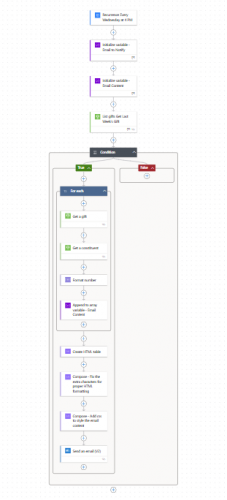
I have pasted the flow below. Any suggestions?
Comments
-
@Susan Fioribello
image is way too blurry to see your flow.you said “it worked great”, meaning your flow is working as you want it already, and your question is just trying to understand why it's working?
0 -
@Alex Wong
It worked in that the Fundraiser name is added correctly but the loop within the loop caused an email to be sent for every record in the list. The Get a Gift step is inside a loop. If I put another get constituent after the Get a Gift another loop is created.
Maybe these images are better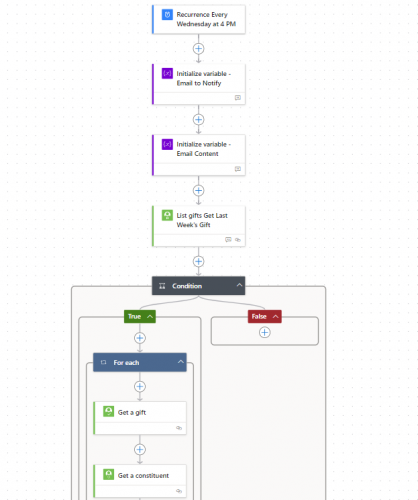
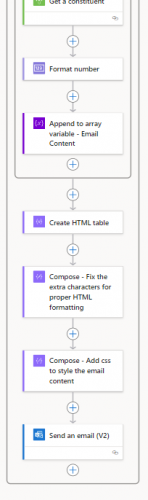
continuation of the True condition…
 0
0 -
@Susan Fioribello
I figured out how to get the looping to stop by adding “First” to the Fundraiser Name variable.
However, the Fundraiser I want to add is not always the first one. Is there a way that I can add a filter to pull by Fundraiser type?
Essentially, I want to pull only “Primary Fundraiser”0 -
@Susan Fioribello
the important thing is you need to know what you want. if a single flow run (at 4PM wed run), you only want to get ONE email, then your Send an email action have to be outside of any apply to each. if you want 1 email per gift, then you want the send an email action to be inside the apply to each that loops each gift.If i understand what you want to do correctly, you will want to do the get fundraisers assignment after get a constituent (inside the apply to each for gifts).
you will get an array of all fundraisers, you will want to do a Filter Array using the “value" returned for all fundraisers, and then filter on type = the type you want.
Assuming no constituent have more than one fundraiser of the type, then you can do a “first()" on the filter array and use the fundraiser id property to get constituent record of the fundraiser (in order to get the name and info on the fundraiser that you want to include in the email).
0 -
@Susan Fioribello- Hi Susan, I thought I would give you a visual the way I pull in fundraiser. Alex gave a great explanation.
Instead of a filter array, I do an Apply to each, then a Condition for the Fundraiser type where we call ours “Coordinator”. Then I grab the name of the Fundraiser and Append it to an Array. I append it to an array because if there is more than one I can use Join to combine them outside the loop.
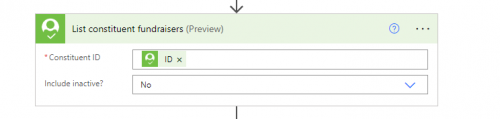
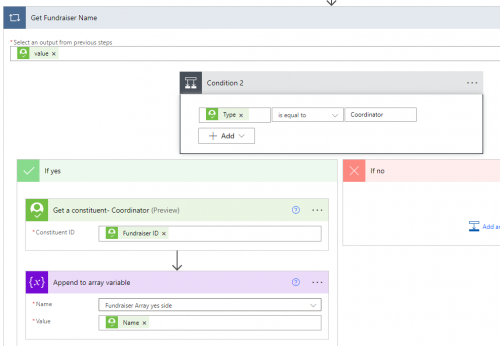
This originally came from @Dan Snyder at Bennington College.
-Carol
2








Categories
- All Categories
- 6 Blackbaud Community Help
- 211 bbcon®
- 1.4K Blackbaud Altru®
- 403 Blackbaud Award Management™ and Blackbaud Stewardship Management™
- 1.2K Blackbaud CRM™ and Blackbaud Internet Solutions™
- 16 donorCentrics®
- 360 Blackbaud eTapestry®
- 2.6K Blackbaud Financial Edge NXT®
- 661 Blackbaud Grantmaking™
- 581 Blackbaud Education Management Solutions for Higher Education
- 3.2K Blackbaud Education Management Solutions for K-12 Schools
- 944 Blackbaud Luminate Online® and Blackbaud TeamRaiser®
- 84 JustGiving® from Blackbaud®
- 6.7K Blackbaud Raiser's Edge NXT®
- 3.8K SKY Developer
- 250 ResearchPoint™
- 120 Blackbaud Tuition Management™
- 165 Organizational Best Practices
- 242 Member Lounge (Just for Fun)
- 37 Blackbaud Community Challenges
- 37 PowerUp Challenges
- 3 (Closed) PowerUp Challenge: Grid View Batch
- 3 (Closed) PowerUp Challenge: Chat for Blackbaud AI
- 3 (Closed) PowerUp Challenge: Data Health
- 3 (Closed) Raiser's Edge NXT PowerUp Challenge: Product Update Briefing
- 3 (Closed) Raiser's Edge NXT PowerUp Challenge: Standard Reports+
- 3 (Closed) Raiser's Edge NXT PowerUp Challenge: Email Marketing
- 3 (Closed) Raiser's Edge NXT PowerUp Challenge: Gift Management
- 4 (Closed) Raiser's Edge NXT PowerUp Challenge: Event Management
- 3 (Closed) Raiser's Edge NXT PowerUp Challenge: Home Page
- 4 (Closed) Raiser's Edge NXT PowerUp Challenge: Standard Reports
- 4 (Closed) Raiser's Edge NXT PowerUp Challenge: Query
- 801 Community News
- 3K Jobs Board
- 56 Blackbaud SKY® Reporting Announcements
- 47 Blackbaud CRM Higher Ed Product Advisory Group (HE PAG)
- 19 Blackbaud CRM Product Advisory Group (BBCRM PAG)