Heads up: student schedule/My Day issue

We have an issue that just popped up as we are in add/drop season. Case opened 9/5.

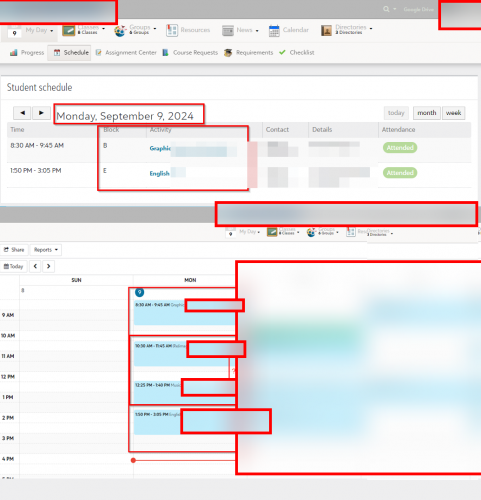
If we add a student to a new class after the class started, that class only shows up in “Week/Month” view, not in “My Day” view.

This is what it looks like to a student, most of whom only use “My Day” view on top:
Comments

  • @Art Bryman We've been having this issue since August 28th. It is also not updating teacher rosters once the schedule change is made which is causing attendance issues. Blackbaud has not responded yet.

  • @Art Bryman I submitted a case about this issue on August 23. The responding rep indicated the following.

    "This issue has been determined internally to require a fix from our development team. As such, I have passed the information on to our product development team for further review. They will be working to test and isolate the root cause, so that a fix can be implemented. Please note that it does take time for the team to identify, implement and test a solution, so that it can be added to a future release. I will update you once I have additional information.

    In the meantime the only real way around this is to set their Begin Date for the course to the prior day, which just tells the system what date they were enrolled."

    That last part is accomplished by adding the student to a class via Manage Classes. I haven't seen any new updates on this.

Categories