Grants for non-registered organizations





We accept applications from registered charities and non-profits, as well as non-registered groups, for-profit organizations and individuals. As a foundation supporting community-based mental health initiatives, we strive to make our application process as barrier-free as possible, and we have funded small (< $4,000) grants to individuals, although the majority of grants are awarded to organizations (both non-profit and for-profit). The legacy application enabled this flexibility, and we added a custom field for applicants to choose their org status (charity, non-profit, social enterprise, for-profit, educational institution, other).
In the new grantee portal, we must choose whether we're accepting applications from individuals or organizations. However, the system only searches non-profits, and even when adding an organization, the system continues to assume the organization is a nonprofit.
Is this lack of flexibility an issue for others? Have you discovered a workaround? The best option I can think of is to create the program to serve individuals (avoiding the searching issue), then add our custom field to collect org status.
Comments
-
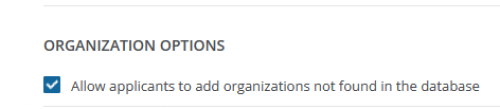
@Monica Jordan We have had the same issue. If helpful, our current workaround is to tick ‘Allow applicants to add organisations not found in the database’ in the program settings; exempt charities or other organisations can then add their organisations. Unfortunately, the instructions for adding an entity state that a government tax identification number (such as EIN, Tax ID, VAT, BN, or PAN) should be added. You can however type N/A or Exempt in this field. So not a perfect solution but it looks to work in our testing.
1 -
@Monica Jordan
I would recommend setting up two programs, one program for Organizations that is set to restrict to the registered list, and a second program enabled as @Hanna Berhanusdotter described checking the “Allow applicants to add to the database” option. This will of course give you two different links, one for each type of organization.On the second program in the description box you can provide directions similar to those Hanna gave, letting the applicants know how to proceed on the “select Organizaton” screen.
2 -
@Hanna Berhanusdotter thank you, this is really helpful. I had tested keying a non-charitable business number and “0000” in the tax ID field and the system seemed to bog down - I thought it was because the numbers weren't found in the system, but it sounds like that may have been an unrelated issue!
It's unfortunate that the field is required - it would be simpler to omit that step when allowing applicants to key their organization's contact info. I will add a suggestion to BB to make that field “hide-able” in the program set-up.
Thanks again!
1 -
@Jason Kelliher This an interesting approach. I'm still getting my head around the new process, so I'll have to consider this.
I was actually wondering whether the logic could be used to direct applicants to different application forms within a single program…. but the registered orgs/individuals option is at the program level, so I guess that wouldn't work.
We have a panel of 8 external reviewers who score our community grants. I haven't followed the workflow through to the reviewer stage yet and I've only completed one review cycle in BBGM - do you know if the reviewers would see applications from 2 programs simultaneously in their reviewer portal?
Thanks again for this suggestion - I will explore this a bit further!
0 -
@Monica Jordan I have added this thread as an Idea “Non registerd organisations in Application form” Blackbaud Grantmaking™ Ideas - Blackbaud CommunityBlackbaud Grantmaking™ Ideas - Blackbaud CommunityBlackbaud Grantmaking™ Ideas - Blackbaud Community
1 -
@Hanna Berhanusdotter Thank you!
0 -
@Jason Kelliher Thanks. I have a few more questions.
We give to many city and county government agencies that cannot register in NPO Connect. Is there a workaround for that? It is my understanding that completing an application begins with registering with NPO Connect. Is that correct?
1 -
You would use this setting to allow organizations that are not on NPO connect to apply:
 0
0









Categories
- All Categories
- New K-12 Community Home (TEST)
- New Higher Education Home Page (Test)
- New Impact Edge Community TEST
- New YourCause Community TEST
- New SKY Community TEST
- New Grantmaking TEST Community
- New Altru Test Community
- New bbcon Community - TEST
- 12 Blackbaud Agents for Good™
- New Raiser's Edge NXT Community
- 8 Blackbaud Community Help
- 222 bbcon®
- 1.4K Blackbaud Altru®
- 410 Blackbaud Award Management™ and Blackbaud Stewardship Management™
- 1.2K Blackbaud CRM™ and Blackbaud Internet Solutions™
- 16 donorCentrics®
- 361 Blackbaud eTapestry®
- 2.7K Blackbaud Financial Edge NXT®
- 687 Blackbaud Grantmaking™
- 603 Blackbaud Education Management Solutions for Higher Education
- 3.3K Blackbaud Education Management Solutions for K-12 Schools
- 954 Blackbaud Luminate Online® and Blackbaud TeamRaiser®
- 85 JustGiving® from Blackbaud®
- 7K Blackbaud Raiser's Edge NXT®
- 4K SKY Developer
- 258 ResearchPoint™
- 123 Blackbaud Tuition Management™
- 165 Organizational Best Practices
- 248 Member Lounge (Just for Fun)
- 40 Blackbaud Community Challenges
- 37 PowerUp Challenges
- 3 (Closed) PowerUp Challenge: Grid View Batch
- 3 (Closed) PowerUp Challenge: Chat for Blackbaud AI
- 3 (Closed) PowerUp Challenge: Data Health
- 3 (Closed) Raiser's Edge NXT PowerUp Challenge: Product Update Briefing
- 3 (Closed) Raiser's Edge NXT PowerUp Challenge: Standard Reports+
- 3 (Closed) Raiser's Edge NXT PowerUp Challenge: Email Marketing
- 3 (Closed) Raiser's Edge NXT PowerUp Challenge: Gift Management
- 4 (Closed) Raiser's Edge NXT PowerUp Challenge: Event Management
- 3 (Closed) Raiser's Edge NXT PowerUp Challenge: Home Page
- 4 (Closed) Raiser's Edge NXT PowerUp Challenge: Standard Reports
- 4 (Closed) Raiser's Edge NXT PowerUp Challenge: Query
- 829 Community News
- 3.1K Jobs Board
- 57 Blackbaud SKY® Reporting Announcements
- 47 Blackbaud CRM Higher Ed Product Advisory Group (HE PAG)
- 19 Blackbaud CRM Product Advisory Group (BBCRM PAG)