Handling Mixed Date Formats in Database Export for Birthday Lists





Hello everyone,
I have the following scenario: In our database, the "BirthDate" field contains mixed date formats. Some records have a full date in MM/DD/YYYY format, while others only have the MM/YY format (missing the day). When I try to create a list of birthdays, the result only shows records with a full birthdate, and the records with just MM/YY are excluded.
Additionally, when I export the data using queries, the "BirthDate" field is exported as Text/ABC format, which makes it impossible to work with this field as a date in Power BI.
If I were to convert the field into the MM/01(Placeholder)/YYYY format in Excel and the imported into Power BI, I would not be able to identify true birthdays vs. "No True Birthdays." However, this would require manually identifying and classifying each record—deciding which ones are true birthdays and which ones are missing a day.
Has anyone else encountered a similar issue? What strategies or solutions would you suggest for handling this? I’d appreciate any insights on how to better manage and work with this data, whether through automated processes or manual workarounds.
Thank you in advance for your help!
Comments
-
@Yessenia Bernabet Claros
from API perspective, you are getting exactly what is what: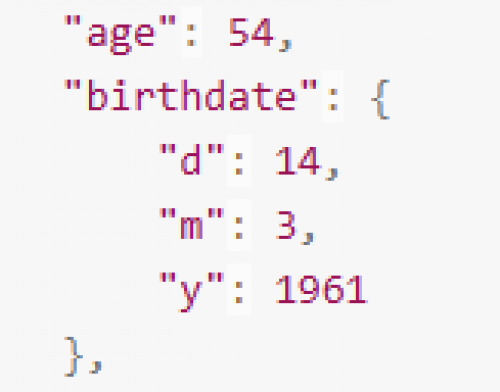
meaning, if you do not have m and d, then you do not have exact birthday to work on.
I don't remember how query (dbview or webview) will show the fuzzy date field, nor how NXT constituent list shows it. however, you just have to play with the possible combination of info. I do not think you can put in day and year alone, as far as I know, you can have
month/year
month/day
month/day/year
year
knowing that, and how the data display (use example run to see how the data is shown), then it is pretty easy to construct a date field based on this.
If the business logic you want to do is birthday related, not “age” related, then you are going to need month/day or month/day/year, anything else is “no good". You can create conditional column in Power Query or DAX pretty easily
2





Categories
- All Categories
- New K-12 Community Home (TEST)
- New Higher Education Home Page (Test)
- New Impact Edge Community TEST
- New YourCause Community TEST
- New SKY Community TEST
- New Grantmaking TEST Community
- New Altru Test Community
- New bbcon Community - TEST
- 12 Blackbaud Agents for Good™
- New Raiser's Edge NXT Community
- 8 Blackbaud Community Help
- 222 bbcon®
- 1.4K Blackbaud Altru®
- 410 Blackbaud Award Management™ and Blackbaud Stewardship Management™
- 1.2K Blackbaud CRM™ and Blackbaud Internet Solutions™
- 16 donorCentrics®
- 361 Blackbaud eTapestry®
- 2.7K Blackbaud Financial Edge NXT®
- 687 Blackbaud Grantmaking™
- 603 Blackbaud Education Management Solutions for Higher Education
- 3.3K Blackbaud Education Management Solutions for K-12 Schools
- 954 Blackbaud Luminate Online® and Blackbaud TeamRaiser®
- 85 JustGiving® from Blackbaud®
- 7K Blackbaud Raiser's Edge NXT®
- 4K SKY Developer
- 258 ResearchPoint™
- 123 Blackbaud Tuition Management™
- 165 Organizational Best Practices
- 248 Member Lounge (Just for Fun)
- 40 Blackbaud Community Challenges
- 37 PowerUp Challenges
- 3 (Closed) PowerUp Challenge: Grid View Batch
- 3 (Closed) PowerUp Challenge: Chat for Blackbaud AI
- 3 (Closed) PowerUp Challenge: Data Health
- 3 (Closed) Raiser's Edge NXT PowerUp Challenge: Product Update Briefing
- 3 (Closed) Raiser's Edge NXT PowerUp Challenge: Standard Reports+
- 3 (Closed) Raiser's Edge NXT PowerUp Challenge: Email Marketing
- 3 (Closed) Raiser's Edge NXT PowerUp Challenge: Gift Management
- 4 (Closed) Raiser's Edge NXT PowerUp Challenge: Event Management
- 3 (Closed) Raiser's Edge NXT PowerUp Challenge: Home Page
- 4 (Closed) Raiser's Edge NXT PowerUp Challenge: Standard Reports
- 4 (Closed) Raiser's Edge NXT PowerUp Challenge: Query
- 829 Community News
- 3.1K Jobs Board
- 57 Blackbaud SKY® Reporting Announcements
- 47 Blackbaud CRM Higher Ed Product Advisory Group (HE PAG)
- 19 Blackbaud CRM Product Advisory Group (BBCRM PAG)