Flow Failing with Null Values in Major/Minor Field Using the Create Education API





Hello Sky Community,
I am working on creating education records and I'm hoping someone can offer me a shortcut. ?
When adding an education record using the Blackbaud API, I need to account for multiple combinations of major/minor fields. Examples include:
- 1 major, no minors
- 1 majors, 1 minor
- 2 majors, no minors
- 2 majors, 1 minor, and so on.
The challenge I’m facing is that the expression I’m using to handle blank fields outputs a null value if the major/minor field is empty. This causes the flow to fail.
Here’s what I’ve tried so far:
- Using the expression directly within the connector field.
- Storing the result of the expression in a variable, then using the variable as input in the connector field.
Both approaches produce the same error.
Before I explore adding multiple conditions to handle this, I wanted to ask the community if there’s a more efficient expression or solution to account for null values in this scenario. Screenshots are provided for additional context.
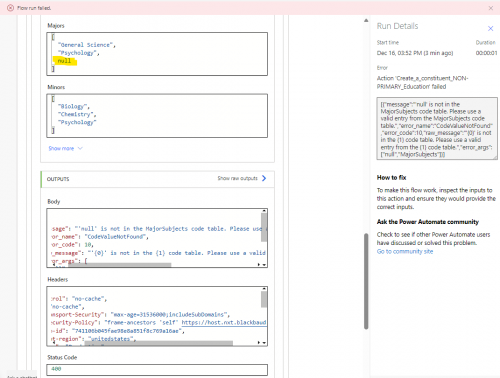
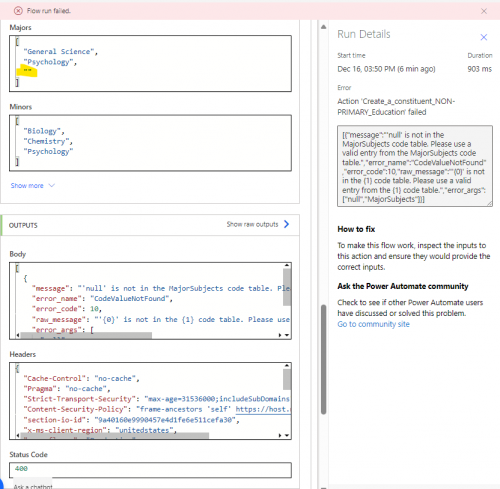
Here’s how I currently have it configured:
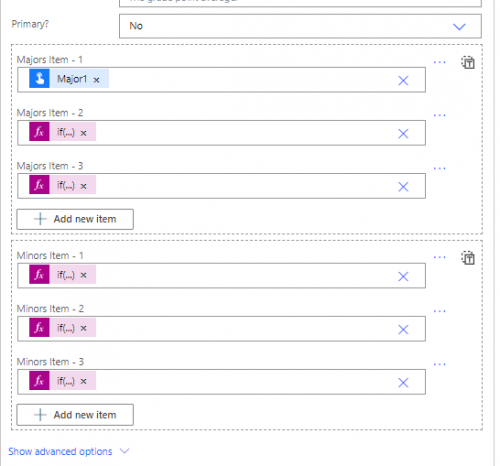
- The expression is placed directly in the fields within the connector.
- There will always be at least one major, so that input field is a required input field for the child flow, the others are optional. Per @Alex Wong's guidance I have added the ?the ['text_7'] field.
Below is an example of one of the expressions I’m using for reference.
Comments
-
@Hallie Guiseppe
the Majors Item and Minors Item field is intaking an array of string. So instead of using the GUI interface of array adding item click on the icon on the upper-right to go into “input” mode.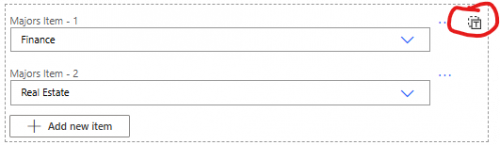

So now you can directly put an array of string into this text box.
So there are 2 ways you can go about doing this, not very different in terms of performance/efficiency
- initialize an Array Variable for Major and Minor
- condition trigger parameter for major 1 is not null (you need the ? to avoid flow error)
- if not null, append major 1 to Major array variable
- repeat for major 2, 3, etc
- repeat for minor 1, 2, 3, etc into the Minor array variable
- condition trigger parameter for major 1 is not null (you need the ? to avoid flow error)

- initialize a String Variable for Major and Minor
- construct the string like an array and put into Majors and Minors field
- json(concat('["', triggerBody()?['text'], if(empty(triggerBody()?['text_1']), '', concat(',"', triggerBody()?['text_1'], '"')), if(empty(triggerBody()?['text_2']), '', concat(',"', triggerBody()?['text_2'], '"')), '"]'))
- notice I take what you said about Major must be at least 1, so I did not condition on the first, but the 2nd and 3rd is conditioned such that if it is empty, nothing is concat into the string, otherwise condition into the string with comma then double quote enclosed
1 - initialize an Array Variable for Major and Minor
-
Thanks @Alex Wong! I'll give this a try this week!
0 -
Thanks @Alex Wong for helping me to get this working!
It took some trial and error, so I’m sharing my approach in case it helps others working with education records. This solution dynamically adds any combination of majors and minors provided in the trigger of the child flow.I used Compose actions because the child flow only processes one record at a time.
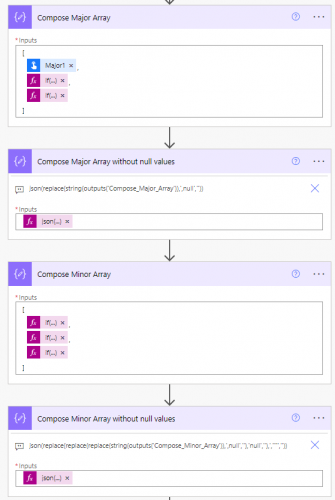
Majors Array
To create the Compose_Major_Array, I used if(not(empty())) expressions to account for optional fields:
[
triggerBody()?['text_5'],
if(not(empty(triggerBody()?['text_6'])), triggerBody()?['text_6'], null),
if(not(empty(triggerBody()?['text_7'])), triggerBody()?['text_7'], null)
]Then, I cleaned up the array to remove null values:
json(replace(string(outputs('Compose_Major_Array')), ',null', ''))
Minors Array
For the Compose_Minor_Array, I accounted for the possibility that the entire array could be empty:
[
if(not(empty(triggerBody()?['text_8'])), triggerBody()?['text_8'], null),
if(not(empty(triggerBody()?['text_9'])), triggerBody()?['text_9'], null),
if(not(empty(triggerBody()?['text_10'])), triggerBody()?['text_10'], null)
]To handle this, I extended the replace() logic to clean up null and empty strings:
json(replace(replace(replace(string(outputs('Compose_Minor_Array')), ',null', ''), 'null', ''), ',""', ''))
This successfully handles any combination of majors and minors provided in the trigger, including cases where no minors are listed. I hope this helps anyone tackling a similar challenge.
0




Categories
- All Categories
- New YourCause Community TEST
- New SKY Community TEST
- New Grantmaking TEST Community
- New Altru Test Community
- New bbcon Community - TEST
- 12 Blackbaud Agents for Good™
- New Raiser's Edge NXT Community
- 7 Blackbaud Community Help
- 218 bbcon®
- 1.4K Blackbaud Altru®
- 409 Blackbaud Award Management™ and Blackbaud Stewardship Management™
- 1.2K Blackbaud CRM™ and Blackbaud Internet Solutions™
- 16 donorCentrics®
- 361 Blackbaud eTapestry®
- 2.7K Blackbaud Financial Edge NXT®
- 681 Blackbaud Grantmaking™
- 599 Blackbaud Education Management Solutions for Higher Education
- 3.3K Blackbaud Education Management Solutions for K-12 Schools
- 952 Blackbaud Luminate Online® and Blackbaud TeamRaiser®
- 85 JustGiving® from Blackbaud®
- 7K Blackbaud Raiser's Edge NXT®
- 3.9K SKY Developer
- 257 ResearchPoint™
- 123 Blackbaud Tuition Management™
- 165 Organizational Best Practices
- 247 Member Lounge (Just for Fun)
- 40 Blackbaud Community Challenges
- 37 PowerUp Challenges
- 3 (Closed) PowerUp Challenge: Grid View Batch
- 3 (Closed) PowerUp Challenge: Chat for Blackbaud AI
- 3 (Closed) PowerUp Challenge: Data Health
- 3 (Closed) Raiser's Edge NXT PowerUp Challenge: Product Update Briefing
- 3 (Closed) Raiser's Edge NXT PowerUp Challenge: Standard Reports+
- 3 (Closed) Raiser's Edge NXT PowerUp Challenge: Email Marketing
- 3 (Closed) Raiser's Edge NXT PowerUp Challenge: Gift Management
- 4 (Closed) Raiser's Edge NXT PowerUp Challenge: Event Management
- 3 (Closed) Raiser's Edge NXT PowerUp Challenge: Home Page
- 4 (Closed) Raiser's Edge NXT PowerUp Challenge: Standard Reports
- 4 (Closed) Raiser's Edge NXT PowerUp Challenge: Query
- 822 Community News
- 3.1K Jobs Board
- 57 Blackbaud SKY® Reporting Announcements
- 47 Blackbaud CRM Higher Ed Product Advisory Group (HE PAG)
- 19 Blackbaud CRM Product Advisory Group (BBCRM PAG)