Exported RE UK dates change to US format in Word merge and other apps

Hi, I am in the UK. We've been having problems with using RE exported data containing dates. In Excel the date looks correct (eg 5/12/2024 - 5th of December 2024). When I mail merge it to produce a list it changes to 12 May, 2024. It also does it in other programs we use (eg Vanilla Soft) For Word Mail merge I use what I think is the correct code (d MMMM yyyy) but it just doesn't work. I searched for discussions on here and didn't find the answer. Please help.


Comments

  • Alex Wong
    Alex Wong Community All-Star
    Ninth Anniversary Kudos 5 Facilitator 3 bbcon 2025 Attendee Badge

    @Lena Payne
    Try this:
    @{ MERGEFIELD DateField \\@ "d MMMM yyyy" }

  • @Alex Wong:
    hi, thanks, that's exactly what I use and it gives the ‘correct look’ after merge but on closer inspection anything with a day of 12 and below changes to the US format. Can the issue be with the data from RE? Is there a way to check what regional setting our RE is set to? All our Microsoft office apps are set to the UK. Thank you again for your help.

    @Lena Payne
    Try this:
    @{ MERGEFIELD DateField \\@ "d MMMM yyyy" }

  • Alex Wong
    Alex Wong Community All-Star
    Ninth Anniversary Kudos 5 Facilitator 3 bbcon 2025 Attendee Badge

    @Lena Payne
    I am in the US so can't know for sure RE is UK geo-friendly with date.

    if you are concern about the date being exported, if you export to CSV, then you can open the file in Notepad and see how it is exported by RE. If not CSV, I recommend you try CSV

  • @Alex Wong thank you! Using the .csv file in Word merge instead of .xls worked in keeping the dates in the UK format. I guess it just takes it as a plain text document without any formulae behind the data? thank you for the tip!

  • Rachel Cavalier
    Rachel Cavalier Community All-Star
    Seventh Anniversary Kudos 5 December 2025 Monthly Challenge bbcon 2025 Attendee Badge

    @Lena Payne
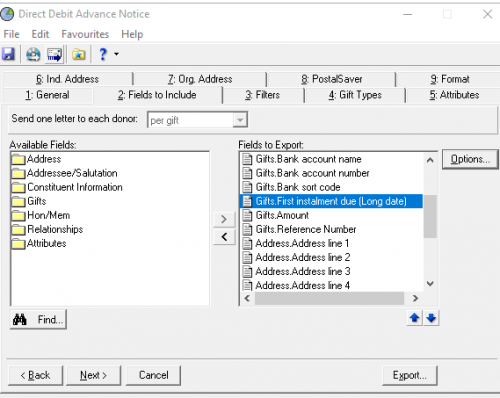
    We had this problem with our Direct Debit Advance notice letters when we first moved to Raiser's Edge back in 2019 - which was a fair while ago now and I'm extremely vague on what solution our BB consultant brought back to us when we pointed the issue out. The regional settings for DB view were correct, but like you, we kept getting “wrong” dates in this mail merge.

    I do note, however, that in the Mail parameter that we have set up for these letters the date that we were having trouble with has “Long Date” picked as the option which I think must have solved the problem.

    2918be253cdd93727efb8ab78a3d59b0-huge-im
  • @Rachel Cavalier thank you for your reply. In the two cases we've had so far, the dates were the date of death and gift date, and I don't think there is an option for a ‘long date' there. We just have a query that we export with these dates in excel and then merge in word, which is when they flip.

  • Rachel Cavalier
    Rachel Cavalier Community All-Star
    Seventh Anniversary Kudos 5 December 2025 Monthly Challenge bbcon 2025 Attendee Badge

    @Lena Payne It might be that you can't set this in Query - only in Export or Mail.