sql agent jobs timing out





We recently upgraded our on premise BBCRM to SQL Server 2019. In doing so, I recreated all our business processes, since this changed the SQL Agent jobs from ActiveX to PowerShell. Since doing this, any job that runs longer than 15 minutes does not return a result back to the sql agent job, and so the job either times out or hangs.
This ends up blocking other jobs from running, with a “waiting for thread" error. Is anyone else experiencing this?
I did see this KB article:
But putting no timeout is making it worse. When I do put in a timeout, the sql agent job reports a timeout error even though the business process in ACE does succeed. I have also seen where I could increase the number of PowerShell threads that can run concurrently, but not sure that this would be advised or not.
Any thoughts anyone else has would be most appreciated.
Thanks.
Arlette
Comments
-
@Arlette Slachmuylder Hello Arlette, I'm sorry you are running into this issue with your recent upgrade. I did want to ensure that you have opened a ticket with support about it? Chat - Blackbaud. You can chat in with support at your convenience!
0 -
@Crystal Bruce
Thanks. I do have an open ticket and am having some back and forth. It did not seem from support's vantage point, that they had heard of this problem before, so I wanted to see if anyone else has run into this.1 -
@Arlette Slachmuylder, we experienced the timeout issue after converting our agent jobs from ActiveX to Powershell with our migration to SQL2016 (not SQL2019), we utilized the KB article you referenced to build a process to update the job step parameters to a different timeout value. Same as what you were seeing, agent job reported a timeout but the CRM businessprocess was still executing. Ultimately, we did wind up using infinite (0) as indicated in the sample script provided for our timeout value, that remedied our agent job timeout issue.
You reference changing the timeout value made it worse, but did not offer explanation of how that was the case. It almost sounds like you are saying with no timeout value the agent jobs simply stay active even though the CRM businessprocesses completed. If that is the case, we did not experience that. It may be worth checking the CRM/IIS timeout values or session times to ensure the agent session is not being dropped on the CRM side, meaning CRM is discarding the agent thread after X amount of time and the agent thread in no longer active in the application once the process completes. Again, not something I've seen (or at least have notes on), so that is simply me rambling.
As far as increasing the number of Powershell worker threads, we did increase that number after identifying waits of “being queued for the Powershell subsystem”. What you reference is things are “waiting for thread”, which is a very different wait message for SQL Server and could be indicative of more holistic things because that is across the entire SQL instance, not just the Powershell processes.
0 -
@Jeff Garmon
Thanks so much for your response.We are not on the most current version of Blackbaud - so I am trying to determine if the issue we are seeing is something that Blackbaud fixed in a future version, or related to our server upgrade.
What I am seeing is that if I set the timeout to 0, and the Blackbaud business process takes longer than 15 minutes to complete, the sql agent job, or really the powershell script, never gets a response back to say the the job completed. Hence, the sql agent job never terminates, even though the Blackbaud process has. Something is timing out and preventing that response from the business process to make it back to the sql agent job.
This then results in the two allowable PowerShell threads to be held by these never completing processes, and so the other jobs that are supposed to kick off, get stuck in a “waiting for thread” process.
I did see that with using PowerShell, the number of threads is supposed to be ¼ of the cores of the sql server, but with ActiveX - the number of threads was much larger. So, increasing the number of PowerShell threads would help me somewhat, but I still have the issue of my longer jobs never getting a response to end properly.
Any other thoughts you have would be greatly appreciated.
Thanks.
Arlette
0 -
@Arlette Slachmuylder
Hi Arlette, I have a workaround for the “waiting for a thread” part of the issue.In SQL Mgmt Studio, Check the current value of concurrent powershell sql agent jobs. Run the following script to see the current value, the default setting is 2, which allows only 2 concurrent crm business processes to run.
SELECT [subsystem_id]
,[subsystem]
,[max_worker_threads]
FROM [msdb].[dbo].[syssubsystems]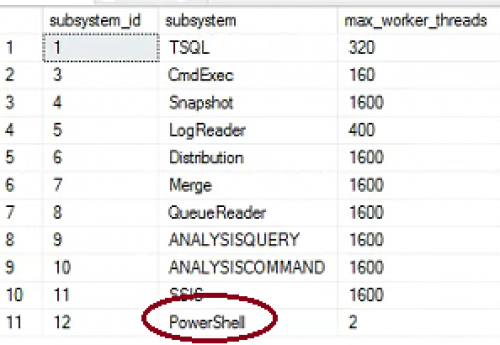
To change the value, run the following script to update the value to something like 20, to allow up to 20 scheduled business processes to run.UPDATE msdb.dbo.syssubsystems
SET max_worker_threads = 20
WHERE subsystem = N'PowerShell'You may need to re-start the SQL Agent after making the change.
This doesn't fix the actual issue of the jobs appearing to timeout, but it should prevent the queue of other jobs waiting before they can run.
- John
0








Categories
- All Categories
- New K-12 Community Home (TEST)
- New Higher Education Home Page (Test)
- New Impact Edge Community TEST
- New YourCause Community TEST
- New SKY Community TEST
- New Grantmaking TEST Community
- New Altru Test Community
- New bbcon Community - TEST
- 12 Blackbaud Agents for Good™
- New Raiser's Edge NXT Community
- 8 Blackbaud Community Help
- 222 bbcon®
- 1.4K Blackbaud Altru®
- 411 Blackbaud Award Management™ and Blackbaud Stewardship Management™
- 1.2K Blackbaud CRM™ and Blackbaud Internet Solutions™
- 16 donorCentrics®
- 361 Blackbaud eTapestry®
- 2.7K Blackbaud Financial Edge NXT®
- 688 Blackbaud Grantmaking™
- 604 Blackbaud Education Management Solutions for Higher Education
- 3.3K Blackbaud Education Management Solutions for K-12 Schools
- 954 Blackbaud Luminate Online® and Blackbaud TeamRaiser®
- 85 JustGiving® from Blackbaud®
- 7.1K Blackbaud Raiser's Edge NXT®
- 4K SKY Developer
- 258 ResearchPoint™
- 123 Blackbaud Tuition Management™
- 165 Organizational Best Practices
- 249 Member Lounge (Just for Fun)
- 40 Blackbaud Community Challenges
- 37 PowerUp Challenges
- 3 (Closed) PowerUp Challenge: Grid View Batch
- 3 (Closed) PowerUp Challenge: Chat for Blackbaud AI
- 3 (Closed) PowerUp Challenge: Data Health
- 3 (Closed) Raiser's Edge NXT PowerUp Challenge: Product Update Briefing
- 3 (Closed) Raiser's Edge NXT PowerUp Challenge: Standard Reports+
- 3 (Closed) Raiser's Edge NXT PowerUp Challenge: Email Marketing
- 3 (Closed) Raiser's Edge NXT PowerUp Challenge: Gift Management
- 4 (Closed) Raiser's Edge NXT PowerUp Challenge: Event Management
- 3 (Closed) Raiser's Edge NXT PowerUp Challenge: Home Page
- 4 (Closed) Raiser's Edge NXT PowerUp Challenge: Standard Reports
- 4 (Closed) Raiser's Edge NXT PowerUp Challenge: Query
- 829 Community News
- 3.1K Jobs Board
- 57 Blackbaud SKY® Reporting Announcements
- 47 Blackbaud CRM Higher Ed Product Advisory Group (HE PAG)
- 19 Blackbaud CRM Product Advisory Group (BBCRM PAG)