Fundraiser Assignment Missing Important Columns on Return




To Preface:
I know that there are two ways to pull down fundraiser assignments down, either form the constituent to see who is assigned to them or from the fundraiser to see who they are assigned to. I know that “required” is false, but the data I want is present on the assignments for both web view and database view.
My Issue:
I tested with both, and I have come to the conclusion that neither can return the “end” parameter. Or many other expected parameters either.
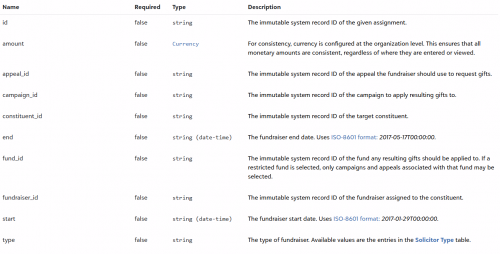
No matter which API endpoint I choose - even though both are supposed to return those columns - I can only get six columns: id, amount, constituent_id, fundraiser_id, start, type. I have checked both RE NXT and RE database view to see that all information I am wanting should be present (e.g., end, fund_id, appeal_id) but I get nothing but those six aforementioned columns from the API.
Questions:
- Is this a known issue? (I saw some posts showing only the truncated fields in results, but I want to know I am not crazy)
- Is this only happening for me? (again, saw a few posts but it went unacknowledged)
- If it is, how do I fix this?
- If not, is a fix planned to release, or should this be reported as a bug instead of just a discussion post?
Comments
-
@Wyatt Mosteller
your screenshot looks like this endpoint: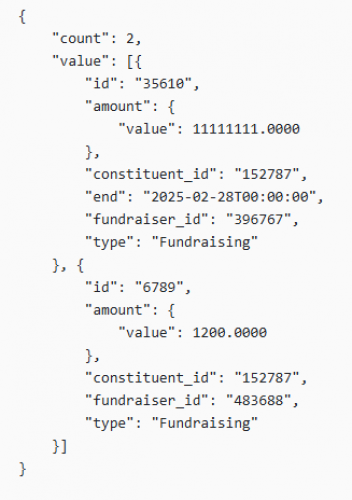
so using that endpoint I am able to get “end” property. but you can see that JSON returned does not show the property if the property is blank.
0 -
Attached are screenshots from multiple steps in my journey for this. First is the raw JSON output for this specific constituent system record id. Second is the Pandas DataFrame having the JSON normalized (hence the amount.value showing up). Finally, the last photo is the RE database view of the constituent record having assigned fundraisers with to and from, but it was not present in the DataFrame.
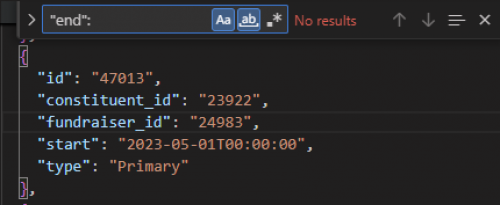
using Find tool on raw JSON (no ends) 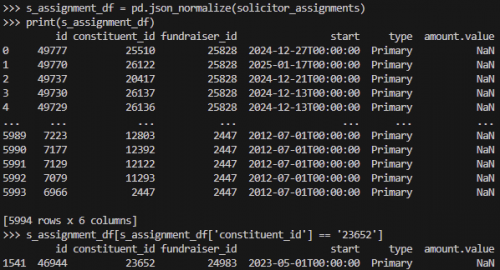
Python Pandas DataFrame created from raw JSON output 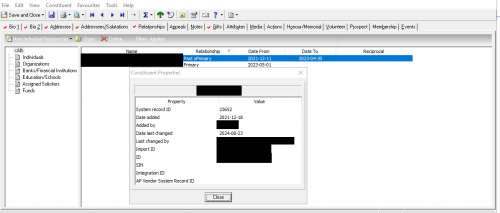
Database View of record After diving deeper to grab screenshots for this, you can see that I only showed the assignment with id of 46944 from the JSON because the assignment with an end didn't show up in the request response. All of the assignments with an end didn't show up. It seems you can only pull active assignments with no option to include inactive like normally possible. Regardless though… why?
Edit: changed “report” to “record” in third caption.0 -
@Wyatt Mosteller
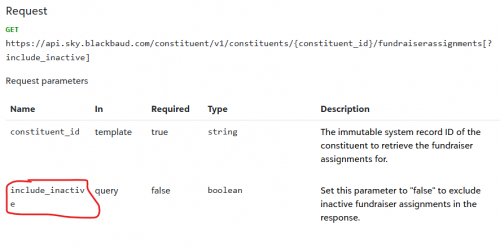
https://developer.sky.blackbaud.com/api#api=56b76470069a0509c8f1c5b3&operation=ListConstituentFundraiserAssignmentsSingleConstituentthis API endpoint does have a include_inactive paramter that can be specified. When not specified, it is default to false (would have been better if they told you inactive is excluded by default, but that is generally the case). So explicitly setting the include_inactive=true will give you those that are inactive (inactive are those that has start/end date range outside of current).
 0
0 -
@Alex Wong So there is. That is another difference between thew two similar but different calls then. I was looking from the fundraisers side (so I could get more data in less calls), and that one only has limit and offset. I just assumed the constituent perspective would've been the same.
Thank you.
0





Categories
- All Categories
- New YourCause Community TEST
- New SKY Community TEST
- New Grantmaking TEST Community
- New Altru Test Community
- New bbcon Community - TEST
- 12 Blackbaud Agents for Good™
- New Raiser's Edge NXT Community
- 7 Blackbaud Community Help
- 218 bbcon®
- 1.4K Blackbaud Altru®
- 409 Blackbaud Award Management™ and Blackbaud Stewardship Management™
- 1.2K Blackbaud CRM™ and Blackbaud Internet Solutions™
- 16 donorCentrics®
- 361 Blackbaud eTapestry®
- 2.7K Blackbaud Financial Edge NXT®
- 681 Blackbaud Grantmaking™
- 599 Blackbaud Education Management Solutions for Higher Education
- 3.3K Blackbaud Education Management Solutions for K-12 Schools
- 952 Blackbaud Luminate Online® and Blackbaud TeamRaiser®
- 85 JustGiving® from Blackbaud®
- 7K Blackbaud Raiser's Edge NXT®
- 3.9K SKY Developer
- 257 ResearchPoint™
- 123 Blackbaud Tuition Management™
- 165 Organizational Best Practices
- 247 Member Lounge (Just for Fun)
- 40 Blackbaud Community Challenges
- 37 PowerUp Challenges
- 3 (Closed) PowerUp Challenge: Grid View Batch
- 3 (Closed) PowerUp Challenge: Chat for Blackbaud AI
- 3 (Closed) PowerUp Challenge: Data Health
- 3 (Closed) Raiser's Edge NXT PowerUp Challenge: Product Update Briefing
- 3 (Closed) Raiser's Edge NXT PowerUp Challenge: Standard Reports+
- 3 (Closed) Raiser's Edge NXT PowerUp Challenge: Email Marketing
- 3 (Closed) Raiser's Edge NXT PowerUp Challenge: Gift Management
- 4 (Closed) Raiser's Edge NXT PowerUp Challenge: Event Management
- 3 (Closed) Raiser's Edge NXT PowerUp Challenge: Home Page
- 4 (Closed) Raiser's Edge NXT PowerUp Challenge: Standard Reports
- 4 (Closed) Raiser's Edge NXT PowerUp Challenge: Query
- 822 Community News
- 3.1K Jobs Board
- 57 Blackbaud SKY® Reporting Announcements
- 47 Blackbaud CRM Higher Ed Product Advisory Group (HE PAG)
- 19 Blackbaud CRM Product Advisory Group (BBCRM PAG)