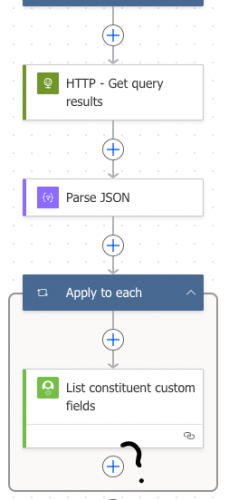
What's next after 'List constituent custom fields'?





Hi everyone! Longtime RE user, still somewhat new to the Developer space (a few years now, a few bbdevdays under my belt, been learning TONS about Power Automate). Building out my first major time-saver flow and running into some issues.
I used this post (thank you Nicole and Alex!) to get started on my flow. What I'm trying to do: update or add a constituent attribute based on query output. I'm successfully running a query and parsing out the query fields. Within the ‘apply to each’ loop, I'm successfully using the QRECID to ‘List constituent custom fields’. But that's when I get stuck. What's the next step? The output is an array of all custom fields on that person's record. I want to check if the custom field I'm looking for is in that array. If it is, I want to update it; if it's missing, I want to add it.
Any assistance would be much appreciated!
Comments
-
@Joe Shaver
after list constituent custom field, you want to do a Filter array action, which filter on category = the category of attribute you are looking for.After the Filter array, you will want to do a Condition action, condition on the length() of the dynamic content of Filter array body. If equals to 0, then you add the attribute, otherwise update it.
1 -
@Alex Wong This worked flawlessly! Thank you so much! I'm using this flow to update giving levels regularly instead of me updating the entire database at the end of the fiscal year manually. Appreciate the assist!
0





Categories
- All Categories
- 6 Blackbaud Community Help
- 213 bbcon®
- 1.4K Blackbaud Altru®
- 401 Blackbaud Award Management™ and Blackbaud Stewardship Management™
- 1.1K Blackbaud CRM™ and Blackbaud Internet Solutions™
- 15 donorCentrics®
- 360 Blackbaud eTapestry®
- 2.6K Blackbaud Financial Edge NXT®
- 655 Blackbaud Grantmaking™
- 576 Blackbaud Education Management Solutions for Higher Education
- 3.2K Blackbaud Education Management Solutions for K-12 Schools
- 939 Blackbaud Luminate Online® and Blackbaud TeamRaiser®
- 84 JustGiving® from Blackbaud®
- 6.6K Blackbaud Raiser's Edge NXT®
- 3.7K SKY Developer
- 248 ResearchPoint™
- 119 Blackbaud Tuition Management™
- 165 Organizational Best Practices
- 241 Member Lounge (Just for Fun)
- 34 Blackbaud Community Challenges
- 34 PowerUp Challenges
- 3 (Open) PowerUp Challenge: Chat for Blackbaud AI
- 3 (Closed) PowerUp Challenge: Data Health
- 3 (Closed) Raiser's Edge NXT PowerUp Challenge: Product Update Briefing
- 3 (Closed) Raiser's Edge NXT PowerUp Challenge: Standard Reports+
- 3 (Closed) Raiser's Edge NXT PowerUp Challenge: Email Marketing
- 3 (Closed) Raiser's Edge NXT PowerUp Challenge: Gift Management
- 4 (Closed) Raiser's Edge NXT PowerUp Challenge: Event Management
- 3 (Closed) Raiser's Edge NXT PowerUp Challenge: Home Page
- 4 (Closed) Raiser's Edge NXT PowerUp Challenge: Standard Reports
- 4 (Closed) Raiser's Edge NXT PowerUp Challenge: Query
- 791 Community News
- 2.9K Jobs Board
- 53 Blackbaud SKY® Reporting Announcements
- 47 Blackbaud CRM Higher Ed Product Advisory Group (HE PAG)
- 19 Blackbaud CRM Product Advisory Group (BBCRM PAG)