Best Practices for Structuring Golf Tournament Registration: Split gift of revenue and philanthropy




Our organization currently combines all golf tournament registration funds - both for tax-deductible donations and for benefits received - into a single fund/account. When entering the golf registrations in RE, we do remove the non-tax deductible portion from the “receipt amount” for the gift record. On the receipt, we specify what portion is tax deductible and what is non tax deductible.
We're considering whether separating these into two different accounts would be more effective for clarity and reporting purposes.
How do other organizations handle this?
Would splitting the funds help improve transparency, particularly with regard to tax-deductible donations versus the value of benefits provided?
Comments
-
@Janette Clark Welcome to the BB community forums.
I think it can be done either way. Does your accounting or event management need reporting that has charitable separate from fee? Reports/data output are often the biggest consideration. How do you want to pull data for reports.
We have events where part of payment is ‘fee’ and other is charitable contribution. We do have the event module and are able to set the fee/receipt and gift amount so when running receipt we can merge both fields into document with explanation of the difference. Works very well with event module but don't know if you have that or not.
2 -
@Janette Clark: Would splitting the funds help improve transparency, particularly with regard to tax-deductible donations versus the value of benefits provided?
This is a question only you can answer @Janette Clark. Fund structure is very organization specific, and I'm not sure if moving the gifts to another fund is very helpful. I would ask your finance team and see if it makes a difference. Since you are already removing the taxable portion, I'm not sure if this solution is more helpful or not.
1 -
@Janette Clark
Our organization previously separated golf tournament registration revenue into two different funds—one for tax-deductible donations and another for the benefit portion. While this approach can improve clarity in some ways, we ultimately moved away from it due to the challenges it created. Here are a few key considerations:- Gift counts may become inflated. If your organization tracks the number of gifts per donor and sets goals based on that data, splitting gifts into separate funds can make it difficult to get an accurate count.
- Increased operational workload. Manually splitting gifts adds extra steps for your team, from data entry to reconciliation.
- Challenges with donation forms. Most online registration forms won’t automatically separate the tax-deductible and benefit portions, requiring manual adjustments after the donor registers.
- Potential donor confusion. If your organization provides annual giving statements, donors may not understand why their registration fee was split between multiple funds.
To streamline our processes and reduce these challenges, we have adjusted how we manage event revenue, including golf outings. While separating funds can work, I recommend weighing these factors to determine what will work best for your team. Best of luck!
3 -
@Hallie Guiseppe Thank you, Hallie! This is a really insightful perspective!
1 -
@Janette Clark
I have always added the benefit amount to get the reduced receipt amount. I think that works best if you run annual giving reports for the donors or if they use the donor portal. I do prefer to add the benefit in the footer of the acknowledgement letter instead of breaking it out there. The body of the letter would say something like, “Thank you for your support in the amount of $5,000,” and the footer would have a sentence like, “Benefits received are $125 per attendee.”3 -
@Hallie Guiseppe our school has struggled with this question as well. I appreciate your comments here. As the gift processor and consultant when creating event forms
 It is less work if event form is created with contribution separated from benefit.
 My question is, how to count contribution amount only when creating Dashboard of Committed Fundraising Revenue. For example, if we charge $1000 for golf that cost $400, I only want to count $600 of revenue. What reports do you execute to get contribution dollars?
0 -
This is such a great question! I would like to start with sharing that our method is rough but it suits our needs. The proceeds from our golf event supports our Annual Fund. We use Power BI for our campaign reporting, because of that I use calculations to reduce the amount received by the budgeted expenses.
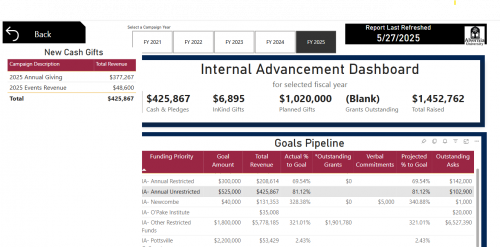
Annual Unrestricted Campaign Report
I have a SharePoint list that is updated annually with new goals and expenses. The revenue from our golf event is added to our annual giving revenue line only after we have received more than the budgeted expenses.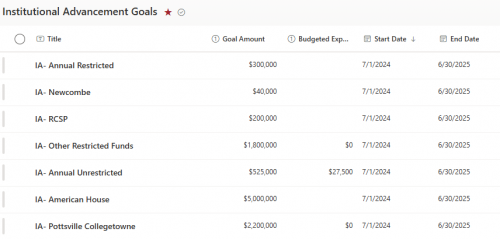
SharePoint List This is how we handle the reporting because we don't have Financial Edge which would allow us to pull in actual expenses for a more accurate report.
Alternatively, you could explore using the Event Summary Report (not currently in Unified View). This report will output a Net amount for each event. If your team enters event expenses into the event records this dbv report should work for you.
0

















Categories
- All Categories
- New YourCause Community TEST
- New SKY Community TEST
- New Grantmaking TEST Community
- New Altru Test Community
- New bbcon Community - TEST
- 12 Blackbaud Agents for Good™
- New Raiser's Edge NXT Community
- 7 Blackbaud Community Help
- 218 bbcon®
- 1.4K Blackbaud Altru®
- 409 Blackbaud Award Management™ and Blackbaud Stewardship Management™
- 1.2K Blackbaud CRM™ and Blackbaud Internet Solutions™
- 16 donorCentrics®
- 361 Blackbaud eTapestry®
- 2.7K Blackbaud Financial Edge NXT®
- 681 Blackbaud Grantmaking™
- 599 Blackbaud Education Management Solutions for Higher Education
- 3.3K Blackbaud Education Management Solutions for K-12 Schools
- 952 Blackbaud Luminate Online® and Blackbaud TeamRaiser®
- 85 JustGiving® from Blackbaud®
- 7K Blackbaud Raiser's Edge NXT®
- 3.9K SKY Developer
- 257 ResearchPoint™
- 123 Blackbaud Tuition Management™
- 165 Organizational Best Practices
- 247 Member Lounge (Just for Fun)
- 40 Blackbaud Community Challenges
- 37 PowerUp Challenges
- 3 (Closed) PowerUp Challenge: Grid View Batch
- 3 (Closed) PowerUp Challenge: Chat for Blackbaud AI
- 3 (Closed) PowerUp Challenge: Data Health
- 3 (Closed) Raiser's Edge NXT PowerUp Challenge: Product Update Briefing
- 3 (Closed) Raiser's Edge NXT PowerUp Challenge: Standard Reports+
- 3 (Closed) Raiser's Edge NXT PowerUp Challenge: Email Marketing
- 3 (Closed) Raiser's Edge NXT PowerUp Challenge: Gift Management
- 4 (Closed) Raiser's Edge NXT PowerUp Challenge: Event Management
- 3 (Closed) Raiser's Edge NXT PowerUp Challenge: Home Page
- 4 (Closed) Raiser's Edge NXT PowerUp Challenge: Standard Reports
- 4 (Closed) Raiser's Edge NXT PowerUp Challenge: Query
- 822 Community News
- 3.1K Jobs Board
- 57 Blackbaud SKY® Reporting Announcements
- 47 Blackbaud CRM Higher Ed Product Advisory Group (HE PAG)
- 19 Blackbaud CRM Product Advisory Group (BBCRM PAG)