How to Generate Access Token Without User Interaction for Nightly API Data Sync

Hi community,
We're planning to consume Blackbaud API data on a nightly basis as part of an automated process. For this to work, we need to generate an access token without requiring any user interaction each time.
What is the recommended way to implement this?
Is there a way to use client credentials flow or any other method supported by Blackbaud that allows us to programmatically obtain tokens?
Any guidance or documentation would be greatly appreciated!
Thanks in advance.
Comments
-
Hi, Blackbaud doesn't provide client credentials flow. However, you can still do this programmatically. The only time you need user interaction is the very first authorization. After that, you can get access tokens and new refresh tokens programmatically forever. You never need to authorize interactively again.
Here's one way to do this:
- Add https://localhost to your app's redirect URIs. Go to https://developer.blackbaud.com/apps, click your app, click Edit under Redirect URIs, add https://localhost, and click Save.
- Do the initial authorization. In a web browser, go to https://oauth2.sky.blackbaud.com/authorization?client_id=YourAppsClientId&response_type=code&redirect_uri=https://localhost
Replace YourAppsClientId. - Blackbaud shows you the authorization page. Click the Authorize button.
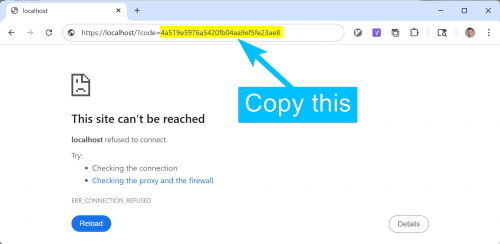
- Blackbaud redirects you to https://localhost. There's an authorization code in the URL:
https://localhost/?code=4a519e5976a5420fb04aa9ef5fe23ae8
This is a fake code, but the format is the same.
I do this without a web server running on localhost to handle the request. So, the browser shows an error: “This site can't be reached.” That's fine. We just need to copy the code from the URL.
- Get a refresh token by sending an HTTP POST request to https://oauth2.sky.blackbaud.com/token.
PowerShell example:
$response = Invoke-RestMethod https://oauth2.sky.blackbaud.com/token -Method Post -Authentication Basic -Credential ([pscredential]::new('YourAppsClientId', (ConvertTo-SecureString 'YourAppsClientSecret' -AsPlainText -Force))) -Body "grant_type=authorization_code&code=YourCode&redirect_uri=https://localhost/"
Replace YourAppsClientId, YourAppsClientSecret, and YourCode. - The refresh token is in $response.refresh_token. Save that to your database or credential manager. Also record the date it was retrieved. It will expire in 365 days. You'll need to renew it before then. Renewal can be done fully programmatically.
- At any time during the refresh token's lifetime, programmatically get an access token from the refresh token like this:
$response = Invoke-RestMethod https://oauth2.sky.blackbaud.com/token -Method Post -Authentication Basic -Credential ([pscredential]::new(YourAppsClientId, (ConvertTo-SecureString YourAppsClientSecret -AsPlainText -Force))) -Body "grant_type=refresh_token&refresh_token=YourRefreshToken&preserve_refresh_token=true"
Replace YourAppsClientId, YourAppsClientSecret, and YourRefreshToken.
The access token is in $response.access_token. Access tokens expire in 1 hour.
Notice preserve_refresh_token in the request. This prevents Blackbaud from expiring your refresh token and generating a new one. - You can make API requests using the access token like this:
$response = Invoke-RestMethod YourApiUrl -Header @{'Bb-Api-Subscription-Key' = YourBlackbaudApiSubscriptionKey; 'Authorization' = "Bearer YourAccessToken"}
Replace YourApiUrl, YourBlackbaudApiSubscriptionKey, and YourAccessToken.
You can find your Blackbaud API subscription key here: https://developer.blackbaud.com/subscriptions/. Click Show under Primary access key to view it. - Renew your refresh token any time before the 1-year expiration. You can do this by making an access token request and leaving off preserve_refresh_token=true. This causes a new refresh token to be included in the response.
$response = Invoke-RestMethod https://oauth2.sky.blackbaud.com/token -Method Post -Authentication Basic -Credential ([pscredential]::new(YourAppsClientId, (ConvertTo-SecureString YourAppsClientSecret -AsPlainText -Force))) -Body "grant_type=refresh_token&refresh_token=YourRefreshToken"
Replace YourAppsClientId, YourAppsClientSecret, and YourRefreshToken.
The access token is in $response.access_token like before. There's also a new refresh token in $response.refresh_token.
I hope this helps! Let me know if you have any questions.
1 - Add https://localhost to your app's redirect URIs. Go to https://developer.blackbaud.com/apps, click your app, click Edit under Redirect URIs, add https://localhost, and click Save.





Categories
- All Categories
- New K-12 Community Home (TEST)
- New Higher Education Home Page (Test)
- New Impact Edge Community TEST
- New YourCause Community TEST
- New SKY Community TEST
- New Grantmaking TEST Community
- New Altru Test Community
- New bbcon Community - TEST
- 12 Blackbaud Agents for Good™
- New Raiser's Edge NXT Community
- 8 Blackbaud Community Help
- 222 bbcon®
- 1.4K Blackbaud Altru®
- 410 Blackbaud Award Management™ and Blackbaud Stewardship Management™
- 1.2K Blackbaud CRM™ and Blackbaud Internet Solutions™
- 16 donorCentrics®
- 361 Blackbaud eTapestry®
- 2.7K Blackbaud Financial Edge NXT®
- 687 Blackbaud Grantmaking™
- 603 Blackbaud Education Management Solutions for Higher Education
- 3.3K Blackbaud Education Management Solutions for K-12 Schools
- 954 Blackbaud Luminate Online® and Blackbaud TeamRaiser®
- 85 JustGiving® from Blackbaud®
- 7K Blackbaud Raiser's Edge NXT®
- 4K SKY Developer
- 258 ResearchPoint™
- 123 Blackbaud Tuition Management™
- 165 Organizational Best Practices
- 248 Member Lounge (Just for Fun)
- 40 Blackbaud Community Challenges
- 37 PowerUp Challenges
- 3 (Closed) PowerUp Challenge: Grid View Batch
- 3 (Closed) PowerUp Challenge: Chat for Blackbaud AI
- 3 (Closed) PowerUp Challenge: Data Health
- 3 (Closed) Raiser's Edge NXT PowerUp Challenge: Product Update Briefing
- 3 (Closed) Raiser's Edge NXT PowerUp Challenge: Standard Reports+
- 3 (Closed) Raiser's Edge NXT PowerUp Challenge: Email Marketing
- 3 (Closed) Raiser's Edge NXT PowerUp Challenge: Gift Management
- 4 (Closed) Raiser's Edge NXT PowerUp Challenge: Event Management
- 3 (Closed) Raiser's Edge NXT PowerUp Challenge: Home Page
- 4 (Closed) Raiser's Edge NXT PowerUp Challenge: Standard Reports
- 4 (Closed) Raiser's Edge NXT PowerUp Challenge: Query
- 829 Community News
- 3.1K Jobs Board
- 57 Blackbaud SKY® Reporting Announcements
- 47 Blackbaud CRM Higher Ed Product Advisory Group (HE PAG)
- 19 Blackbaud CRM Product Advisory Group (BBCRM PAG)