TeamRaiser Tips And Tricks: Two Ways To Optimize The Registration Flow





The following post is from Jeff Rineer, a developer with Cathexis Partners, a Blackbaud Partner.
Optimizing your TeamRaiser event starts by streamlining the registration process. The easier it is for participants to register, the more likely they will be to complete the registration process, and the less likely they will be to create duplicate records in your system.
Here are two tips for optimizing the registration flow for your TeamRaiser events:
Set the returning user login page to the first step
One thing you can do that makes registration flow easier on users is to enforce returning user login. If participants don’t log in before moving through the registration process, they can end up being bumped out of the registration process mid-stream – having to follow a series of steps to reset the password. That can result in a frustrating experience, and potentially a lost registration!
To enforce returning user login, follow these steps: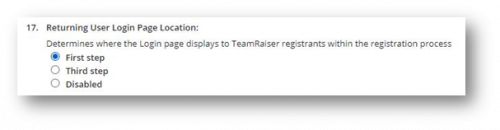
Customize the user login page
You’re not stuck using the default user login page in TeamRaiser. With a bit of work with CSS, jQuery, and HTML, you can fine tune the user experience.
For example, some users might not be returning event participants, but they might have an account and not know it.
You can add a question or other verbiage that streamlines the login process by letting users know that if they previously participated in an event, made a donation, purchased an event ticket, completed an action alert, or purchased a product from your ecommerce store, then they have a user account.
Let’s look at a real-world example we created for an organization. This organization has many events, and participants could have participated in any number of them over the years.
So, we first ask if they have ever participated in an event. This helps users know that they might have a user account – even if they don’t realize it. You could change the wording to something like “Have you ever made a donation or purchased tickets?” – whatever makes sense for your organization.

If users click “No,” then they’re directed to the new user registration flow. If users click “Yes,” then they’re directed to the user login field. If they can’t remember their user name and password, they can click a “Not sure?” link and if they enter incorrect information, they will see an error with a help link.
These are two simple ways to expedite and simplify the process for returning users. But they lead to big benefits:
Learn more
Discover more TeamRaiser tips and tricks in this Cathexis Partners on-demand webinar.
TeamRaiser Community Call
Join thought leaders and top event fundraising organizations for our TeamRaiser Community Call on April 7th as we share data-driven insights on digital and event fundraising, discuss best-practices, and highlight new ideas to adapt in today’s environment. Shana Masterson, Senior Principal P2P Consultant, and Brooke Hansel, Nonprofit Marketing Manager, will be joined by some special guests from nonprofits who are planning hybrid events. Mark Becker from Cathexis Partners will also be sharing some other TeamRaiser tips and tricks.
Register here.
Optimizing your TeamRaiser event starts by streamlining the registration process. The easier it is for participants to register, the more likely they will be to complete the registration process, and the less likely they will be to create duplicate records in your system.
Here are two tips for optimizing the registration flow for your TeamRaiser events:
Set the returning user login page to the first step
One thing you can do that makes registration flow easier on users is to enforce returning user login. If participants don’t log in before moving through the registration process, they can end up being bumped out of the registration process mid-stream – having to follow a series of steps to reset the password. That can result in a frustrating experience, and potentially a lost registration!
To enforce returning user login, follow these steps:
- Navigate to: Select Event Options > Edit Advanced Options > Define Misc Options > Returning User Login Page Location
- Then: select the radio button next to First Step

Customize the user login page
You’re not stuck using the default user login page in TeamRaiser. With a bit of work with CSS, jQuery, and HTML, you can fine tune the user experience.
For example, some users might not be returning event participants, but they might have an account and not know it.
You can add a question or other verbiage that streamlines the login process by letting users know that if they previously participated in an event, made a donation, purchased an event ticket, completed an action alert, or purchased a product from your ecommerce store, then they have a user account.
Let’s look at a real-world example we created for an organization. This organization has many events, and participants could have participated in any number of them over the years.
So, we first ask if they have ever participated in an event. This helps users know that they might have a user account – even if they don’t realize it. You could change the wording to something like “Have you ever made a donation or purchased tickets?” – whatever makes sense for your organization.

If users click “No,” then they’re directed to the new user registration flow. If users click “Yes,” then they’re directed to the user login field. If they can’t remember their user name and password, they can click a “Not sure?” link and if they enter incorrect information, they will see an error with a help link.
These are two simple ways to expedite and simplify the process for returning users. But they lead to big benefits:
- By coaching users to log in and helping them remember their login information, you can help ensure their experience with your TeamRaiser event is a great one right off the bat.
- If your organization doesn’t enforce unique email addresses in the TeamRaiser registration process, these approaches also encourage returning users to use their existing account rather than creating a new one with the same email address.
- These approaches also reduce the likelihood that returning users will create a new account with a different email address.
Learn more
Discover more TeamRaiser tips and tricks in this Cathexis Partners on-demand webinar.
TeamRaiser Community Call
Join thought leaders and top event fundraising organizations for our TeamRaiser Community Call on April 7th as we share data-driven insights on digital and event fundraising, discuss best-practices, and highlight new ideas to adapt in today’s environment. Shana Masterson, Senior Principal P2P Consultant, and Brooke Hansel, Nonprofit Marketing Manager, will be joined by some special guests from nonprofits who are planning hybrid events. Mark Becker from Cathexis Partners will also be sharing some other TeamRaiser tips and tricks.
Register here.
2
Categories
- All Categories
- New eTapestry Home Community
- New K-12 Community Home (TEST)
- New Higher Education Home Page (Test)
- New Impact Edge Community TEST
- New YourCause Community TEST
- New SKY Community TEST
- New Grantmaking TEST Community
- New Altru Test Community
- New bbcon Community - TEST
- 12 Blackbaud Agents for Good™
- New Raiser's Edge NXT Community
- 8 Blackbaud Community Help
- 223 bbcon®
- 1.4K Blackbaud Altru®
- 411 Blackbaud Award Management™ and Blackbaud Stewardship Management™
- 1.2K Blackbaud CRM™ and Blackbaud Internet Solutions™
- 16 donorCentrics®
- 361 Blackbaud eTapestry®
- 2.7K Blackbaud Financial Edge NXT®
- 688 Blackbaud Grantmaking™
- 604 Blackbaud Education Management Solutions for Higher Education
- 3.3K Blackbaud Education Management Solutions for K-12 Schools
- 954 Blackbaud Luminate Online® and Blackbaud TeamRaiser®
- 85 JustGiving® from Blackbaud®
- 7.1K Blackbaud Raiser's Edge NXT®
- 4K SKY Developer
- 258 ResearchPoint™
- 124 Blackbaud Tuition Management™
- 165 Organizational Best Practices
- 249 Member Lounge (Just for Fun)
- 40 Blackbaud Community Challenges
- 37 PowerUp Challenges
- 3 (Closed) PowerUp Challenge: Grid View Batch
- 3 (Closed) PowerUp Challenge: Chat for Blackbaud AI
- 3 (Closed) PowerUp Challenge: Data Health
- 3 (Closed) Raiser's Edge NXT PowerUp Challenge: Product Update Briefing
- 3 (Closed) Raiser's Edge NXT PowerUp Challenge: Standard Reports+
- 3 (Closed) Raiser's Edge NXT PowerUp Challenge: Email Marketing
- 3 (Closed) Raiser's Edge NXT PowerUp Challenge: Gift Management
- 4 (Closed) Raiser's Edge NXT PowerUp Challenge: Event Management
- 3 (Closed) Raiser's Edge NXT PowerUp Challenge: Home Page
- 4 (Closed) Raiser's Edge NXT PowerUp Challenge: Standard Reports
- 4 (Closed) Raiser's Edge NXT PowerUp Challenge: Query
- 829 Community News
- 3.1K Jobs Board
- 57 Blackbaud SKY® Reporting Announcements
- 47 Blackbaud CRM Higher Ed Product Advisory Group (HE PAG)
- 19 Blackbaud CRM Product Advisory Group (BBCRM PAG)