What's New In Raiser's Edge NXT The Week Of February 21





This week, Raiser's Edge NXT updates with new features and enhancements to help you manage address information, track specialized information about gifts, and gauge how well your organization retains its first-year donors!
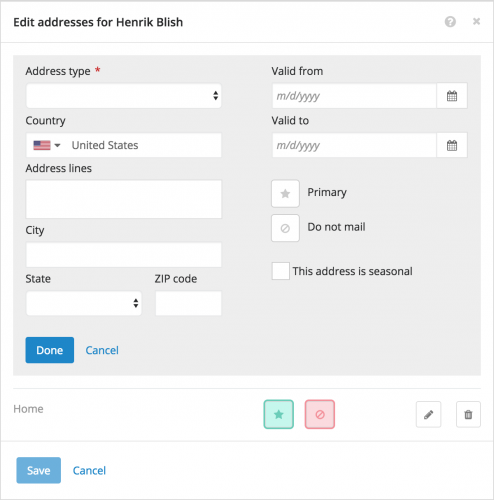 Manage addresses. As previously discussed, some have enjoyed a trial run of managing address information about your constituents and related individuals or organizations. With this update, everyone can now use this feature to help keep current with the best ways to reach individuals and organizations. You can add new addresses or share them across other records, such as a constituent's spouse or employer. When you add or edit an address, you can also mark it as Primary or Do not mail. To manage this information for a record, select Edit, Addresses under Contact information. (Admins! As also discussed, you can set up countries and address formats in the database view to help ensure quality data entry.) For more information, see the Addresses Help.
Manage custom fields for a gift. On a gift's record, you can now manage specialized information — such as its source or whether you sent a payment reminder — under Custom fields. (In the database view, custom fields appear as attributes.) For more information, check out the Custom Fields Help.
Analyze first-year donor retention. Gaining a new donor is great, but keeping them around for the long haul is even better. To help gauge how well you retain newly-acquired donors, you can now analyze constituents who gave their first gift — of any type — during the previous fiscal year and again during the current year under Retention in Fundraising, Analyze. Under First-year donor retention, you can analyze how many of last year's first-time donors gave again — and how much — during the current year, and compare the current first-year donor retention to the previous year's. With the LYBUNT donors total, you can also view how many first-year donors gave "Last Year, But Unfortunately Not This" year. For more information, see the Donor Retention Analysis Help.
For more information about these features, or to catch up on previous releases, check out the What's New Help or What's Recent Help. Enjoy!
 Manage addresses. As previously discussed, some have enjoyed a trial run of managing address information about your constituents and related individuals or organizations. With this update, everyone can now use this feature to help keep current with the best ways to reach individuals and organizations. You can add new addresses or share them across other records, such as a constituent's spouse or employer. When you add or edit an address, you can also mark it as Primary or Do not mail. To manage this information for a record, select Edit, Addresses under Contact information. (Admins! As also discussed, you can set up countries and address formats in the database view to help ensure quality data entry.) For more information, see the Addresses Help.
Manage custom fields for a gift. On a gift's record, you can now manage specialized information — such as its source or whether you sent a payment reminder — under Custom fields. (In the database view, custom fields appear as attributes.) For more information, check out the Custom Fields Help.
Analyze first-year donor retention. Gaining a new donor is great, but keeping them around for the long haul is even better. To help gauge how well you retain newly-acquired donors, you can now analyze constituents who gave their first gift — of any type — during the previous fiscal year and again during the current year under Retention in Fundraising, Analyze. Under First-year donor retention, you can analyze how many of last year's first-time donors gave again — and how much — during the current year, and compare the current first-year donor retention to the previous year's. With the LYBUNT donors total, you can also view how many first-year donors gave "Last Year, But Unfortunately Not This" year. For more information, see the Donor Retention Analysis Help.
For more information about these features, or to catch up on previous releases, check out the What's New Help or What's Recent Help. Enjoy!
0
Categories
- All Categories
- New K-12 Community Home (TEST)
- New Higher Education Home Page (Test)
- New Impact Edge Community TEST
- New YourCause Community TEST
- New SKY Community TEST
- New Grantmaking TEST Community
- New Altru Test Community
- New bbcon Community - TEST
- 12 Blackbaud Agents for Good™
- New Raiser's Edge NXT Community
- 8 Blackbaud Community Help
- 222 bbcon®
- 1.4K Blackbaud Altru®
- 410 Blackbaud Award Management™ and Blackbaud Stewardship Management™
- 1.2K Blackbaud CRM™ and Blackbaud Internet Solutions™
- 16 donorCentrics®
- 361 Blackbaud eTapestry®
- 2.7K Blackbaud Financial Edge NXT®
- 687 Blackbaud Grantmaking™
- 604 Blackbaud Education Management Solutions for Higher Education
- 3.3K Blackbaud Education Management Solutions for K-12 Schools
- 954 Blackbaud Luminate Online® and Blackbaud TeamRaiser®
- 85 JustGiving® from Blackbaud®
- 7K Blackbaud Raiser's Edge NXT®
- 4K SKY Developer
- 258 ResearchPoint™
- 123 Blackbaud Tuition Management™
- 165 Organizational Best Practices
- 248 Member Lounge (Just for Fun)
- 40 Blackbaud Community Challenges
- 37 PowerUp Challenges
- 3 (Closed) PowerUp Challenge: Grid View Batch
- 3 (Closed) PowerUp Challenge: Chat for Blackbaud AI
- 3 (Closed) PowerUp Challenge: Data Health
- 3 (Closed) Raiser's Edge NXT PowerUp Challenge: Product Update Briefing
- 3 (Closed) Raiser's Edge NXT PowerUp Challenge: Standard Reports+
- 3 (Closed) Raiser's Edge NXT PowerUp Challenge: Email Marketing
- 3 (Closed) Raiser's Edge NXT PowerUp Challenge: Gift Management
- 4 (Closed) Raiser's Edge NXT PowerUp Challenge: Event Management
- 3 (Closed) Raiser's Edge NXT PowerUp Challenge: Home Page
- 4 (Closed) Raiser's Edge NXT PowerUp Challenge: Standard Reports
- 4 (Closed) Raiser's Edge NXT PowerUp Challenge: Query
- 829 Community News
- 3.1K Jobs Board
- 57 Blackbaud SKY® Reporting Announcements
- 47 Blackbaud CRM Higher Ed Product Advisory Group (HE PAG)
- 19 Blackbaud CRM Product Advisory Group (BBCRM PAG)