What's New In Raiser's Edge NXT The Week Of June 27





This week, Raiser's Edge NXT updates with a handful of enhancements to Lists and the constituent map!
 Custom area map filter. As previously mentioned, you can now select Filter map, Custom area and draw a shape — regular or irregular, point-by-point — around a specific area to include on the constituent map, such as along a major highway or within man-made or natural borders. With this filter, you can draw any polygon — from a triangle or hexagon to a funky chicken wing — to find constituents.
To focus on a more general area, you can still select Filter map, Rectangle area to draw a box around a where to include. To filter the map by multiple areas, select Rectangle area or Custom area to draw shapes around the locations, and then select Apply filters. For more information, see the Constituent Map Help.
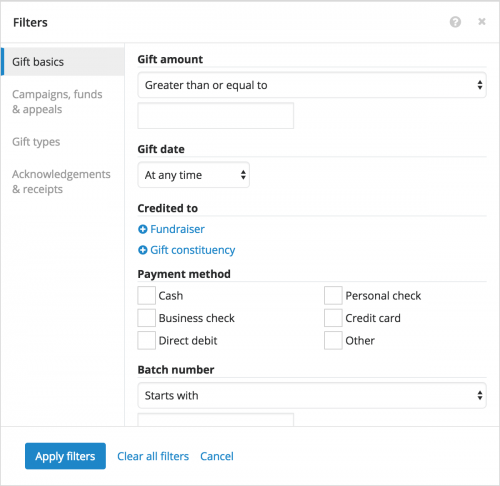 New gift list filters. As also discussed, you can now filter a gift list to include only giving that meets specific criteria.
Update profile pictures in lists. To help identify and personify a constituent, you can attach a photo or image to their record as a profile picture. To quickly update multiple profile pictures, you can now add them in a constituent list. Simply include the Profile picture column and then move the new image from your file explorer to the constituent's picture or initials in the list. For more information, see the Profile Pictures Help.
For more information about these features, or to catch up on previous releases, see the What's New Help and What's Recent Help. Enjoy!
 Custom area map filter. As previously mentioned, you can now select Filter map, Custom area and draw a shape — regular or irregular, point-by-point — around a specific area to include on the constituent map, such as along a major highway or within man-made or natural borders. With this filter, you can draw any polygon — from a triangle or hexagon to a funky chicken wing — to find constituents.
To focus on a more general area, you can still select Filter map, Rectangle area to draw a box around a where to include. To filter the map by multiple areas, select Rectangle area or Custom area to draw shapes around the locations, and then select Apply filters. For more information, see the Constituent Map Help.
 New gift list filters. As also discussed, you can now filter a gift list to include only giving that meets specific criteria.
- Gift constituency — The donor's constituent code (or affiliation with your organization), in context of the gift
- Payment method — How the donor paid for the gift, such as Cash or Credit card
- Batch number — Which batch included the gift
- Acknowledgement — Whether the donor was (or will be) sent an acknowledgement as thanks for the gift, and when
- Receipt — Whether the donor was (or will be) issued a receipt for the gift, such as for tax purposes, and if so, when and with what number
Update profile pictures in lists. To help identify and personify a constituent, you can attach a photo or image to their record as a profile picture. To quickly update multiple profile pictures, you can now add them in a constituent list. Simply include the Profile picture column and then move the new image from your file explorer to the constituent's picture or initials in the list. For more information, see the Profile Pictures Help.
For more information about these features, or to catch up on previous releases, see the What's New Help and What's Recent Help. Enjoy!
0
Categories
- All Categories
- 6 Blackbaud Community Help
- 211 bbcon®
- 1.4K Blackbaud Altru®
- 402 Blackbaud Award Management™ and Blackbaud Stewardship Management™
- 1.1K Blackbaud CRM™ and Blackbaud Internet Solutions™
- 15 donorCentrics®
- 360 Blackbaud eTapestry®
- 2.6K Blackbaud Financial Edge NXT®
- 655 Blackbaud Grantmaking™
- 576 Blackbaud Education Management Solutions for Higher Education
- 3.2K Blackbaud Education Management Solutions for K-12 Schools
- 941 Blackbaud Luminate Online® and Blackbaud TeamRaiser®
- 84 JustGiving® from Blackbaud®
- 6.7K Blackbaud Raiser's Edge NXT®
- 3.7K SKY Developer
- 248 ResearchPoint™
- 120 Blackbaud Tuition Management™
- 165 Organizational Best Practices
- 240 Member Lounge (Just for Fun)
- 34 Blackbaud Community Challenges
- 37 PowerUp Challenges
- 3 (Open) PowerUp Challenge: Grid View Batch
- 3 (Closed) PowerUp Challenge: Chat for Blackbaud AI
- 3 (Closed) PowerUp Challenge: Data Health
- 3 (Closed) Raiser's Edge NXT PowerUp Challenge: Product Update Briefing
- 3 (Closed) Raiser's Edge NXT PowerUp Challenge: Standard Reports+
- 3 (Closed) Raiser's Edge NXT PowerUp Challenge: Email Marketing
- 3 (Closed) Raiser's Edge NXT PowerUp Challenge: Gift Management
- 4 (Closed) Raiser's Edge NXT PowerUp Challenge: Event Management
- 3 (Closed) Raiser's Edge NXT PowerUp Challenge: Home Page
- 4 (Closed) Raiser's Edge NXT PowerUp Challenge: Standard Reports
- 4 (Closed) Raiser's Edge NXT PowerUp Challenge: Query
- 796 Community News
- 3K Jobs Board
- 54 Blackbaud SKY® Reporting Announcements
- 47 Blackbaud CRM Higher Ed Product Advisory Group (HE PAG)
- 19 Blackbaud CRM Product Advisory Group (BBCRM PAG)