What's New In Raiser's Edge NXT The Week Of February 6





This week, Raiser's Edge NXT introduces a number of enhancements, including to lists, gifts, and (for some of you) Email and Report builder.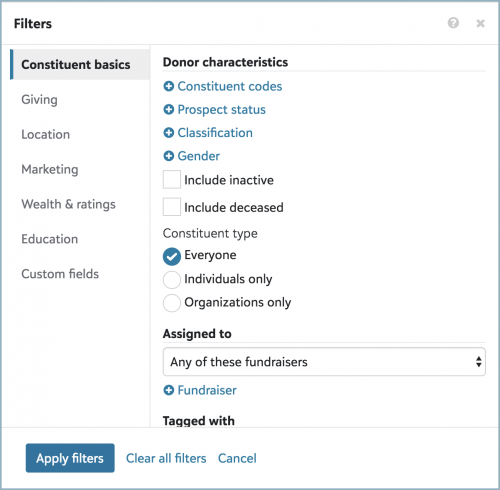 Filter constituent lists by gender and constituent type. To help focus on only the constituents you want, you can now select Filters, Constituent basics in a constituent list to include records by gender or whether they're individuals or organizations.
View constituent IDs in lists of gifts or constituents. To help verify you have the right records in a list, you can now include a Constituent ID column to view the lookup IDs of constituent records in a list of gifts or constituents. To include this column, select Choose columns, Constituent ID, and Apply changes.
View summary notes in action lists. On an action's record, you can manage its summary as a note to track pertinent details such as talking points or the intent of the interaction. To reference these details in an action list, the Action summary column now includes the actions' summary notes. To include this column, select Choose columns, Action summary, and Apply changes. When you export an action list that includes the Action summary column, the Note description column now appears in the CSV file. For more information, see Notes.
A gift's "Reference" is now its "Comment". For consistency when adding a gift and reviewing its record, special details you track about the giving now appears as its Comment on its record. (Previously (and still, in the database view), these details appeared as is Reference.) For more information, see the Gift Overview Help.
And for some of you, based on waved rollouts:
Design email more efficiently (for those with Marketing). To improve how quickly you can view changes when you create email messages, and for consistency with other features in Raiser's Edge NXT, the email designer in Marketing, Email now includes a new look and feel. To switch to the new version, select Try it out under Create your content in the email designer. For more information, see the Email Designer Help.
Copy existing dashboards (for those with Report builder). To ease creating dashboards, you can now create new dashboards based on existing custom dashboards. To copy an existing dashboard and save it as a new one, select Copy from its menu in Analysis, Report builder, or select Save as new when you edit the dashboard. For more information, see the Dashboards Help.
Customize chart colors (for those with Insight Designer). To help better visualize your data, you can now choose which colors to use for charts you create in Analysis, Report builder. To change a chart's colors, select each of its measures under Configuration, Colors. For a color other than those on the default palette, select Custom color. For more information, see Insight Types.
(Don't see these feature? No worries, if all goes well based on feedback and usage, expect their wider release in future updates.)
For more information about these features, or to catch up on previous releases, check out the What's New Help and What's Recent Help. Enjoy!
 Filter constituent lists by gender and constituent type. To help focus on only the constituents you want, you can now select Filters, Constituent basics in a constituent list to include records by gender or whether they're individuals or organizations.
- To filter by gender such as male, female, or non-binary, under Donor characteristics, select Gender, choose which genders to include, and select Select. To view the genders of constituents in a list, select Choose columns, Gender, and Apply changes.
- To filter by record type, under Constituent type, choose whether to include everyone or only individuals or organizations. When you export a constituent list that includes the Constituent summary column, a Constituent type column now appears in a comma-separated values (CSV) file and indicates whether a constituent is an individual or organization.
View constituent IDs in lists of gifts or constituents. To help verify you have the right records in a list, you can now include a Constituent ID column to view the lookup IDs of constituent records in a list of gifts or constituents. To include this column, select Choose columns, Constituent ID, and Apply changes.
- When you export a constituent list, the CSV file automatically includes Constituent ID, regardless of whether the list includes the column.
- To include the lookup ID of donors' constituent records when you export a gift list, include the Constituent ID column.
View summary notes in action lists. On an action's record, you can manage its summary as a note to track pertinent details such as talking points or the intent of the interaction. To reference these details in an action list, the Action summary column now includes the actions' summary notes. To include this column, select Choose columns, Action summary, and Apply changes. When you export an action list that includes the Action summary column, the Note description column now appears in the CSV file. For more information, see Notes.
A gift's "Reference" is now its "Comment". For consistency when adding a gift and reviewing its record, special details you track about the giving now appears as its Comment on its record. (Previously (and still, in the database view), these details appeared as is Reference.) For more information, see the Gift Overview Help.
And for some of you, based on waved rollouts:
Design email more efficiently (for those with Marketing). To improve how quickly you can view changes when you create email messages, and for consistency with other features in Raiser's Edge NXT, the email designer in Marketing, Email now includes a new look and feel. To switch to the new version, select Try it out under Create your content in the email designer. For more information, see the Email Designer Help.
Copy existing dashboards (for those with Report builder). To ease creating dashboards, you can now create new dashboards based on existing custom dashboards. To copy an existing dashboard and save it as a new one, select Copy from its menu in Analysis, Report builder, or select Save as new when you edit the dashboard. For more information, see the Dashboards Help.
Customize chart colors (for those with Insight Designer). To help better visualize your data, you can now choose which colors to use for charts you create in Analysis, Report builder. To change a chart's colors, select each of its measures under Configuration, Colors. For a color other than those on the default palette, select Custom color. For more information, see Insight Types.
(Don't see these feature? No worries, if all goes well based on feedback and usage, expect their wider release in future updates.)
For more information about these features, or to catch up on previous releases, check out the What's New Help and What's Recent Help. Enjoy!
2
Categories
- All Categories
- 6 Blackbaud Community Help
- 211 bbcon®
- 1.4K Blackbaud Altru®
- 402 Blackbaud Award Management™ and Blackbaud Stewardship Management™
- 1.1K Blackbaud CRM™ and Blackbaud Internet Solutions™
- 15 donorCentrics®
- 360 Blackbaud eTapestry®
- 2.6K Blackbaud Financial Edge NXT®
- 655 Blackbaud Grantmaking™
- 576 Blackbaud Education Management Solutions for Higher Education
- 3.2K Blackbaud Education Management Solutions for K-12 Schools
- 941 Blackbaud Luminate Online® and Blackbaud TeamRaiser®
- 84 JustGiving® from Blackbaud®
- 6.7K Blackbaud Raiser's Edge NXT®
- 3.7K SKY Developer
- 248 ResearchPoint™
- 120 Blackbaud Tuition Management™
- 165 Organizational Best Practices
- 240 Member Lounge (Just for Fun)
- 34 Blackbaud Community Challenges
- 37 PowerUp Challenges
- 3 (Open) PowerUp Challenge: Grid View Batch
- 3 (Closed) PowerUp Challenge: Chat for Blackbaud AI
- 3 (Closed) PowerUp Challenge: Data Health
- 3 (Closed) Raiser's Edge NXT PowerUp Challenge: Product Update Briefing
- 3 (Closed) Raiser's Edge NXT PowerUp Challenge: Standard Reports+
- 3 (Closed) Raiser's Edge NXT PowerUp Challenge: Email Marketing
- 3 (Closed) Raiser's Edge NXT PowerUp Challenge: Gift Management
- 4 (Closed) Raiser's Edge NXT PowerUp Challenge: Event Management
- 3 (Closed) Raiser's Edge NXT PowerUp Challenge: Home Page
- 4 (Closed) Raiser's Edge NXT PowerUp Challenge: Standard Reports
- 4 (Closed) Raiser's Edge NXT PowerUp Challenge: Query
- 796 Community News
- 3K Jobs Board
- 54 Blackbaud SKY® Reporting Announcements
- 47 Blackbaud CRM Higher Ed Product Advisory Group (HE PAG)
- 19 Blackbaud CRM Product Advisory Group (BBCRM PAG)