What's New In Raiser's Edge NXT EAP: New Gift Amount Measures





In Analysis, you can use new measures to analyze giving amounts.
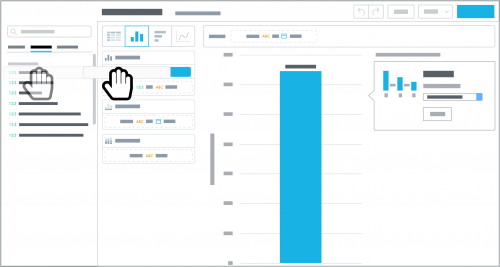 Gift receipt amount. Use this measure to analyze the tax-deductible amount of giving. Typically, this is the gift amount less the value of any benefits the donor receives. By default, this measure provides the sum — or total — receipt amount of all gifts. To analyze a different amount or specific gifts with an insight, select the measure under Measures and adjust its number-crunching.
Gift amount received. The total amount raised through gift types configured as received revenue, such as for accounting totals.
For example: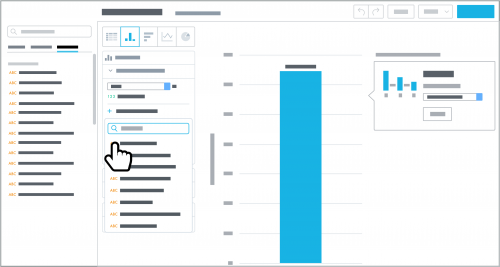 By default, these measures include all gift types your configuration counts as the revenue type. To include only specific gifts or donors, select Add attribute filter and choose the criteria — such as Campaign category or Constituent primary code — of those to analyze. (Admins! In Control Panel, Settings, you can choose which gift types to count as received or committed revenue. For more information, see the Revenue Types Help.)
For more information, see the Giving Measures Help.
 Gift receipt amount. Use this measure to analyze the tax-deductible amount of giving. Typically, this is the gift amount less the value of any benefits the donor receives. By default, this measure provides the sum — or total — receipt amount of all gifts. To analyze a different amount or specific gifts with an insight, select the measure under Measures and adjust its number-crunching.
- To analyze a different amount such as Average or Median, choose which calculation to use.
- To include fewer gifts, select Add attribute filter and choose the criteria of those to include, such as those given by specific constituent codes or toward specific campaigns or funds.
Gift amount received. The total amount raised through gift types configured as received revenue, such as for accounting totals.
For example:
- Use these measures to provide targeted analysis of giving in context of a specific revenue type and its configured gift types.
- Use these measures together — such as in a bar or column chart — to compare the same giving through the lens of each revenue type.
 By default, these measures include all gift types your configuration counts as the revenue type. To include only specific gifts or donors, select Add attribute filter and choose the criteria — such as Campaign category or Constituent primary code — of those to analyze. (Admins! In Control Panel, Settings, you can choose which gift types to count as received or committed revenue. For more information, see the Revenue Types Help.)
For more information, see the Giving Measures Help.
0
Categories
- All Categories
- New YourCause Community TEST
- New SKY Community TEST
- New Grantmaking TEST Community
- New Altru Test Community
- New bbcon Community - TEST
- 12 Blackbaud Agents for Good™
- New Raiser's Edge NXT Community
- 7 Blackbaud Community Help
- 218 bbcon®
- 1.4K Blackbaud Altru®
- 409 Blackbaud Award Management™ and Blackbaud Stewardship Management™
- 1.2K Blackbaud CRM™ and Blackbaud Internet Solutions™
- 16 donorCentrics®
- 361 Blackbaud eTapestry®
- 2.7K Blackbaud Financial Edge NXT®
- 680 Blackbaud Grantmaking™
- 598 Blackbaud Education Management Solutions for Higher Education
- 3.3K Blackbaud Education Management Solutions for K-12 Schools
- 952 Blackbaud Luminate Online® and Blackbaud TeamRaiser®
- 85 JustGiving® from Blackbaud®
- 7K Blackbaud Raiser's Edge NXT®
- 3.9K SKY Developer
- 257 ResearchPoint™
- 123 Blackbaud Tuition Management™
- 165 Organizational Best Practices
- 247 Member Lounge (Just for Fun)
- 40 Blackbaud Community Challenges
- 37 PowerUp Challenges
- 3 (Closed) PowerUp Challenge: Grid View Batch
- 3 (Closed) PowerUp Challenge: Chat for Blackbaud AI
- 3 (Closed) PowerUp Challenge: Data Health
- 3 (Closed) Raiser's Edge NXT PowerUp Challenge: Product Update Briefing
- 3 (Closed) Raiser's Edge NXT PowerUp Challenge: Standard Reports+
- 3 (Closed) Raiser's Edge NXT PowerUp Challenge: Email Marketing
- 3 (Closed) Raiser's Edge NXT PowerUp Challenge: Gift Management
- 4 (Closed) Raiser's Edge NXT PowerUp Challenge: Event Management
- 3 (Closed) Raiser's Edge NXT PowerUp Challenge: Home Page
- 4 (Closed) Raiser's Edge NXT PowerUp Challenge: Standard Reports
- 4 (Closed) Raiser's Edge NXT PowerUp Challenge: Query
- 822 Community News
- 3.1K Jobs Board
- 57 Blackbaud SKY® Reporting Announcements
- 47 Blackbaud CRM Higher Ed Product Advisory Group (HE PAG)
- 19 Blackbaud CRM Product Advisory Group (BBCRM PAG)