What's New In Blackbaud Raiser's Edge NXT® — February 24, 2026





Here are the latest changes in Blackbaud Raiser's Edge NXT for February 24, 2026.
Quickly focus on opportunities by gift type
Generally available
You can now filter Opportunity lists by Gift type, making it easier to see whether an opportunity is expected to result in pledges, gifts in kind, or other gift types. From Portfolio, Opportunity lists, open a list and select Filters. Under Opportunity details, choose Gift type and apply the filter.
You can also add Gift type as a column to quickly scan and compare opportunities at a glance. This helps you prioritize follow‑up without opening individual records. Select Columns, Opportunity details, choose Gift type, and apply the change.
Tip: Gift type information is sourced from the opportunity record and reflects the value shown on the Details tile.
Grid view batch for improved data entry
Generally available
The new grid batch offers an improved workflow for adding multiple gifts to a batch, while maintaining all the functionality of the previous batch UI. From Gifts, Overview, select Add, New grid batch, or on an existing unapproved batch's record, select Edit, Edit in grid view. Now you can see and review all batch gifts in a single grid, tab through fields for faster entry, and configure the columns to add, remove, or rearrange fields on the batch. The status column is locked to allow you to easily identify and review errors that occurred when saving gifts. For more information, see Add Gifts in Grid Batch.
Updated batch fields include the constituent field, which now has an advanced search that provides additional constituent details to ensure that you're selecting the correct constituent. After you enter a constituent, select the constituent icon that to open and edit the constituent record from the flyout without having to leave the grid batch.
Under Related Links, you can access the new template functionality, which allows you to set the columns and default values for the fields on your batches. You can reuse the templates for each batch you create, allowing for a quicker workflow. For more information, see Gift Batch template.
Note: The approval process for batches is not changing. Any existing unapproved batches in your system are unaffected by the update.
Update credit card information in web view
For some of you
To more easily manage payment information, now you can update credit card details directly from the gift record.
General ledger distributions available in web view
For more of you
You can now configure general ledger distributions directly on Funds records in web view for both Blackbaud Financial Edge NXT integrated and non-integrated environments.
Apply manual payments to a pledge
For more of you
You can now apply manual payments to automated pledges. This enhancement lets your organization accept manual payments for open installments and update pledge schedules with more control.
Optimize giving with Prospect Insights Pro
For some of you
Maximize fundraising outcomes with Prospect Insights Pro's optimized opportunities. Now, when you add or edit an opportunity for a prospect in a Prospect Insights Pro queue, Prospect Insights Pro suggests gift ask amounts based on a prospect's likely gift capacity.
For those with Blackbaud AI - Chat enabled, you can create an action plan to support opportunities you create or edit via Prospect Insights Pro.
For more information, see Prospect Insights Pro Opportunities.

Prospect Insights Pro scores refresh
For some of you
Prospect Insights Pro's data models and projected giving and wealth information scores now use the latest available data and adaptive modeling. The refresh affects all queues, so make sure to review your best major gift prospects. Because the queues are sorted by priority, you may notice different prospects at the top of a list.
Comments
-
Did make me smile: "Grid view batch for improved data entry"!
It doesn't read high speed as is frequently seen. Grid view is nice. But still a work in progress and I don't find it high speed. Database view is faster IMO.
3 -
@JoAnn Strommen Agreed that not quite the same as database view yet but I like the direction it is headed (specifically batch templates). Moving to it for batches where it meets my needs and sticking with database view for those it is not there yet.
1 -
For online donations, I have to change the columns on every batch to edit appeals, campaigns, and funds. Is there functionality that allows certain columns to be saved as standard for online/recurring donation batches?
0 -
While I appreciate the potential for significant improvements with the new grid view batch in NXT, is there a way to revert to the previous NXT gift entry batch interface from before the rollout? It is our goal to use the new one, but in the meantime on busy days and for complex gifts it would be very helpful to have the ability to revert back to the old interface. Even if it is just for 30/60/90 days. Is there an option to revert back that I am missing?
1 -
Hello, I have a related question to Matthew's. Since the previous gift batch processing has gone away, is there a way to see the fields that were in the previous iteration of our automated batches? Since we need to recreate this, it would be very helpful as I don't remember all of the fields off the top of my head.
2 -
Regarding the General Ledger distributions to the Projects and Funds— I only see one GL distribution to a Fund showing in debit and credits fields currently. Are we going to have to manually add all other gift types, and credit and debit fields to web-view or will they be transferred over from database view as well?
0 -
This should be pulling from database view. It is saving to the same place in the database so the plan is to not ask you to have to recreate all this work.
I may want you to file this as a bug so we can take a look to ensure that everything is working as we expect it to.
0 -
I just got a chance to take a look at this and does not understand.
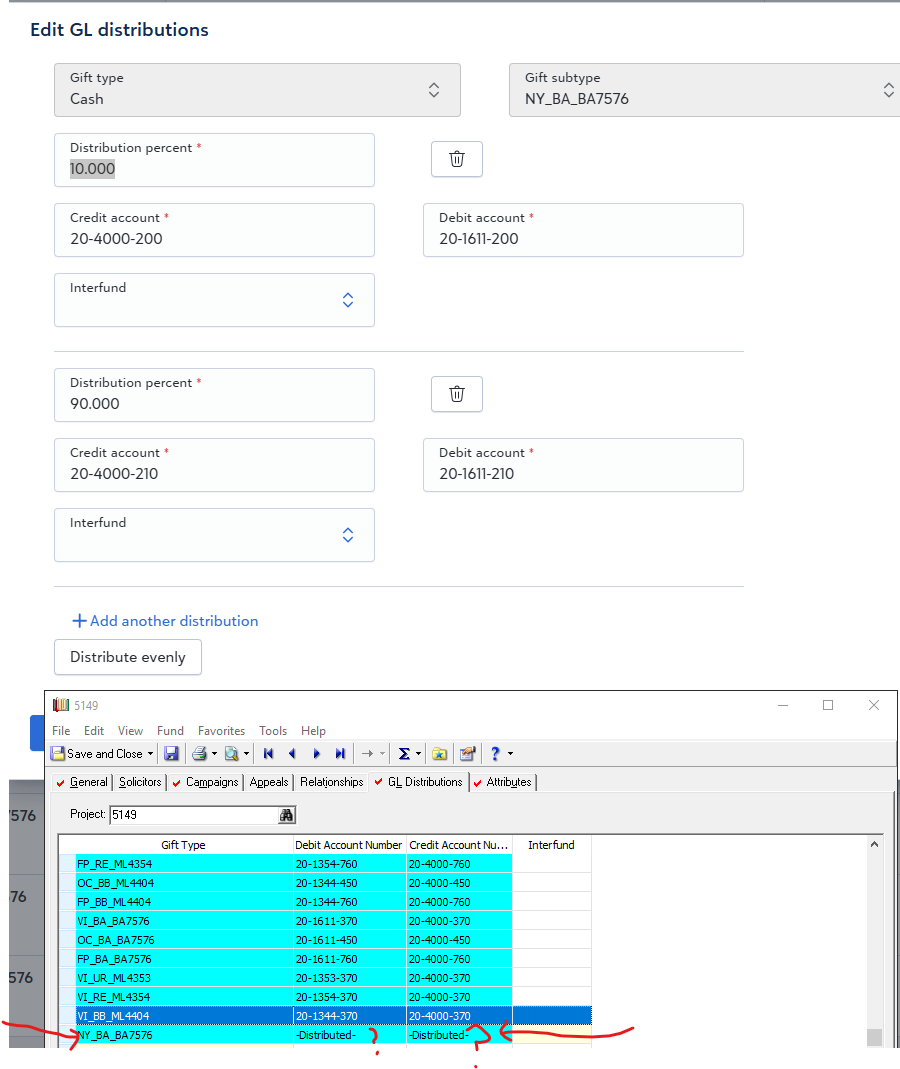
GL Distribution as I understand it in fund record does not have a "percentage" on a "line" of Gift Type/Subtype combination.
When I tested this, and then go back to the GL distribution in db view, it just say "-Distributed-". Does not make sense. THis is a change in functionality that we will need a lot more information on.
0 -
Went back into RE Database Schema
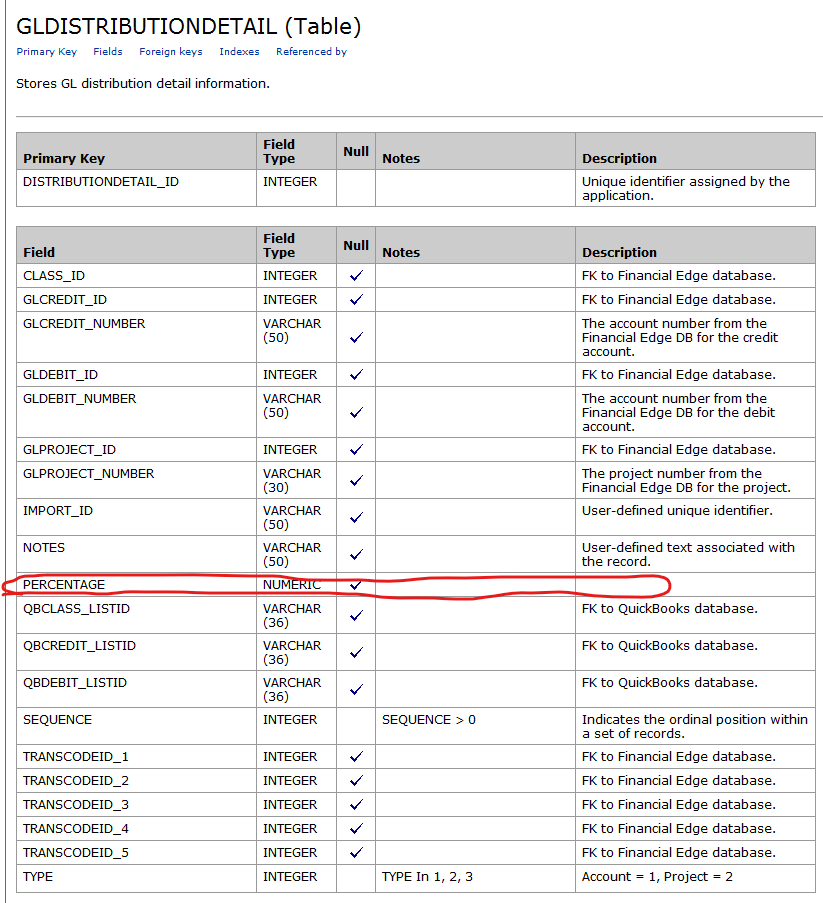
I think the PERCENTAGE only applies to Project being distributed to, please double check this.
0 -
If i were to query fund distribution, I see there IS a separate field of Percentage under distribution and another under Project. However, in the Fund Record > GL Distribution tab, this was never configurable. And considering I have seen and reported a bug on webview-based GL Posting error where GL distribution was posted incorrectly, not sure it is related, but -Distributed- is a concerning string of text that was part of the reported error/bug.
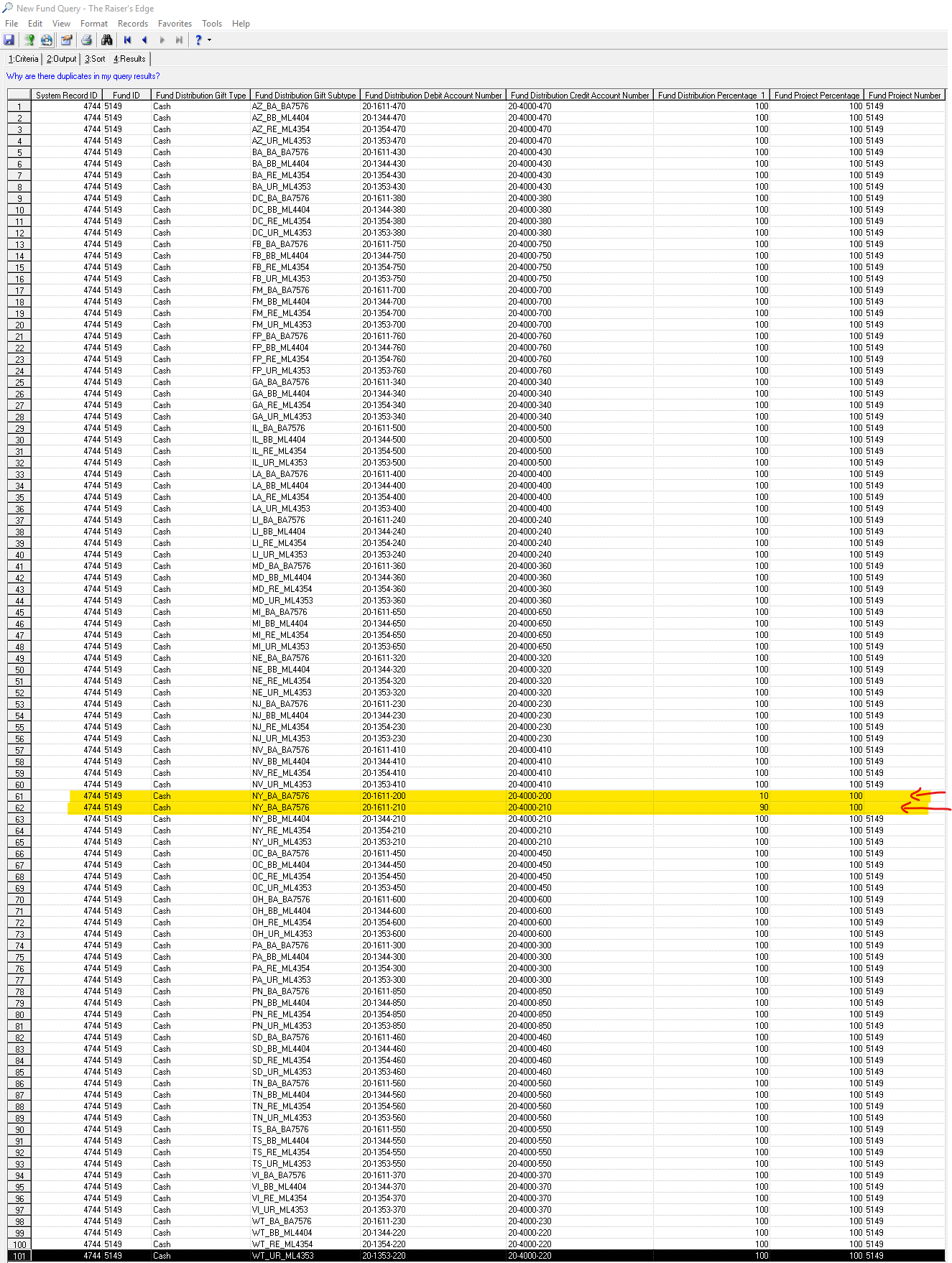
I also noticed in the querying, that Project Number is blank for the 2 lines I edited specifically to have 10% and 90% distributed to different debit/credit account number.
0 -
Does anyone know if with the new updates you'll be able to move batch templates from DBV to webview? Or if they have to be recreated in webview…
1 -
@Brooklyn Pala You have to create in web view. That could change but doubtful.
2 -
Thanks for the help! @JoAnn Strommen
0 -
I have called in twice about this as it adds a lot of time and manual labor to the process. Even if you create a template, you still have to add/edit the columns you would like to work with for each batch. This new format is not saving anyone any time or effort. Disappointing change!
0 -
@Erik Leaver @Anthony Gallo I understand there are many post/thread that is discussion the recent changes, so my reply reporting a potential problem is overlooked.
Can you please check my replies regarding the fund gl distribution on webview? We have already seen a mess up with RE Posting into FE on webview caused a major issue, would like to avoid this in webview again.
0

























Categories
- All Categories
- 6 Blackbaud Community Help
- 211 bbcon®
- 1.4K Blackbaud Altru®
- 403 Blackbaud Award Management™ and Blackbaud Stewardship Management™
- 1.2K Blackbaud CRM™ and Blackbaud Internet Solutions™
- 15 donorCentrics®
- 360 Blackbaud eTapestry®
- 2.6K Blackbaud Financial Edge NXT®
- 658 Blackbaud Grantmaking™
- 579 Blackbaud Education Management Solutions for Higher Education
- 3.2K Blackbaud Education Management Solutions for K-12 Schools
- 943 Blackbaud Luminate Online® and Blackbaud TeamRaiser®
- 84 JustGiving® from Blackbaud®
- 6.7K Blackbaud Raiser's Edge NXT®
- 3.8K SKY Developer
- 250 ResearchPoint™
- 120 Blackbaud Tuition Management™
- 165 Organizational Best Practices
- 241 Member Lounge (Just for Fun)
- 36 Blackbaud Community Challenges
- 37 PowerUp Challenges
- 3 (Open) PowerUp Challenge: Grid View Batch
- 3 (Closed) PowerUp Challenge: Chat for Blackbaud AI
- 3 (Closed) PowerUp Challenge: Data Health
- 3 (Closed) Raiser's Edge NXT PowerUp Challenge: Product Update Briefing
- 3 (Closed) Raiser's Edge NXT PowerUp Challenge: Standard Reports+
- 3 (Closed) Raiser's Edge NXT PowerUp Challenge: Email Marketing
- 3 (Closed) Raiser's Edge NXT PowerUp Challenge: Gift Management
- 4 (Closed) Raiser's Edge NXT PowerUp Challenge: Event Management
- 3 (Closed) Raiser's Edge NXT PowerUp Challenge: Home Page
- 4 (Closed) Raiser's Edge NXT PowerUp Challenge: Standard Reports
- 4 (Closed) Raiser's Edge NXT PowerUp Challenge: Query
- 798 Community News
- 3K Jobs Board
- 56 Blackbaud SKY® Reporting Announcements
- 47 Blackbaud CRM Higher Ed Product Advisory Group (HE PAG)
- 19 Blackbaud CRM Product Advisory Group (BBCRM PAG)