Spousal Records and Deceased Donors in RE




I work in Estate Administration so I spend a lot of time thinking about how we handle deceased donors in Raiser's Edge. I am new at my organization and I’ve noticed something that has caused me some concern: when we receive notification that a donor has passed away, the record is marked as deceased regardless of if there is a spouse on the record. Consequently, the spouse is no longer receiving any communication (appeals or otherwise), solicitation, or stewardship anymore.
I've been discussing this at length with our IT team and we've come up with a couple of options but we're not sure which is the best approach.
1) Swap the spouses on the record so the living spouse is now the main constituent. However, we’re concerned with this causing tax receipt issues since the living donor could request that the tax receipts be reissued in their name. I intend to reach out to the Canadian Revenue Agency to get more information.
2) Create a second record for the living spouse and move all the pertinent information (address, cons codes, appeals, attributes, notes, actions, proposals) from the main/deceased record into the spouse’s record. Gifts would to be soft credited. This gets around the tax receipt issue but it means that we no longer have the history in the deceased’s record.
I’m very interested to hear what other organizations have done and if there is an industry best practice for how to handle these situations.
I've been discussing this at length with our IT team and we've come up with a couple of options but we're not sure which is the best approach.
1) Swap the spouses on the record so the living spouse is now the main constituent. However, we’re concerned with this causing tax receipt issues since the living donor could request that the tax receipts be reissued in their name. I intend to reach out to the Canadian Revenue Agency to get more information.
2) Create a second record for the living spouse and move all the pertinent information (address, cons codes, appeals, attributes, notes, actions, proposals) from the main/deceased record into the spouse’s record. Gifts would to be soft credited. This gets around the tax receipt issue but it means that we no longer have the history in the deceased’s record.
I’m very interested to hear what other organizations have done and if there is an industry best practice for how to handle these situations.
Tagged:
0
Comments
-
#2. And be sure to go to Config>Business Rules>Deceased Options to automate some of this process.6
-
We have been working to streamline this process too. We start a new record for the surviving spouse, unless they are also an alumni in which case they would have a separate record. The constituency code we use is Surviving Spouse. We merge records with caution. Relationships aren't accurately transferable so take some time.
As Katherine suggested, some of this can be automated. I'm eager to hear other suggestions too. Good luck!2 -
I would create a new record. I don't know if I would move everything to the new record. Obviously, soft credits for historical gifts, but I think moving everything over creates a false narrative. Generally speaking, there's the primary donor who has the affinity and the history with the organization. I don't know if moving over older appeals or attributes makes sense. And definitely not all the cons codes. Only those that apply. I'd keep a relationship to the deceased record that has the historical information, but I disagree that everything needs to be moved over to the new record for the spouse.
9 -
I agree that it makes sense to personalize the spousal record if you have an existing relationship with one or both of the couple but a lot of these are cases of DM donors. If we only move a small amount of the data over, then they probably wouldn't fall in the same data set. I think that's my biggest concern.
How would you handle those situations?0 -
I think it depends on how the data is being grouped. If the main criteria is giving, and if the soft credits are in, the spousal record should pull as long as you have included soft credits in the query options. If the criteria is something else, I'd consider adding the missing code/attribute/whatever. Obviously, volume would be a factor as well.
But your concern is more than valid. Obviously, you know your data better than anyone, any making sure that those spousal records is included in the data set is paramount.0 -
In that case, we would make the spouse a constituent and give them a solicit code of "mail to" which includes them in our mailings.0
-
Adriana -
I've done it both ways, depending upon the organization with which I'm working. My preferred way is to swap the spouses, but I'm a fan of fewer records. The surviving spouse didn't start giving when the first spouse passed away and most spouses give together. I'll add - that typically schools with records for alumni are the typical exceptions to this. I don't think, in using RE since 1997, I've every had an issue with a surviving spouse requesting a tax receipt without all giving recorded on it.
2 -
We swap the spouses. In Canada, a charitable tax receipt can be used by both donors, so if the main constituent dies, then either his living spouse or his estate can use the charitable tax receipt. It can also be split between the living spouse and the estate. As long as the gift was made before the constituent died. So, for us, this is the only way we record deceased persons. This allows for the living donor to continue to receive mail without the deceased person's name on the mailing.1
-
We have two scenarios - 1 - both spouses are constituents and either they give separately or as a couple (meaning 1 is soft credited). If a spouse dies, we mark the record as deceased and make the surviving spouse the "head of household".
2 - a constituent dies and the spouse is not a constituent - you can add the non-constituent as a constituent by opening the spouse link and going to the relationship tab and using the add this individual as a constituent. The addressing information and any other information you have on the individual's relationship record will populate to the constituent record.
You will only see the very basic information on the "new" constituent record.
I use the system to make changes automatically when a constituent's record is marked as deceased. This helps a great deal in not forgetting to make necessary changes to addressee information.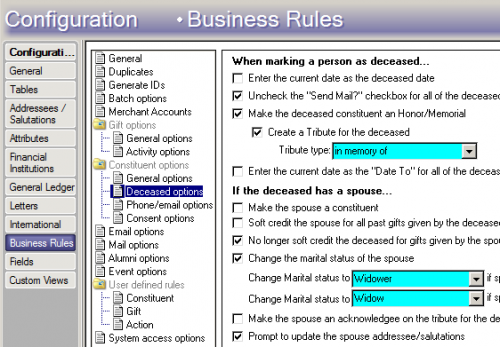
4 -
Hi! I vote for #2, and agree with what was mentioned before about picking and choosing what goes to the new record.
I create a new record for the surviving spouse, and use the business rules for deceased record processing (as mentioned previously) to automate many of the tasks. I then use the constituent merge tool to merge SOME information over to the surviving spouse's record (i.e things that we need to retain, but not necessarily on the decedent's record). However, that merge tool removes the information from the decedent's record, so, since I want to keep a history on the decedent's record for historical tracking, some information has to be exported/imported (essentially "copied to" the new spouse record) using export and then ImportOmatic. An example of something I merge over is appeals (rationale is, these appeals applied to the couple when they shared a record, I no longer need to know how we appealed to the decedent, but I definitely want to know how we appealed to the surviving spouse, because we use appeal history to inform future appeal segmentation, i.e are they an individual who traditionally gives in response to an end-of-year appeal). An example of something I export/import is Notes, which usually need to be retained on both records.0 -
I also vote for #2 with moving selected data to spouse record. I know some orgs choose to swap names but in my experience that really messes up some types of data like board/committee service, interests, education, business etc. So much cleaner to use deceased options to create a new record for spouse if they do not have one and move/copy the info desired.1





















Categories
- All Categories
- 6 Blackbaud Community Help
- 211 bbcon®
- 1.4K Blackbaud Altru®
- 402 Blackbaud Award Management™ and Blackbaud Stewardship Management™
- 1.1K Blackbaud CRM™ and Blackbaud Internet Solutions™
- 15 donorCentrics®
- 360 Blackbaud eTapestry®
- 2.6K Blackbaud Financial Edge NXT®
- 655 Blackbaud Grantmaking™
- 577 Blackbaud Education Management Solutions for Higher Education
- 3.2K Blackbaud Education Management Solutions for K-12 Schools
- 940 Blackbaud Luminate Online® and Blackbaud TeamRaiser®
- 84 JustGiving® from Blackbaud®
- 6.7K Blackbaud Raiser's Edge NXT®
- 3.7K SKY Developer
- 248 ResearchPoint™
- 119 Blackbaud Tuition Management™
- 165 Organizational Best Practices
- 240 Member Lounge (Just for Fun)
- 34 Blackbaud Community Challenges
- 37 PowerUp Challenges
- 3 (Open) PowerUp Challenge: Grid View Batch
- 3 (Closed) PowerUp Challenge: Chat for Blackbaud AI
- 3 (Closed) PowerUp Challenge: Data Health
- 3 (Closed) Raiser's Edge NXT PowerUp Challenge: Product Update Briefing
- 3 (Closed) Raiser's Edge NXT PowerUp Challenge: Standard Reports+
- 3 (Closed) Raiser's Edge NXT PowerUp Challenge: Email Marketing
- 3 (Closed) Raiser's Edge NXT PowerUp Challenge: Gift Management
- 4 (Closed) Raiser's Edge NXT PowerUp Challenge: Event Management
- 3 (Closed) Raiser's Edge NXT PowerUp Challenge: Home Page
- 4 (Closed) Raiser's Edge NXT PowerUp Challenge: Standard Reports
- 4 (Closed) Raiser's Edge NXT PowerUp Challenge: Query
- 796 Community News
- 3K Jobs Board
- 54 Blackbaud SKY® Reporting Announcements
- 47 Blackbaud CRM Higher Ed Product Advisory Group (HE PAG)
- 19 Blackbaud CRM Product Advisory Group (BBCRM PAG)