Where did Manage Enrollment go?
Comments
-
Hi Scott Chrysler,
I want to make sure your idea gets seen. This original post is over a month since it was posted...
One thing I have seen work very well to use the power of the people in Community is to create a new post with the link to the idea you want implemented, then asking others to vote for the idea.
You might find an idea similar to yours or create a new one by clicking the idea tab and searching.
Here is an older example of how an idea is publicized in a different community. You can copy her verbiage to make it easy for you! https://community.blackbaud.com/forums/viewtopic/213/40728
In harmony,
Elizabeth
Blackbaud Community Team1 -
Thank you, ma'am.
Scott0 -
Thank you Scott Chrysler for sharing your real life ideas to make the software help you grow social good in the Community!
On a personal note, thank you for being an educator. I am homeschooling and witness how much our teachers are accommodating my kids to make this change be as positive of an experience as possible. I know you and everyone else in our education world is doing the same. All the best!
Elizabeth1 -
I am going through each student's schedule. We have a two semester schedule and if the course is offered both semesters but scheduled in one of the semesters it still appears in the other semester. I wish it would disappear once scheduled in one of the semesters and not appear in both. Students who have a conflict show up as done. Even those who have an extra course that did not work out because of too many courses in one of the semesters are appearing as done. This should not appear that way I need to be able to find all the students with a problem.0
-
Good afternoon everyone!
We are still making improvements and changes to the Student Enrollment tab and Edit Student Enrollment dialog and we so appreciate your continued feedback. We wanted to call attention to some recent updates that just became available with today's (5/12) release.
Improvements- Making the current section size visible within each cell of the grid on both the Edit Student Enrollment dialog and Find a Section dialog
- The Find a Section area is now a full-page display
- Changing the context menu (three dots beside student name in the list) to a one-click Edit button
For ideas/feedback continue posting here, in the Idea Bank, or please feel free to reach out with a direct message if you'd like to share examples/information privately. Your input is invaluable to ensuring the product performs as you need.
Thank you all!
Best,
Elizabeth
Blackbaud UX Designer – Student Information System0 -
Elizabeth -
It would be amazingly convenient if the student's name in Fulfillment Matrix was a link that brought us directly to the student's Student Enrollment page. Would save hundreds of clicks.
Thanks,
Scott0 -
It would also be incredibly helpful if the course/section columns were frozen when you scrolled to the right! Our middle school runs separate periods for each grade level, and it becomes really annoying/error-prone in the new enrollment manager - when you scroll to the right to view a 7th or 8th graders enrollments, you then have to scroll back to the left to make changes (or to remind yourself about which course is in which row.
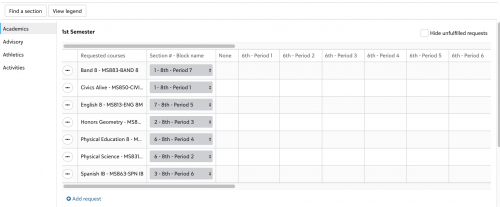
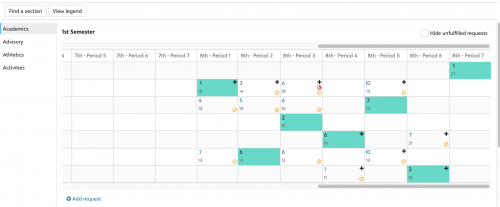
0 -
Elizabeth King
Just discovered another major (as in, I'm actually not sure how we'll be able to get through scheduling our students!) issue. The new manage student enrollment screen doesn't seem to be handling "any term" requests correctly. I'm going to reach out to support as soon as they're open for the day - but when I use the dropdown next to an "any term" request to remove the section/period generated by the "generate student schedules" process, I am unable to actually add that "any term" request course back in either period.
I noticed this because we had some students who ended up having both of their "any term" elective requests being fulfilled in the same semester - crowding out a core course in that semester, and leaving them with an empty period in the other semester. We have LOVED being able to give students the option of making an "any term" request for electives, and this makes those requests unworkable.
(And this might just be my preference, but I really miss seeing the period options in the grid for alternate classes. When I'm looking over a student's requests and trying to complete their schedule, seeing ALL of the possible periods they could be in any of their requests - including alternates - was a huge help. With the new view, I'm going to basically just have to memorize the periods for all of our elective classes that might be listed as alternates - ugh)1 -
Megan - I have noticed the same thing and have opened a ticket on this. I feel like it is hit and miss when it works. Also, in my ticket, I noticed that when you change a schedule, thus removing the "green" filled in box, there is a still a conflict listed on the period block. This was also included in my ticket that I opened, and I haven't heard anything in about a week.0
-
Hi Everyone,
I'm just wondering if there is any client of this system who is happy with the change that occurred. Just wondering. We are the clients and a change was made and I have not heard of anyone who is happy with the change. Please respond if you prefer the new system over the original way it was setup.
Patti Macmanus0 -
Patti - this is our second year of doing the master schedule and scheduling in general in this system. Previously we had Education Edge and for 10 or 11 years it was a much more smooth process doing the master schedule and doing enrollments. As I see the changes that are being made, it appears that Blackbaud is trying to emulate Education Edge, but until the features are fully built-out and functional, this new interface is more cumbersome and challenging. As I already mentioned, we have the block conflict that doesn't disappear when you change a class until you save and close then come back in. Same thing if you move a student into a class that has hit it's max and you are prompted if you want to do it. You click confirm, and nothing happens, but it actually puts the student in the class because when you save and close then go back in, it will show the student is there. Beyond the "any term" issue that was already mentioned, we ran into the issue where the "any term" class would show up in both semester, and instead of disappearing as an option for the semester it wasn't scheduled for, the request was there both semesters and sometimes the student would be scheduled for the same single request both semesters, and the other "any term" course didn't get scheduled at all. (this issue appeared to be resolved on the 5/12 update because it hasn't happened since - but I am not fully sure as the weekly release notes no longer list the fixes in the system). I can see where Blackbaud is going with this new interface, but with the number of issues we have had, we are using the old interface. Until some of this basic functionality is fixed, and we have more powerful filtering options when we use the "save and next" feature (such as filtering by a specific section, not just gender or grade), it is cumbersome right now.0
-
Thank you Chris. I have been using this OnCampus scheduling for about 4-5 years and have liked it alot. This year, due to covid, we actually had the students use the online request system and it worked pretty well. My issue is with the change in this one aspect of the process. As you said, it is very cumbersome and I'm not sure why they changed it. Were there complaints about the old way . . . I don't know. I just wish they would put it back to the original way.0
-
I do like the ability to see the current enrollment in the new grid view without having to click on each section - that's an improvement. And later in the day yesterday, the "any term" section drop-down was working.
I did manage to find a back-end way to use the old view if you prefer it. From the "Requests and Recommendations" list, in the "three dots" menu next to a student you can click on "Edit enrollment" instead of "Edit requests" and get to the old grid view. (Blackbaud folks - please please please don't take it away from that spot! At least for now while the new version still has some kinks being worked out)1 -
LOL Megan! I had found a way to see the old system also though the scheduling module - but I'm not going to reveal mine because I'm afraid they will close it!0
-
Is anyone else struggling with the fact that the courses are all listed alphabetically in the scheduling window rather than by course preference? Through the course request page, we entered preferences for each elective, and now in the scheduling screen, I can't see those preferences at all. I just see the courses listed in straight alphabetical order, which is of no help. Am I missing something? If you've found a solution or have faced a similar difficulty, I'd welcome any feedback!0
-
I just went in to start working on our seniors - and saw the changes to alternates in the new interface. It is nearly impossible for me to make schedules when I can't see where the alternates are. We have SO MANY singletons, with lots of semester seminars - so over half our seniors need to use their alternates. It is a nightmare to try and do that without being able to see on the grid where they are.2
-
Hi everyone, I wanted to make sure you saw the announcement about the survey dealing with Manage Enrollment and Edit Student Enrollment. It should take about 5 minutes, and it will help us make the whole process work better for you. Please click here to read the announcement and take the survey. Thank you!2
-
The new Edit Enrollment screen is mostly good, but I have a lot of issues whenever a student has alternates entered. Often, it does not let me select a section for the main request, only the alternate. The only fix I've found is to delete the request (along with the alternate) and then manually re-add it on the Edit Enrollment screen.
Has anybody else run into this bug? You can see a screenshot attached. There should be two dropdowns, but there's only one, for the alternate.
0 -
I am finding that if I select the alternate, it does
not show up in the grid on student enrollment. If I click save and
then go to the people finder>student>groups, I can see the
alternate in the schedule, but neither the period offered nor
enrolled show in the grid blocks. Very frustrating because you
cannot see if it saved correctly without going out and going
to a different screen.
--Amy Calhoun
Assistant Head of Upper School, AcademicsOffice:
615-301-3527
To make a referral to CPA Student
Support Team use link below.1 -
I would like to able to view by cycle day in schedule view. We often have classes that don't meet every day of the cycle and it is important to see when they meet.0
-
Just discovered the FILTER options for the Student Enrollment list - my life just became 100% easier as I try to balance section enrollment. I would like to suggest - I was going to add this to my survey but the survey closed last Wednesday - adding a filter for specific courses. I have 9th through 12th graders in Spanish II, so when I am working with a scheduling issue in the course, I need to keep scrolling through the entire list of upper school students. Being able to filter on "Spanish II" would make life even easier. If this filter had the option of including multiple courses, ie Spanish II and AP Calculus BC, it would be EVEN BETTER!
I would say the filter should include any students who scheduled or requested the selected course.
Stay well.
Scott2 -
Hi Scott - I requested that same feature to Blackbaud. I would take it one step further - not just the specific course, but a specific section as well. The example I gave is we might have a section of Spanish II, but we need to reschedule it from 6th period to 3rd period. It would be great to have the filtering ability to filter by class section so that as we do the Save and Next button it would only flip through the 20ish students that were in that specific section that needs to be rescheduled. (as opposed to flipping through every student who requested Spanish II in the other sections that would be unaffected by the single section changing)3
-
I agree. I would love to be able to select students
by a specific class to work with their schedules. .For instance, if
i need to move a section, it would help to look at those individual
schedules to see if the move is possible.
--Amy Calhoun
Assistant Head of Upper School, AcademicsOffice:
615-301-3527
To make a referral to CPA Student
Support Team use link below.3 -
I'm not sure if this is the right place to share this. After going to 'Edit Enrollment,' selecting a student to work on, and making a change to the schedule, the page reloads but places me at the bottom--as a result, I frequently make additional changes in the wrong semester, because I assume I'm at the top of the students' schedule (1st semester) when I'm actually at the bottom (2nd semester). I can't see any logical reason why I'd be placed at the bottom of a reloaded page instead of at the top. Thanks!
1 -
I have one more question related to changing a student's enrollments--not sure if there's a better place for it. Sometimes when I add a class to a student's enrollment, it adds twice. If I remove one, both disappear. If I add it back, it's back twice again OR it's back once, but then once saved, it disappears. Video attached.1
-
Beth Wilson:
I have one more question related to changing a student's enrollments--not sure if there's a better place for it. Sometimes when I add a class to a student's enrollment, it adds twice. If I remove one, both disappear. If I add it back, it's back twice again OR it's back once, but then once saved, it disappears. Video attached.Hi Beth - yes, I dealt with that quite a bit in the new system. Thanks for sharing the video so I can see it wasn't just me. The way we worked around it is we never add new requests in the edit enrollment screen. I noticed that when we ran the total number of requests for each class, our freshman health class had more requests than students in the freshman class. What was happening when we entered requests through edit enrollment is it added a specific semester request for a class that could be any term. In essence, when we were making changes, there was then an "any term" requests as well as a request for a specific semester. The way we fixed that is we un-enrolled the student from the class, went back to the requests area and removed the request for the specific semester and made sure we only had an "any term" request. And we have not put any new requests in via the edit enrollment screen because there is no way to tell it any term - if we added it to 1st semester it made it a 1st semester request; if we added it to 2nd semester, it made it a 2nd semester class. Maybe some behind the scenes code has been updated since I reported this to Blackbaud, but we haven't been adding requests this way recently due to this issue we saw back in May.
4 -
Thanks, Chris! That is helpful.1
-
For our English 11 and 12, and 11th and 12th grade history classes, we offer seminars to the students. So for T1-T2 and T3, students rank ~6-7 English classes and then for History they rank 4 classes for each term. (Plus students provide alternates for other electives.)
It appears that the alternates are listed in alphabetical order. It would be AMAZING if they could be ranked in preference order. Currently I have to go back to their course request page or my original course request sheet to see if I a particular class is their 1st of 4th choice.0 -
I'd like to be able to search for students using their Preferred Name on this page, just as I can in the People Finder. Right now, it only returns results for the student's first or last name.1
-
I think that the ability to search for a student [or any record for that matter] should be the same *throughout* the system.
AND it should support "regular expressions". [meaning wildcards and pattern matching].
I find it very inconvenient and annoying that this works in some places but not in others.
1































Categories
- All Categories
- 6 Blackbaud Community Help
- 213 bbcon®
- 1.4K Blackbaud Altru®
- 403 Blackbaud Award Management™ and Blackbaud Stewardship Management™
- 1.1K Blackbaud CRM™ and Blackbaud Internet Solutions™
- 15 donorCentrics®
- 360 Blackbaud eTapestry®
- 2.6K Blackbaud Financial Edge NXT®
- 656 Blackbaud Grantmaking™
- 577 Blackbaud Education Management Solutions for Higher Education
- 3.2K Blackbaud Education Management Solutions for K-12 Schools
- 939 Blackbaud Luminate Online® and Blackbaud TeamRaiser®
- 84 JustGiving® from Blackbaud®
- 6.6K Blackbaud Raiser's Edge NXT®
- 3.7K SKY Developer
- 248 ResearchPoint™
- 119 Blackbaud Tuition Management™
- 165 Organizational Best Practices
- 241 Member Lounge (Just for Fun)
- 34 Blackbaud Community Challenges
- 37 PowerUp Challenges
- 3 (Open) PowerUp Challenge: Grid View Batch
- 3 (Closed) PowerUp Challenge: Chat for Blackbaud AI
- 3 (Closed) PowerUp Challenge: Data Health
- 3 (Closed) Raiser's Edge NXT PowerUp Challenge: Product Update Briefing
- 3 (Closed) Raiser's Edge NXT PowerUp Challenge: Standard Reports+
- 3 (Closed) Raiser's Edge NXT PowerUp Challenge: Email Marketing
- 3 (Closed) Raiser's Edge NXT PowerUp Challenge: Gift Management
- 4 (Closed) Raiser's Edge NXT PowerUp Challenge: Event Management
- 3 (Closed) Raiser's Edge NXT PowerUp Challenge: Home Page
- 4 (Closed) Raiser's Edge NXT PowerUp Challenge: Standard Reports
- 4 (Closed) Raiser's Edge NXT PowerUp Challenge: Query
- 794 Community News
- 3K Jobs Board
- 54 Blackbaud SKY® Reporting Announcements
- 47 Blackbaud CRM Higher Ed Product Advisory Group (HE PAG)
- 19 Blackbaud CRM Product Advisory Group (BBCRM PAG)