Workflow Designer: Automatically add constituents to a workflow!





Hi everyone!
It’s an exciting time at Blackbaud because we released the capability to truly automate Workflows! When we first released Workflow Designer last year, your feedback was that you liked the functionality, but you really wanted a way for the workflow to automatically pull in new constituents. Well, we listened to you, and that functionality is now available!
*Note: The workflow list is checked nightly to retrieve new constituents for the workflow. For example, if you create a workflow and use a list that looks for every constituent that makes their First Gift greater than $50, we will check that list every night and any new constituent that meets that criteria will automatically be added to the workflow at that time. We have plans for more immediate response options in the future, so stay tuned!
Here are some quick examples of how you can use Workflow Designer to help your organization:
-
Want to engage with new donors? Create a list that looks for donors who make their First gift and specify what amount threshold you want (ex: Greater than $50) and apply that list to a workflow. Then, create a series of NXT Actions in Workflow Designer for your fundraisers to complete.
-
Planning an event? Create a list of all the constituents you want to invite to your event, then create a workflow of Actions for your fundraisers to invite them to the event, remind them of the event, and thank them for coming to the event. You can even create a workflow of tasks that your organization needs to complete to get ready for the event (ex: book venue, order swag, book caterer, etc.).
-
Need to re-engage with lapsed donors? Create a list of any donor tagged with Lapsed Donor on their record. Then create a workflow of actions for your fundraisers to reach out to those donors to connect with them.
-
Travelling and want to connect with donors/constituents on your trip? Create a list and use the Location filters to find donors that live near the area you're visiting. Then create an actions workflow for you or someone at your organization to reach out to those donors to set up in-person meetings.
With all the options that Lists provides today in NXT, there are many other valuable workflows that you can create with Workflow Designer.
In addition to this new functionality, we have more exciting features headed your way for Workflow Designer, such as the ability to automate sending a series of emails. As always, please let us know if you have any feedback or questions. Your feedback is valuable to us, and we want to ensure that your experience with Workflow Designer continues to improve and evolve.
Thank you!
Comments
-
When will this functionality be available? I'm trying to create a workflow that will send an email to new donors, or send e-Receipts to donors that perhaps didn't give online but don't want us to waste resources on a paper receipt. Right now Workflow will only add the Action item to a record but doesn't actually perform the action! Seems a little pointless in my opinion...In addition to this new functionality, we have more exciting features headed your way for Workflow Designer, such as the ability to automate sending a series of emails. As always, please let us know if you have any feedback or questions. Your feedback is valuable to us, and we want to ensure that your experience with Workflow Designer continues to improve and evolve.
0 -
Hi Keith,
The email automation capability in Workflow Designer is in EAP (Early Adopter Program) right now, with hopes to release in the next few months. Keep an eye out in NXT and in the Community here for any announcements about it!2 -
I recently discovered and used this feature and it was fantastic. Will there be any short training offered on this function?0
-
Hi Ashley,
I am so glad you liked our new feature! In terms of training, I believe the plan is to have a combined training with all of our new features once we release the email automation we have in EAP right now. This way we don't have small one- off training classes, and instead have a more robust training that offers you more information and value. I would be on the lookout for those classes/videos to start being available in the next month or so. So keep an eye out!
Thanks again for your feedback!0 -
I have added a workflow that should pick up anyone who has made their "first gift" and add an action reminding us to send a welcome letter.
I now have a problem where the action has been added to anyone who has had a gift processed since we activated the workflow - a lot of these were not 'first gifts'. What criteria does this use to define 'first gift'?
This is the workflow we added: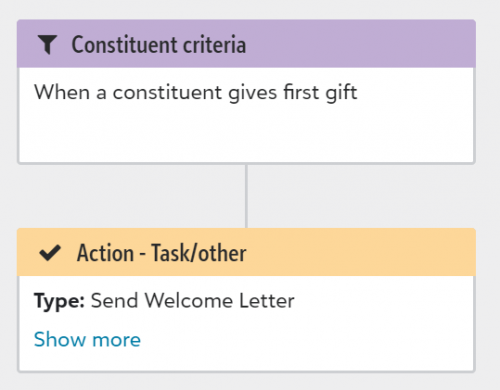
0 -
Hi Leian,
Thanks for letting us know about this. We are looking into this now to see what may be going on, and hope to have it figured out soon! You are correct and it should ONLY add the action to First Gifts, and First Gift should be the same as it is in Lists. I will post here as soon as we know what is going on.
Thanks you!1 -
When creating a workflow using constituent criteria will it add those actions starting from date the workflow is activated or will it go back all time. For instance we created a COVID 19 fund and I would like to apply a workflow for a thank you call for all donors over $500. We have already done some thank you calls-will the workflow start from the day I activate it or will it populate an action for all COVID 19 fund gifts?
Thanks
Rachel0 -
Rachel,
Great question! You are exactly right- with the constituent criteria it will only start picking up constituents that meet that criteria from the day the workflow is activated moving forward, nothing in the past. For example, lets say you set your criteria to "anyone who gives a First Gift greater than $50", and you activate that workflow at 2pm. Then, Sally Jones decides to go to your website and donate her first gift of $55 to your organization at 10am in the morning on the day you activated that workflow. Since her gift was given on the same day that you activated the workflow, she will get added to the workflow. It will just add anyone who gives any gifts prior to the day that you activated the workflow. Hope that makes sense!
Thanks!
Kylee Long0 -
Re: Leian,
Leian Ireland I just wanted to let you know that we have resolved the issue you reported the other day. We just had to make a small tweak, and now it should work the way you expected. Thanks for reporting it to us! Let us know if you encounter any other issues.
Thanks!
Kylee Long1 -
Thanks for getting back to me so quickly! So just to clarify if I activate the workflow today anyone today and beyond will be part of the workflow but if i have 10 people that gave a gift to the fund 10 days ago before I activated the workflow they will get an action as well as ?
0 -
Rachel,
The workflow will get added to any constituent from the day you activate the workflow moving forward only. So, the constituents that gave gifts 10 days ago would not get added to the workflow, because they were given prior to the day you activated the workflow. Does that make sense?
One thing to note, if you do want those people who donated 10 days ago to get the workflow, you can always manually Apply them to the workflow. In Lists AND on the Constituent Record there is an Apply Workflow button, that way you can apply any active workflow to a constituent on an as-needed basis.
Hope that helps a bit more! 0 -
That makes perfect sense! Thank you!
0 -
No problem! Happy to help anytime! ?0
-
I love this feature. However, I see a glitch in lists. If I have a list of people who meet the criteria and then ask it to exclude someone from the list...it doesn't. Any thoughts on when this will be fixed. Thank you!0
-
Amy Gerald Just to make sure I understand, you mean that you went to create a list in NXT, and when you tried to exclude someone it just didn't work? Like, the List itself did not update? This may/may not help, but I do know that it is very important that you Save your list after you make any changes like that, before you use it in a workflow. If you excluded the person but did not save, then Workflow Designer won't be able to recognize that you made the change. That may not be what's going on here, but wanted to mention that. I'll check on this issue and see if its known or not. Thanks for letting us know!0
-
Hello Kylee Long - I possibly didn't save the list until after the workflow was activated. I did save it but I might not have done that immediately.0
-
Hi Amy Gerald ,
Yeah, it can be tricky to remember to save your list right after you make changes, because you actually SEE the changes right away so you think it's "done". The thing to remember is that without a Save, your changes are not written to the system permanently, so no other area of NXT that uses that List will know that you made any changes. This would also be the case if you used that list for a regular Email as well- the email service will only recognize the most recent Save that was done. Its something that we try to document in our Help guides, but I don't think it is really well known amongst all clients. When in doubt, always keep an eye on the "*" (asterisk) next to the name of your list. Having the asterisk there means that you have not saved that list since you made changes. I hope that helps! Let me know if you notice anything else that seems "off"!1 -
I am trying to create a workflow for anyone who gives their Greatest gift of $500 or more. However, when reading your post I am concerned that I may miss some folks. When we manually enter a gift we enter the gift date as the postmark date on the gift envelope. So if I enter a gift on Jan 5 that is postmarked Dec 31, will these constituents be included in the workflow? Or will the workflow only be applied to those gifts that are entered on Jan 5 and dated Jan 5?
0















Categories
- All Categories
- 6 Blackbaud Community Help
- 211 bbcon®
- 1.4K Blackbaud Altru®
- 402 Blackbaud Award Management™ and Blackbaud Stewardship Management™
- 1.1K Blackbaud CRM™ and Blackbaud Internet Solutions™
- 15 donorCentrics®
- 360 Blackbaud eTapestry®
- 2.6K Blackbaud Financial Edge NXT®
- 657 Blackbaud Grantmaking™
- 577 Blackbaud Education Management Solutions for Higher Education
- 3.2K Blackbaud Education Management Solutions for K-12 Schools
- 941 Blackbaud Luminate Online® and Blackbaud TeamRaiser®
- 84 JustGiving® from Blackbaud®
- 6.7K Blackbaud Raiser's Edge NXT®
- 3.7K SKY Developer
- 248 ResearchPoint™
- 120 Blackbaud Tuition Management™
- 165 Organizational Best Practices
- 240 Member Lounge (Just for Fun)
- 34 Blackbaud Community Challenges
- 37 PowerUp Challenges
- 3 (Open) PowerUp Challenge: Grid View Batch
- 3 (Closed) PowerUp Challenge: Chat for Blackbaud AI
- 3 (Closed) PowerUp Challenge: Data Health
- 3 (Closed) Raiser's Edge NXT PowerUp Challenge: Product Update Briefing
- 3 (Closed) Raiser's Edge NXT PowerUp Challenge: Standard Reports+
- 3 (Closed) Raiser's Edge NXT PowerUp Challenge: Email Marketing
- 3 (Closed) Raiser's Edge NXT PowerUp Challenge: Gift Management
- 4 (Closed) Raiser's Edge NXT PowerUp Challenge: Event Management
- 3 (Closed) Raiser's Edge NXT PowerUp Challenge: Home Page
- 4 (Closed) Raiser's Edge NXT PowerUp Challenge: Standard Reports
- 4 (Closed) Raiser's Edge NXT PowerUp Challenge: Query
- 796 Community News
- 3K Jobs Board
- 54 Blackbaud SKY® Reporting Announcements
- 47 Blackbaud CRM Higher Ed Product Advisory Group (HE PAG)
- 19 Blackbaud CRM Product Advisory Group (BBCRM PAG)