Registration Questions on Webforms by Type





Hi,
Does anyone know how to get the registration questions to only ask for a specific price type? As a children's museum, we always register an adult along with a child(ren). We want to know certain things about the children (ex. age, interests...) but not the adult. Maybe it is not possible, but if it is, can anyone provide a little guidance?
Thanks,
Tamara
Does anyone know how to get the registration questions to only ask for a specific price type? As a children's museum, we always register an adult along with a child(ren). We want to know certain things about the children (ex. age, interests...) but not the adult. Maybe it is not possible, but if it is, can anyone provide a little guidance?
Thanks,
Tamara
Tagged:
0
Comments
-
Hi Tamara - I haven't used this at our organization, but I'm hoping it may be helpful for you. Here is a how-to Marketing Survey from the Blackbaud Ticketing Guide: https://www.blackbaud.com/files/support/guides/ac/tickets.pdf (scroll to page 56). You can set this to a variety of criteria. Although it may not work for the price type, maybe it can be sent to the registrants after signup?
Hope this helps!1 -
Thanks! I found it! It is just one line in that huge ticketing guide but for anyone who is following this:
"Add or edit registration questions 1. From Tickets, under Configuration, click Manage Registration Forms. Note: You can also add a new registration question from the Registration Information tab on a Program Event page. For information about the Registration Information tab, see Manage Program Registration Information on page 174. 2. Under Registration information, click Add, Question. The Add a question screen appears. Note: To edit a question, select it in the row and click Edit. 3. In Field name, enter the name of the field. 4. In Field type, select the type of field it is. For example, if you select Dropdown list, you can enter the dropdown options in the Option grid that appears. Note: You can use the up and down arrows to reorder the options in the grid. 5. If you want this question to be available for the web, select Show online and enter what you text you want to appear on the web, in the Web text field. 6. If you do not want this question to appear for all price types, clear the Show for all price types checkbox, and in the Price type grid, enter the price types for it."
(I actually clicked on the pencil to get here...)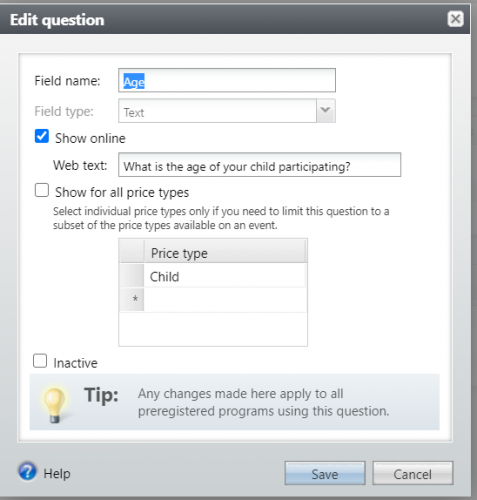
1




Categories
- All Categories
- 6 Blackbaud Community Help
- 211 bbcon®
- 1.4K Blackbaud Altru®
- 402 Blackbaud Award Management™ and Blackbaud Stewardship Management™
- 1.1K Blackbaud CRM™ and Blackbaud Internet Solutions™
- 15 donorCentrics®
- 360 Blackbaud eTapestry®
- 2.6K Blackbaud Financial Edge NXT®
- 657 Blackbaud Grantmaking™
- 577 Blackbaud Education Management Solutions for Higher Education
- 3.2K Blackbaud Education Management Solutions for K-12 Schools
- 941 Blackbaud Luminate Online® and Blackbaud TeamRaiser®
- 84 JustGiving® from Blackbaud®
- 6.7K Blackbaud Raiser's Edge NXT®
- 3.7K SKY Developer
- 248 ResearchPoint™
- 120 Blackbaud Tuition Management™
- 165 Organizational Best Practices
- 240 Member Lounge (Just for Fun)
- 34 Blackbaud Community Challenges
- 37 PowerUp Challenges
- 3 (Open) PowerUp Challenge: Grid View Batch
- 3 (Closed) PowerUp Challenge: Chat for Blackbaud AI
- 3 (Closed) PowerUp Challenge: Data Health
- 3 (Closed) Raiser's Edge NXT PowerUp Challenge: Product Update Briefing
- 3 (Closed) Raiser's Edge NXT PowerUp Challenge: Standard Reports+
- 3 (Closed) Raiser's Edge NXT PowerUp Challenge: Email Marketing
- 3 (Closed) Raiser's Edge NXT PowerUp Challenge: Gift Management
- 4 (Closed) Raiser's Edge NXT PowerUp Challenge: Event Management
- 3 (Closed) Raiser's Edge NXT PowerUp Challenge: Home Page
- 4 (Closed) Raiser's Edge NXT PowerUp Challenge: Standard Reports
- 4 (Closed) Raiser's Edge NXT PowerUp Challenge: Query
- 796 Community News
- 3K Jobs Board
- 54 Blackbaud SKY® Reporting Announcements
- 47 Blackbaud CRM Higher Ed Product Advisory Group (HE PAG)
- 19 Blackbaud CRM Product Advisory Group (BBCRM PAG)