Phone number validation - use phone type validation rules for SKY API




We are receiving an error when adding a constituent to Raiser's Edge, when including certain phone numbers:
"Error: ContactBusinessLogicPhoneNumberIsInvalid (code 50013). The phone number XXXXXXXXX is invalid".
We don't have any validation set on the phone types being used for this so we were stumped as to why we would get an error. After chatting to the support team, I was told that this is because there is some (seemingly undocumented) validation happening:
"All operations that write phone numbers use the configured base country for each tenant (Database view > Configuration > General > Country). If a requested phone number does not contain an international code, we assume the phone number is for the base country and validate it as such. If a phone number fails validation for the base country, we have no way of guessing which country code should be applied to the number. The operation fails to avoid writing invalid phone numbers to the database."
This doesn’t seem like best practice. In Raiser's Edge, you can set formatting rules on each phone type. What is the point of being able to set format restrictions at the Phone Type level, if the API is just ignoring those and applying some blanket rule? If the system allows you to set your own validation patterns on each phone type and these are enforced in other parts of the system, then the API should also follow these rules.
Our phone types are not set up to have any validation on them, and that is a business decision we have made, understanding the risks and potentially incorrect data involved. We shouldn’t be forced to undergo an additional level of validation that is actually preventing those constituents from being added to the database altogether (due to this happening in the “Add constituent“ process).
Is there potential scope to implement a change to phone number validation within the SKY API so that it uses the rules set up at the phone type level?
"Error: ContactBusinessLogicPhoneNumberIsInvalid (code 50013). The phone number XXXXXXXXX is invalid".
We don't have any validation set on the phone types being used for this so we were stumped as to why we would get an error. After chatting to the support team, I was told that this is because there is some (seemingly undocumented) validation happening:
"All operations that write phone numbers use the configured base country for each tenant (Database view > Configuration > General > Country). If a requested phone number does not contain an international code, we assume the phone number is for the base country and validate it as such. If a phone number fails validation for the base country, we have no way of guessing which country code should be applied to the number. The operation fails to avoid writing invalid phone numbers to the database."
This doesn’t seem like best practice. In Raiser's Edge, you can set formatting rules on each phone type. What is the point of being able to set format restrictions at the Phone Type level, if the API is just ignoring those and applying some blanket rule? If the system allows you to set your own validation patterns on each phone type and these are enforced in other parts of the system, then the API should also follow these rules.
Our phone types are not set up to have any validation on them, and that is a business decision we have made, understanding the risks and potentially incorrect data involved. We shouldn’t be forced to undergo an additional level of validation that is actually preventing those constituents from being added to the database altogether (due to this happening in the “Add constituent“ process).
Is there potential scope to implement a change to phone number validation within the SKY API so that it uses the rules set up at the phone type level?
1
Comments
-
Hello Chris,
This validation is more about making sure the phone number is valid and contains everything in it you would need to dial the number. We are assuming some country code validation if it isn't present but even if we do that and that number isn't a valid number, we will kick it out. It really isn't a matter of formatting as much as it is a matter of the number being valid. This decision was made so that we are not allowing bad data to come into the system.
If you have some examples of what you are importing and what you are seeing we would be glad to take a closer look. My statement above is assuming a few things that we have heard in the past but your issue could be something else entirely.
Anthony0 -
Hi Anthony,
We are also experiencing the same issue that Chris Howe describes above, where there is incorrect validation being applied by the API to phone numbers causing us to be unable to submit new constituents.
We are based in New Zealand and there is no standard phone number format in our country. Phone numbers can be any of the following formats - all of these should be accepted as they are valid NZ numbers:
09 123 4567
021 123 456
021 123 4567
021 123 45678
0800 123 456 up to 0800 123 45678
0800 ABCDEF up to 0800 ABCDEFGH
Currently, the API is only accepting numbers in the following format (exactly this number of digits, with dashes):
123-456-7890
Anything that does not confirm to this exact structure is throwing a ContactBusinessLogicPhoneNumberIsInvalid (50013) error and prevents the submission. This is preventing us from being able to connect our web forms to the Raiser's Edge CRM.
As such we need the API to respect the fact that we have no validation rules set on the phone number fields in the Raiser's Edge database, and allow us to submit any number of digits, ideally with or without dashes or spaces (as there is no standardised place to insert those either).
Do you know if this can be achieved?
Many thanks,
Chris Evans
0 -
Hi Chris,
I'm not sure if you seen these two posts regarding phone formats:
https://community.blackbaud.com/forums/viewtopic/491/52466https://community.blackbaud.com/forums/viewtopic/491/48291
In short, have you set your country to NZ in config? It sounds like you're seeing US formatted numbers. The other thing mentioned in the posts is to submit a country code with the number.
Not sure if that'll help but I hope so.
Cheers,
Steve Cinquegrana | CEO and Principal Developer | Protégé Solutions0 -
Hi Steve,
Thanks for that. Yes, I've seen those posts before and we have tried to submit with a country code - we still get the same validation error.
I'm fairly certain the database is set to be based in NZ. We don't have access to the Database view to change those settings but our client is only based in NZ, and when we look to add a Phone number via NXT in the browser it defaults to NZ as the country choice with the NZ flag :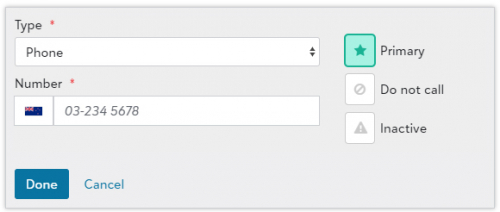
But this image illustrates an additional potential issue. Even if it was set to validate NZ phone numbers, that format in the NXT browser of 03-234 5678 is only one of many possible NZ phone number formats (in this case a standard landline). It wouldn't handle mobile numbers, toll free numbers, extensions for organisations, etc.
So ideally we need the API to just not validate phone numbers at all, as it's unlikely it would have a validation complex enough to handle the dozen or so valid formats we have here. I'm happy to be proven wrong, we just don't know how to get around the API error and it's become a blocking issue for us.
Thanks,
Chris
0










Categories
- All Categories
- 6 Blackbaud Community Help
- 211 bbcon®
- 1.4K Blackbaud Altru®
- 402 Blackbaud Award Management™ and Blackbaud Stewardship Management™
- 1.1K Blackbaud CRM™ and Blackbaud Internet Solutions™
- 15 donorCentrics®
- 360 Blackbaud eTapestry®
- 2.6K Blackbaud Financial Edge NXT®
- 656 Blackbaud Grantmaking™
- 577 Blackbaud Education Management Solutions for Higher Education
- 3.2K Blackbaud Education Management Solutions for K-12 Schools
- 941 Blackbaud Luminate Online® and Blackbaud TeamRaiser®
- 84 JustGiving® from Blackbaud®
- 6.7K Blackbaud Raiser's Edge NXT®
- 3.7K SKY Developer
- 248 ResearchPoint™
- 120 Blackbaud Tuition Management™
- 165 Organizational Best Practices
- 240 Member Lounge (Just for Fun)
- 34 Blackbaud Community Challenges
- 37 PowerUp Challenges
- 3 (Open) PowerUp Challenge: Grid View Batch
- 3 (Closed) PowerUp Challenge: Chat for Blackbaud AI
- 3 (Closed) PowerUp Challenge: Data Health
- 3 (Closed) Raiser's Edge NXT PowerUp Challenge: Product Update Briefing
- 3 (Closed) Raiser's Edge NXT PowerUp Challenge: Standard Reports+
- 3 (Closed) Raiser's Edge NXT PowerUp Challenge: Email Marketing
- 3 (Closed) Raiser's Edge NXT PowerUp Challenge: Gift Management
- 4 (Closed) Raiser's Edge NXT PowerUp Challenge: Event Management
- 3 (Closed) Raiser's Edge NXT PowerUp Challenge: Home Page
- 4 (Closed) Raiser's Edge NXT PowerUp Challenge: Standard Reports
- 4 (Closed) Raiser's Edge NXT PowerUp Challenge: Query
- 796 Community News
- 3K Jobs Board
- 54 Blackbaud SKY® Reporting Announcements
- 47 Blackbaud CRM Higher Ed Product Advisory Group (HE PAG)
- 19 Blackbaud CRM Product Advisory Group (BBCRM PAG)