Automating Database download and restore from Azure Blob Storage




At this time it appears that BB nightly backup delivery service does not allow for delivery to our BB FTP site, so FTP automation is off the table.
Instead the backups appear to only be available on Azure blob storage.
I've confirmed automation is possible using azcopy via a powershell type Job Agent in SQL Server. This is an automated transfer of files to local storage, with is then followed by a RESTORE db FROM DISK. Essentially a two step process - 1) copy to disk. 2) restore from disk.
However, the most direct solution I'm interested in would be a RESTORE db FROM URL using the SAS credential as a means of both accessing and downloading/restoring in one step.
Has anyone gotten this to work? I get a permissions error.
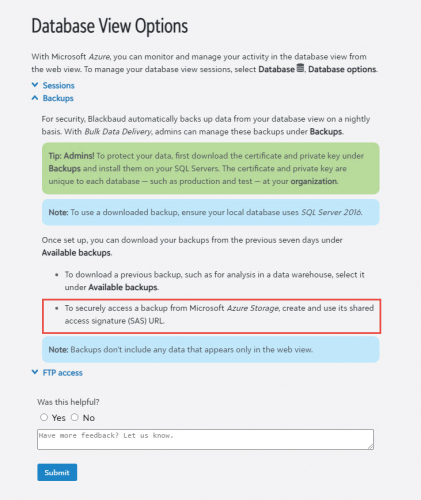
Below is the documentation that leads me to believe this should be possible.
What I've gotten so far from BB, is that the SAS is intended for manual use with Azure Storage Explorer. It does indeed work for that purpose, but it should also work equally well for an automated process.
I'm just missing some peace of the puzzle.
Thanks!
https://webfiles.blackbaud.com/files/support/helpfiles/rex/content/bb-database-view-options.html
Comments
-
Neal - sorry, this doesn't answer your questions! - but your post has intrigued me. I thought that to get a backup restored on cloud-hosted Azure, you were dependent on BB to do it for you, for a one-time fee. Am I understanding that a person can get "Bulk Data Delivery" added to their NXT subscription and gain access to it themselves?0
-
Whoa! I didn't even know this was an option.
I thought we were stuck with the old monthly "Contact the Help Desk, Request a Backup, Wait a Day or Two, Receive Notice that a Backup is in your FTP space, Manually Download, Restore in Your Own Environment" method.
This is kind of exciting. ?0 -
Hi Faith,
No, this is a service from Blackbaud to
deliver backups daily -- for restore to a local sql server, as
opposed to restoring either your cloud based production or sandbox
environment.Neal
ZandonellaVice President of
Data & Information ServicesMontana State
University Alumni Foundation406-994-4912
CONFIDENTIALITY: This email
(including any attachments) may contain confidential, proprietary
and privileged information, and unauthorized disclosure or use is
prohibited. If you received this email in error, please notify the
sender and delete this email from your system. Thank
you.0 -
No, sorry if I was unclear. I'm referring to the service from Blackbaud that delivers backups daily -- for restore to a local sql server, as opposed to being used to restoring your cloud based production or sandbox environment.
0 -
That is the concept. We contracted for nightly backups, however they don't appear to be available via FTP as assumed when we purchased the nightly backups. ? The backups are only available in Azure, which poses it's own challenges for automated retrieval. I'll post more, as I learn more from BB.0
-
Neal, clarifying that -- although this backup is not able to be "restored" to the cloud environment without BB assistance, it could still be opened locally and one could, hypothetically, export any data needed to import into the Cloud-hosted environment? I'm thinking about all the KB articles that advise "backing up before imports", and thinking that if an import error occurred, one could simply import the corrected data back into the system if they had access to the nightly backup files themselves. Am I on the right track here?
I've only ever had to restore our database once in 10 years, back when we sere self-hosted, but it creates a cautious habit. ?0 -
Hi Faith, yes the local db could be used to
generate import list for a variety of use cases, including to
correct a prior import mistake.Typically it would be used for reporting, or
to generate ad hoc lists that are too complicated for the RENXT
native list, query, or export tools.Neal
ZandonellaVice President of
Data & Information ServicesMontana State
University Alumni Foundation406-994-4912
Join the MSU
Alumni Association at msuaf.org/join.CONFIDENTIALITY: This email
(including any attachments) may contain confidential, proprietary
and privileged information, and unauthorized disclosure or use is
prohibited. If you received this email in error, please notify the
sender and delete this email from your system. Thank
you.1 -
Hi Neal, did you CREATE CREDENTIAL on your local SQL instance to access the file on Azure? Once that's in place you should be able to run the RESTORE db FROM URL = '' WITH CREDENTIAL = '' from what I can tell. There's some more info here: https://www.sqlshack.com/how-to-connect-and-perform-a-sql-server-database-restore-from-azure-blob-storage/.
Let me know how it goes.
Mike0 -
Yes, thanks for the suggestion.
After we created the credential, there is no
need to RESTORE Db FROM URL WITH CREDENTIAL. The WITH
CREDENTIAL statement is only explicitly used when you are not using
SAS, but are going directly to the blob storage with an explicit
secret key. BB uses SAS as a generic credential for all
customers, instead of having to provision an individual, secret key
per customer.We’ve discovered what the core issue is.
Unfortunately the RESTORE Db FROM URL can only be used with a block
file type. BB is storing the .bak files as page files.
We are now clear on the issue, and I doubt BB will be willing to
change the file types on their backups, but I’ve asked that they do
so, in order to facilitate the automation of restoring backups.Our current work around is to do the two-step,
using sql powershell AZCOPY, then restore from disk. Works
great, although it does not take advantage of SQL servers restore
from URL capabilities.Thanks again. I’ll post if we make any
further progress with BB.Neal
0 -
Hi Neal. Thanks for your post. I believe we can help you.
Mission BI Reporting Access™ and SQL Access™ are Blackbaud Marketplace Applications that enable standardized data source connections to your RE NXT™ and FE NXT™ data from virtually any reporting platform such as Microsoft Power BI, Tableau, or Crystal Reports.
Reporting Access™ and SQL Access™ are much more than simple API connectors. They are specialized database solutions, hosted and managed in the secure Mission BI Cloud, and optimized as data source connections for advanced custom reporting.
To be clear, our direct database access solution would eliminate the need for the daily backup and automate near real time refreshes in a secure SQL environment within the Mission BI warehouse.
Let's jump on a call to become acquainted and discuss how I can help. Please use the link below to drop a time on my calendar for us to connect.
View my schedule and book a Conversation with me HERE.Best,
JohnJohn Wooster
CRO | Mission BI, Inc.
843.491.6969 | https://www.missionbi.com 0
0 -
@Neal Zandonella
>>Our current work around is to do the two-step, using sql powershell AZCOPY, then restore from disk. Works great, although it does not take advantage of SQL servers restore from URL capabilities. @Neal - this would work for my organisation - a two step process is fine. Can you give me any pointers to how you have got AZCopy to work, I have tried this with all the advice I have found and can still not get the script to work - Mick0












Categories
- All Categories
- 6 Blackbaud Community Help
- 213 bbcon®
- 1.4K Blackbaud Altru®
- 403 Blackbaud Award Management™ and Blackbaud Stewardship Management™
- 1.1K Blackbaud CRM™ and Blackbaud Internet Solutions™
- 15 donorCentrics®
- 360 Blackbaud eTapestry®
- 2.6K Blackbaud Financial Edge NXT®
- 656 Blackbaud Grantmaking™
- 577 Blackbaud Education Management Solutions for Higher Education
- 3.2K Blackbaud Education Management Solutions for K-12 Schools
- 939 Blackbaud Luminate Online® and Blackbaud TeamRaiser®
- 84 JustGiving® from Blackbaud®
- 6.6K Blackbaud Raiser's Edge NXT®
- 3.7K SKY Developer
- 248 ResearchPoint™
- 119 Blackbaud Tuition Management™
- 165 Organizational Best Practices
- 241 Member Lounge (Just for Fun)
- 34 Blackbaud Community Challenges
- 37 PowerUp Challenges
- 3 (Open) PowerUp Challenge: Grid View Batch
- 3 (Closed) PowerUp Challenge: Chat for Blackbaud AI
- 3 (Closed) PowerUp Challenge: Data Health
- 3 (Closed) Raiser's Edge NXT PowerUp Challenge: Product Update Briefing
- 3 (Closed) Raiser's Edge NXT PowerUp Challenge: Standard Reports+
- 3 (Closed) Raiser's Edge NXT PowerUp Challenge: Email Marketing
- 3 (Closed) Raiser's Edge NXT PowerUp Challenge: Gift Management
- 4 (Closed) Raiser's Edge NXT PowerUp Challenge: Event Management
- 3 (Closed) Raiser's Edge NXT PowerUp Challenge: Home Page
- 4 (Closed) Raiser's Edge NXT PowerUp Challenge: Standard Reports
- 4 (Closed) Raiser's Edge NXT PowerUp Challenge: Query
- 794 Community News
- 2.9K Jobs Board
- 54 Blackbaud SKY® Reporting Announcements
- 47 Blackbaud CRM Higher Ed Product Advisory Group (HE PAG)
- 19 Blackbaud CRM Product Advisory Group (BBCRM PAG)