Sharing my Power Automate Flow: Upcoming Opportunity Notification





Summary
This flow sends a notification email monthly (on the 25th) with upcoming opportunities. The digest includes summary information about each upcoming opportunity as well as hyperlinks to the opportunity and constituent records.
Required Connections
Blackbaud Raiser's Edge NXT Constituents
Blackbaud Raiser's Edge NXT Prospects
Outlook
Suggested Skill Level
Beginner
Configuration Needs
- Start in NXT by building an Opportunity list for the flow. My version of this list looks for Opportunities assigned to a specific fundraiser with an ask date next month.
- While importing the flow into your environment, configure your connections to the RE NXT Constituents and Prospects new connectors, and Outlook.
- Enter your Org's unique Environment ID into the "Initialize Environment ID Variable - String" action in the "value" field. If you are confused on where to find your Environment ID take a look at any URL from your Web View Environment it is the string of numbers and letters after "envid=" and before the "&svcid=renxt".
- Select your previously created Opportunity List in the "List Opportunities from NXT" step.
- Review the digest code in the "Apply to Each Opportunity Found" Loop > "Append to array variable 2"; add/remove elements to match your organization's preferences.
- Edit the notification emails on both sides of the conditional - recipient email, message body, and "advanced options" reply to email.
Troubleshooting Tips
- Format Number tends to ‘break’ frequently when editing this flow. If you get an error that involves this element - delete the listing and re-add it to the flow; then update the listing in the “Append to array variable 2” element.
Edits: updated the flow to include the new connectors and changed the hyperlink syntax for the digest table; updated the body of this post to match the changes. If you have any questions, post them here.
UpcomingOpportunityNotification_20220512203759.zip
Comments
-
This is awesome, thanks so much for sharing!2
-
Austen, this is spectacular! Thank you for posting!
2 -
I have updated the flow to include the update syntax for hyperlinks, alleviating this problem. Let me know if you have any questions.
Old Post: Some of the hyperlinks within this flow may not work as they are currently written. Check out this post for more information on how to update them within the imported flow:
1 -
I have updated the shared template to include actions from the new connectors and fixed a few other troublesome spots. Let me know if you have any questions about the changes or the flow.
1 -
@Austen Brown
Hi my friend! I have been using this flow for a while now to send our MGO's notifications of upcoming opportunities. My team loves it! I'm now trying to adapt this flow to accommodate a different but similar use case. My goal is to send a notification to all fundraisers assigned to the opportunity when it has been modified. I used the “addDays(utcNow(),-1)” expression in the modified on or after field of “List Opportunities” step in hopes it will only pull modified opportunities from the list into the flow. I'm not sure that will work yet, because I can't get past the issue of sending the email to the assigned fundraisers.To get the fundraisers assigned I added the following steps to append the fundraiser email address to a string variable:
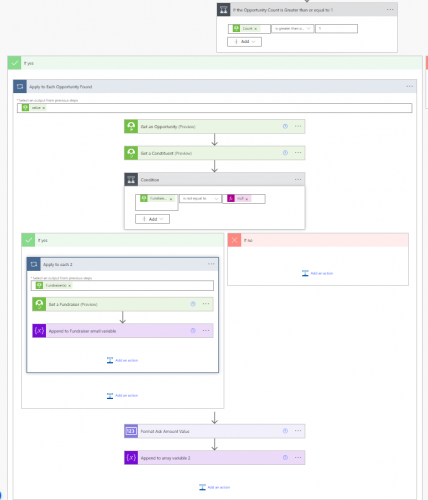
Get fundraiser email After that I use the “fundraiseremail” variable in the email To: field and then set the variable to “null” after the email sends.
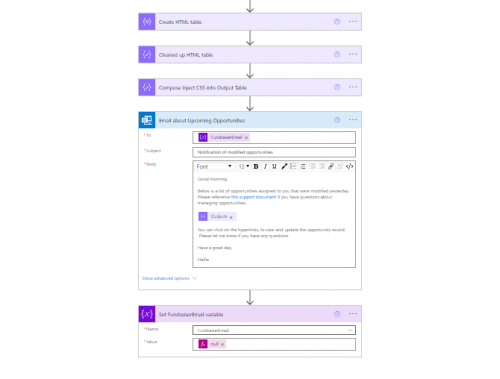
Fundraiser Email The result is that the flow is adding the fundraiser email address multiple times if they are on multiple opportunities and if there is a second fundraiser assigned it adds that in the mix too.
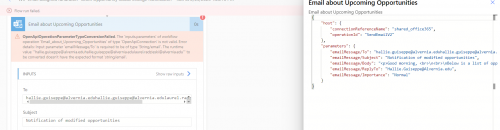
I'm not sure how to tell the flow how to separate them out based on the opportunity. For example, if Hallie & Laurel on a single opportunity, they would get that notification, if Hallie is only on one of them (on the list) only Hallie will get that one.
I'm hoping you might know of another sample flow out there that has done a similar thing.
Thanks!
0 -
@Austen Brown - Thank you for sharing this workflow! I'm trying to build a similar flow that sends an email with opportunities with funded status from the week prior. Is there a way to include the "Opportunity Assigned to" fundraiser info to the table in the email?
0 -
Yep - You'll want the "Fundraiser(s) Constituent ID" from the output of a "Get an Opportunity" action. PA will put this into an apply to each. Use the "Get a Constituent" action to get the Fundraiser's name. Depending on how you want to list this in the email - I recommend using an Variable Array to collect the names. Then once out of the loop - use a join() expression to convert the array of names to a string/list of names.
 0
0













Categories
- All Categories
- 6 Blackbaud Community Help
- 211 bbcon®
- 1.4K Blackbaud Altru®
- 403 Blackbaud Award Management™ and Blackbaud Stewardship Management™
- 1.2K Blackbaud CRM™ and Blackbaud Internet Solutions™
- 15 donorCentrics®
- 360 Blackbaud eTapestry®
- 2.6K Blackbaud Financial Edge NXT®
- 659 Blackbaud Grantmaking™
- 579 Blackbaud Education Management Solutions for Higher Education
- 3.2K Blackbaud Education Management Solutions for K-12 Schools
- 943 Blackbaud Luminate Online® and Blackbaud TeamRaiser®
- 84 JustGiving® from Blackbaud®
- 6.7K Blackbaud Raiser's Edge NXT®
- 3.8K SKY Developer
- 250 ResearchPoint™
- 120 Blackbaud Tuition Management™
- 165 Organizational Best Practices
- 241 Member Lounge (Just for Fun)
- 36 Blackbaud Community Challenges
- 37 PowerUp Challenges
- 3 (Open) PowerUp Challenge: Grid View Batch
- 3 (Closed) PowerUp Challenge: Chat for Blackbaud AI
- 3 (Closed) PowerUp Challenge: Data Health
- 3 (Closed) Raiser's Edge NXT PowerUp Challenge: Product Update Briefing
- 3 (Closed) Raiser's Edge NXT PowerUp Challenge: Standard Reports+
- 3 (Closed) Raiser's Edge NXT PowerUp Challenge: Email Marketing
- 3 (Closed) Raiser's Edge NXT PowerUp Challenge: Gift Management
- 4 (Closed) Raiser's Edge NXT PowerUp Challenge: Event Management
- 3 (Closed) Raiser's Edge NXT PowerUp Challenge: Home Page
- 4 (Closed) Raiser's Edge NXT PowerUp Challenge: Standard Reports
- 4 (Closed) Raiser's Edge NXT PowerUp Challenge: Query
- 798 Community News
- 3K Jobs Board
- 56 Blackbaud SKY® Reporting Announcements
- 47 Blackbaud CRM Higher Ed Product Advisory Group (HE PAG)
- 19 Blackbaud CRM Product Advisory Group (BBCRM PAG)