Query for Donor Analysis


I am fairly new to Altru.
I need to run a query to start an overall donor analysis process.
I want to run a query of active constituents. I want the report to show me: names, address, giving totals for FY17, FY18, FY19, FY20, and their total cumulative giving.
What would be the best way to do this? I have tried using smart fields, but they are not pulling anything when I transfer to excel.
Thank you!
Comments
-
Hi Sammi Kern!
Just to help me better understand the situation, you're saying that the Smart Fields are working in Altru. Everything looks good when you view your query results. It's when you export to Excel that something goes awry. Is that right?
As a side thought, if you are comfortable with Excel, another way you might achieve this (working around Smart Fields) would be to use a Pivot Table and run a Revenue query for that same time period (FY17 - FY20).
You would export that to Excel. Once in Excel you would take your revenue Date field and you could add a column next to it. In that column, you would populate that column with your fiscal year. If your fiscal year matches the calendar year, you could just use the Year function like =Year(DATE). If your fiscal year does not match the calendar year, no worries. You can still make it work. It'll just take a little more work writing the formula, but it's definitely doable. (I can help write that formula if you need a hand).
So then you'd have your Fiscal Year in a column. You can insert all that into a Pivot Table. Have your donors going down the rows (maybe using a combo of Name plus Lookup ID). Have your Fiscal Year value along the columns. And then revenue amount in the Values section. That should give the report you're needing.
Two quick thoughts: you may want to pull in Recognition Credits into the output (Application Details / Revenue Recognition Credits). So then you can see your soft credit recipients (if you use Recognition Credits). Also, you'll want to be mindful of Application and Transaction Type. You probably don't want to pull in Pledges and Pledge Payments. That can be tricky. It took me forever to get used to that in Altru. Let me know if you would like more detail about Application and Transaction Type.
Good luck.
Chris1 -
Hi @Lisa Dziepak!
I got your reply. I don't see it on the site anymore. So I'm not sure if that's a glitch or if you figured what you had mentioned.
I have not run into that issue personally. I don't deal with memberships in that way. And we don't count those memberships toward their annual charitable giving totals (basically, we don't count the membership when compiling the donor recognition lists you mentioned).
But I can imagine what you're describing being a challenge. I believe I have noticed what you mentioned as well. That only the Order gets recognition credit. The Payment on the Order does not get recognition credit. So your Smart Field does need to be based on the Order and not the Payment on the Order. And that would create the Discount problem you mentioned.
0 -
Chris,
Thank you for your quick reply. Yes, I did delete it because I realized that I wasn’t certain about the order only receiving recog cred. Looking back through my own record I saw recognition credits were previously given on orders and payments for both gifts and memberships. Then I realized that I was looking at a membership order for me where I applied the staff discount thus making the payment $0. So in Altru there was no $0 payment on order recorded, whereas a back office payment discounted to $0 shows up as $0 payment on membership. But regardless I still have the same issue with not only accounting for discounted memberships but refunded orders also.
I was intrigued though by your description of using revenue and excel and pivot tables to compile giving. (As soon as I learn how to use pivot tables!) But every time I try to pull revenue for gifts I struggle with the right combination of transaction types and applications so that I don't duplicate revenue. I may just be overthinking it, but that is why I went to using smart fields and then I query on refunds so I know to double check the totals for those constituents with a refund on their record. I started If you have an example of a revenue query that includes donations, and recurring gifts I would love if you could share it with me. My development people want to see donation totals separated from total pledges for current FY and total pledge payments in current FY on pledge from a previous year. And don't get me started on membership!!
But if you have any wisdom to impart on the most straightforward way to compile a gifts list I would love to hear it. Thanks!1 -
@Lisa Dziepak, you shouldn't doubt yourself for a second! You are right on! The credits are a little weird. And pulling Revenue versus Cash (the Pledges versus the Pledge Payments), can definitely be a little tricky.
I'll quickly say that I don't really have as much experience with the membership side of things. But I can see the challenges you're talking about. I'd have to play around a little to see just exactly how a refund behaves and how to capture that in your reporting. My suggestion is to reach out to your Blackbaud Customer Success Manager. They may be able to get you connected to someone who can help with your membership revenue reporting.
Regarding pulling Pledges versus Pledge Payments, I use a Revenue query source view. Here is a screenshot of the Transaction Types and Applications I use to pull Revenue.
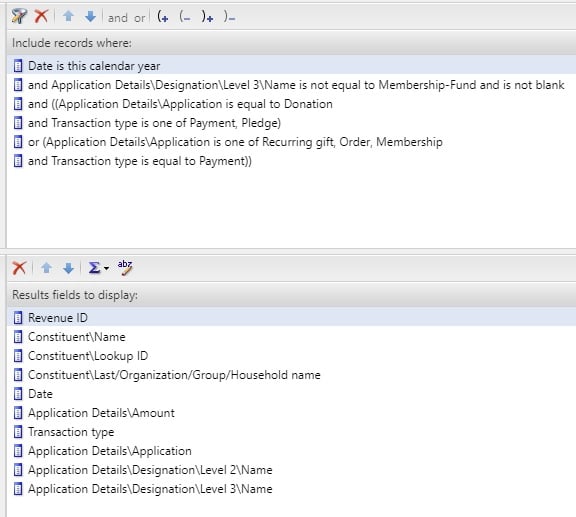
Since this is a Revenue query, it's worth noting that this is giving me a look at the source of the funds. I'm not looking at Recognition here. So this is what I would use if I was putting together my year-to-date revenue report.
Just looking at the criteria:
- Date is this calendar year. Pretty straightforward. Just keeps the report current and works year after year.
- Application Details Designation Name is not Blank. This just means the funds must have a designation, which, for my organization, means that the revenue is fundraising revenue (since earned revenue doesn't get a designation).
- From an old system, when we moved to Altru, Membership got tied to a designation. So I just get that out of the way by “blocking” that fundraising hierarchy. That's all I'm doing there.
- Finally, you need two sets of Transaction Types and Applications. I just group those with parentheses. If it's unclear in the screenshot or you need a hand finding those fields, please let me know.
Your report may need to take into consideration Gift in Kind payments. It really just depends on how you record those. For me Gift in Kind is its own Initiative. That's why I have the Level 2 designation name in my output. This allows me to group by my reporting categories.
You may also need to think about other Applications, like Matching Gift. We handle Matching Gifts a different way, so that's why it's not in that list.
And this is also ALMOST the same setup as you would have for a Cash report. Like if you wanted to see the Pledge Payments instead of Pledges. You would keep the first two pieces of criteria the same. 1. Date is This Year and 2. Designation is Not Blank (block other hierarchies if needed). The third is just Transaction Type equals Payment. That's it. I don't care beyond that. It's a payment to a designation, so it's cash and it's a donation (again, you may need to be mindful of Gift in Kind).
Your output needs might be different to mine. I've found that I like to have Revenue ID in the first column. I like having column A in my Excel spreadsheet to be full of data, no blank cells. It just makes things easier. So that's why I like Revenue ID first.
Regarding, the Pivot Table. That really isn't too hard. It may just be new. I could help walk you through that, if you'd like. It'd probably just be easiest and clearest to hop on a Zoom and I can share my screen, if that works for you. If you aren't available for that, then I could write out the steps. Whichever you would prefer.
I hope this helps get you a little closer.
Chris
0 -
Chris Nungesser thank you so much for the detailed response! This is definitely helpful. I think I was trying to make the query unnecessarily too complex. We have a lot of "exceptions" to our donation designations/applications and membership earned revenue, ugh! But I think I will try this approach and see if I can use Excel to get the format I want. Thanks for offer to help with pivot tables I may reach out for help. And for the cash report I could probably add payment method to the output to identify Gift-in-kind. Thanks again!0







Categories
- All Categories
- 6 Blackbaud Community Help
- 211 bbcon®
- 1.4K Blackbaud Altru®
- 402 Blackbaud Award Management™ and Blackbaud Stewardship Management™
- 1.1K Blackbaud CRM™ and Blackbaud Internet Solutions™
- 15 donorCentrics®
- 360 Blackbaud eTapestry®
- 2.6K Blackbaud Financial Edge NXT®
- 655 Blackbaud Grantmaking™
- 576 Blackbaud Education Management Solutions for Higher Education
- 3.2K Blackbaud Education Management Solutions for K-12 Schools
- 940 Blackbaud Luminate Online® and Blackbaud TeamRaiser®
- 84 JustGiving® from Blackbaud®
- 6.7K Blackbaud Raiser's Edge NXT®
- 3.7K SKY Developer
- 248 ResearchPoint™
- 120 Blackbaud Tuition Management™
- 165 Organizational Best Practices
- 240 Member Lounge (Just for Fun)
- 34 Blackbaud Community Challenges
- 37 PowerUp Challenges
- 3 (Open) PowerUp Challenge: Grid View Batch
- 3 (Closed) PowerUp Challenge: Chat for Blackbaud AI
- 3 (Closed) PowerUp Challenge: Data Health
- 3 (Closed) Raiser's Edge NXT PowerUp Challenge: Product Update Briefing
- 3 (Closed) Raiser's Edge NXT PowerUp Challenge: Standard Reports+
- 3 (Closed) Raiser's Edge NXT PowerUp Challenge: Email Marketing
- 3 (Closed) Raiser's Edge NXT PowerUp Challenge: Gift Management
- 4 (Closed) Raiser's Edge NXT PowerUp Challenge: Event Management
- 3 (Closed) Raiser's Edge NXT PowerUp Challenge: Home Page
- 4 (Closed) Raiser's Edge NXT PowerUp Challenge: Standard Reports
- 4 (Closed) Raiser's Edge NXT PowerUp Challenge: Query
- 796 Community News
- 3K Jobs Board
- 54 Blackbaud SKY® Reporting Announcements
- 47 Blackbaud CRM Higher Ed Product Advisory Group (HE PAG)
- 19 Blackbaud CRM Product Advisory Group (BBCRM PAG)