Need to uncheck "is spouse" box -- find a way to globally remove "spouse" relationship from records





This need stems from information I found regarding running reports: (below is what I found)
-------------------------------------------------------------------------
Decreased spouse is included in Constituent directory
When running a Constituent directory and not including Deceased records, but including Spouse (by going to Format tab>Detail and checking the option to include spouse) the spouse is in the report, even if the Spouse is marked as Deceased
Answer:
The option to Include Spouse is based on the Spouse Relationship regardless of if the Spouse is marked as Deceased.
The relationship can be changed to a non-spouse relationship by navigating to the Relationship tab, opening the spouse relationship and unchecking the Spouse button in the lower left corner of the relationship and click Save and Close on the relationship record. This will keep the relationship record with the Constituent, but it will no longer be a spouse relationship.
----------------------------------------------------------------------------------------------------------
My goal is to run the Constituent Directory with only “live” spouses included.
It appears I need to remove the “spouse” relationship from 3000+ records. I need to do this on a global-scale. I've already tried many global changes: 1. remove spouse from “relationship” field on the relationship tab. 2. remove spouse from “reciprocal” field on relationship tab. 3. Replace “check” with “unchecked” for ‘is spouse’. None of these have removed the checkmark and deceased spouses are still showing up on my report.
Are there any suggestions, or known methods that work that anyone could share?
Comments
-
I think you're saying that in the cases you've tested, removing and unchecking still doesn't remove them from your report? Have I correctly understood your situation?
0 -
Heather: If I were to manually remove the checkmark from the relationship tab, then the spouse does not show up on my report. Removing the checkmark is the solution, however, I don't want to have to manually update 3000+ records. I was hoping for a global fix. All the global changes I've tried have not successfully removed the checkmark. Sorry, I should have explained that better.
0 -
@Susan LeMier I am sorry I don't have the time to test this out and provide a better response, but it's an extremely busy time right now

I couldn't find anything about removing the Is Spouse check, but here is an article on how to ADD the check. Perhaps, you can reverse the process after reading through the article? Again, apologies for not being able to test it out first.
How to globally mark the Is spouse checkbox (blackbaud.com)
1 -
Larry: Thank you for the information. I have also read the article you suggested. I basically reversed the process and it did not remove the checkmark. I had hoped it would work, but it did not.1
-
Susan - Once I get a couple of things done this morning, I will look at some of my imports and see if I can find something, if no one else gets you an answer before then.
0 -
@Susan LeMier In your original post, step 3, was that attempt through Admin>Import>Individual Relationship and using the “Update existing records” under What do you want to do? If not, have a look at that process.
If so, did you also try “Create import file” ? I have had to create an import file, make the change in that file and use it for “Update existing records” in a separate run.
2 -
I don't see any way to globally change that checkbox. But you can do an Individual relationship import that would remove that checkbox.
1. Do a query that gives you a spreadsheet with the following columns - Is spouse, IRRelat, IRRecip, IRFirstname, IRLastname, Import ID, and Individual Relationship ID
2. Is spouse = No; both IRRelat and IRRecip = spouse; use first and last names for the next two columns; Import ID is constituent import ID; and then Individual relationship ID is just that
4. Import using Import ID
5. Test Test Test the import.
Here's what my import looked like: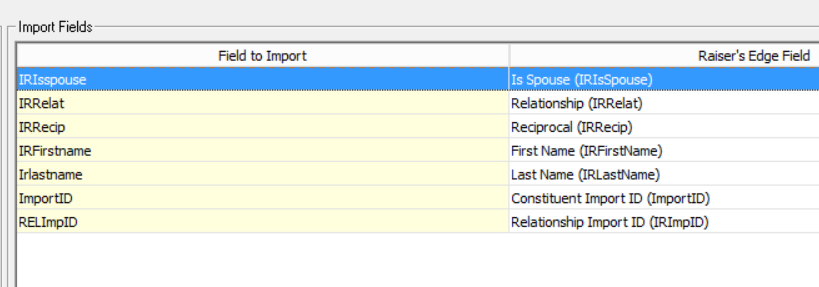
Hope this helps.
3 -
No. I have not tried to use the import function, but it seems that might be my only option. I will look at the tips offered to see what works for me.
Thank you for taking time to help with my issue.0 -
Mark: It seems an Import is my only option. I'm going to give this a try. Will post how it worked. Thank you for your assistance.
1 -
In my experience the relationship/reciprocal data has no connection to the spouse checkbox. You can have relationships identified as spouse, no data or any text you want in those fields. I wouldn't mess with those fields unless you are okay with removing that data.
I think an import to update records should work. I'm surprised that the reverse of the link that @Larry Wheeler provided doesn't do it.
0 -
I was successful in removing the check from “is spouse” box on the relationship tab by performing an IMPORT to update existing records. HUGE thank you to Mark and Larry for pointing me in that direction, and especially to Mark for providing me the specific info I used for the query and import. This is what I did:
I created a “Constituent” – Static query to gather the records I wanted to update.
Criteria:

Output:
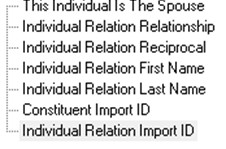
I exported the file.
Column headings from the export were changed
From:

To:

I changed the values in the columns as follows:
IRIsspouse = NO
IRRelat = Spouse
IRRecip = Spouse
IRFirstName = (leave as is)
IRlastName = (leave as is)
ImportID = (leave as is)
IRImpID = (leave as is)
Then I saved the file as CSV.
Next, I performed an IMPORT to update existing records. Type of Import: Constituent > Individual Relationship
(General)
What do you want to do? Update existing records
What file do you wish to import? Selected the saved CSV file
How do you want the system to identify existing constituents? Use the import ID
(File layout)
What is the format of this import file? Delimited
Field Separators and Text Qualifiers: Comma - Quotation
(Fields)
** I left as the program loaded them:
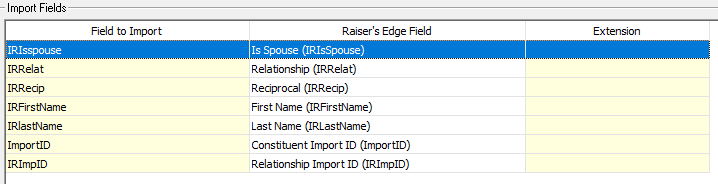
(Summary)
You can mark as you prefer. I always create a control report, but good idea to also create an output query of updated records.
4 -
Great job, Susan.
1 -
Thank you for sharing very specific directions Susan. What a sense of accomplishment to get this done!0














Categories
- All Categories
- 6 Blackbaud Community Help
- 213 bbcon®
- 1.4K Blackbaud Altru®
- 403 Blackbaud Award Management™ and Blackbaud Stewardship Management™
- 1.1K Blackbaud CRM™ and Blackbaud Internet Solutions™
- 15 donorCentrics®
- 360 Blackbaud eTapestry®
- 2.6K Blackbaud Financial Edge NXT®
- 656 Blackbaud Grantmaking™
- 577 Blackbaud Education Management Solutions for Higher Education
- 3.2K Blackbaud Education Management Solutions for K-12 Schools
- 939 Blackbaud Luminate Online® and Blackbaud TeamRaiser®
- 84 JustGiving® from Blackbaud®
- 6.6K Blackbaud Raiser's Edge NXT®
- 3.7K SKY Developer
- 248 ResearchPoint™
- 119 Blackbaud Tuition Management™
- 165 Organizational Best Practices
- 241 Member Lounge (Just for Fun)
- 34 Blackbaud Community Challenges
- 37 PowerUp Challenges
- 3 (Open) PowerUp Challenge: Grid View Batch
- 3 (Closed) PowerUp Challenge: Chat for Blackbaud AI
- 3 (Closed) PowerUp Challenge: Data Health
- 3 (Closed) Raiser's Edge NXT PowerUp Challenge: Product Update Briefing
- 3 (Closed) Raiser's Edge NXT PowerUp Challenge: Standard Reports+
- 3 (Closed) Raiser's Edge NXT PowerUp Challenge: Email Marketing
- 3 (Closed) Raiser's Edge NXT PowerUp Challenge: Gift Management
- 4 (Closed) Raiser's Edge NXT PowerUp Challenge: Event Management
- 3 (Closed) Raiser's Edge NXT PowerUp Challenge: Home Page
- 4 (Closed) Raiser's Edge NXT PowerUp Challenge: Standard Reports
- 4 (Closed) Raiser's Edge NXT PowerUp Challenge: Query
- 794 Community News
- 2.9K Jobs Board
- 54 Blackbaud SKY® Reporting Announcements
- 47 Blackbaud CRM Higher Ed Product Advisory Group (HE PAG)
- 19 Blackbaud CRM Product Advisory Group (BBCRM PAG)