JE Batch Import Add-In





About a week ago, my Excel JE Batch Import Add-In stopped working. It no longer allows me to sign in, and instead gives me a message that “this website doesn't work in Internet Explorer”. It goes on to say that IE-11 will be retired on 6/15/22. and that these sites can still be used now by opening them in Microsoft Edge with Internet Explorer mode. Huh? I'm just an accountant that needs to be able to upload her JEs from Excel into FE. Has anyone had this problem? Now I'm having to upload my JEs via database, and it takes about 10 times longer, plus it's a little finicky sometimes. I need my Excel Add-In!! Help!
Comments
-
Mine add-in stopped working today, 11/16/2021. Going to Support did not help much. I use Chrome and we are also a Google Gmail institution.. I've had trouble from time to time with it, but I lost an afternoon of productivity today. Support says its an MS Office issue with Excel 16 maybe not working with Chrome or an update occurred that may have disrupted its functioning. They suggested clearing cache and cookies,, refreshing browser. My attempt to use the add-in results in being redirected out of my regular Chrome browser to IE and another redirect to MS Edge and a prompt to login to Google. The result . Nothing good. My IT guy is also stumped. He thinks an up to Excel 2019 might be an option. I think we coukd uninstall the add in and ckwar cookies cache and start over wby adding it again might work. Sonething seems to be blocking the ability to sign in with the add-in. If you discover a solution, please post it here.
0 -
We do not use the add-in to import journal entries. We have a template in the DB view that we can upload a csv file into a journal entry.0
-
I've had to resort to this method (CSV file upload to DB) now that my excel add in isn't working, but the DB method is so clunky. The excel add in is quite slick and now I'm spoiled.
0 -
Beth, you are describing my situation exactly! We are also a Google institution, so I use Google Chrome. I'm so frustrated. It's taking me 5 times longer to do things now, and so far my I.T. guy is stumped too. We do use Excel 2019, but we are still having this problem. I'm desperate for a solution.
0 -
Same. We were successfully using Excel Batch JE for several months. Received an update message and after update now get the same “Internet Explorer” error even though Chrome is default browser. Try adding on to second PC and environment (licensed user) and still get same error message. The CFO says this add-on is still working on her laptop. Interesting.
0 -
I believe it was an update of some kind in other products that stopped it's functionality, possible an Internet Explorer or MS Edge update trying to hijack the default browser. I don't know but I am beyond frustrated. It was good Monday, but Tuesday it wasn't. I had some other odd thing happen with an update that day too. I noticed there was an app update dated yesterday. Maybe there is a bug in it. Blackbaud support directs it to an office.com issue. I had the environment admin disconnect it in marketplace and then reconnect it. I got rid of it in Excel 2016 before that. Then when he added it back, I still have the same issues.0
-
Same thing here…when my employee contacted BB, she was told she had an unsupported version of Excel. But that wasn't the case. I tried to remove and reload the add-in without success. Hopefully someone from BB will see all of these messages and jump in. We have come to rely upon this functionality for some of our work that requires a lot of front end analysis before we book entries.
1 -
Dale, Would you ask the CFO if her laptop uses the 365 application for Excel? All the research I have been doing on the Microsoft Office Add-Ins and browsers indicates there is a compatibility issue. I think it's multi-pronged problem. Operating system, browser, and type of Office product.
0 -
I found info that pointed to that issue as well. We use a non-subscription 2019 version with Windows 10 as our operating system. It seemed to me that the only solution might be to upgrade our version of Microsoft Office? Not sure.
0 -
We use Professional Plus 20160
-
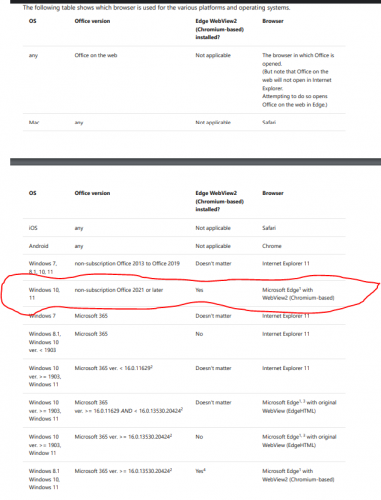
This is the table I found that made me think we needed to upgrade our Microsoft Office to 2021.
 0
0 -
Here's the link to that table.
Here's the link to that table.media widget
CancelPost
0 -
I do too. It's still broke. It is odd that your cfo's add-in still works. I wonder if her updates are disabled. There was some kind of update that happened with my desktop on Monday after the last successfully use of the ADD-In.
0 -
I have posted a note on my support case requesting a very specific recommendation about optimal office product and browser combination based on Windows 10 operating system (my system). If others aren't getting resolved, I am sure there is a bug. There was a note in all my reading the support stopped for Internet Explorer based on which app was being used and it could cause functionality of Office Add-Ins to stop working. (if I am understanding that documentation correctly).
0 -
What operating system is being used on the computer that Excel 2016 stopped working?
0 -
Also, please find out what operating system is on your CFO's laptop, if you are able.
0 -
I just received this response to my support case:

So, it looks like a different browser or a different Office version is necessary to make it work on Windows 10. My the table that they sent me. Windows 10 appears to need MS Edge and Office 21 with Webview2 also installed.
1 -
That's how I read it too. I do have Microsoft Edge, but it's not my default browser. I guess I'll have to upgrade my Microsoft Office.
Thanks for passing on this info!0 -
Maybe your IT person can enable the WebView2 also if not already done. Good luck.
0 -
good idea to try that first. Thanks.0
-
We are in the exact same situation. Have you determined if the update to Microsoft Office 2021 will fix the issue?
0 -
I had Office 2021 installed and mine works now! I had to “Re-add” the add-ins though.
1 -
Thank you. I am assuming your are Windows 10 or higher? Do you use Chrome or MS Edge?
0 -
Yes, we use Windows 10. Chrome is my default and I do have MS Edge is installed.0
-
Yes, I have Windows 10 and am using Chrome as my default web browser.1
-
One other quick question. When you insert the add-in within Excel, does it route sign in to connect it through MS Edge or Chrome?
0 -
I asked my IT guy if he knows and he's not sure. He said all he did was remove Internet Explorer 11 then update to the 2021 Version of Office.1
-
In this thread, Crystal Brown indicates that Office 2021 restored functionality of the add-in. I have not attempted an upgrade of Office yet. Hope to do that tomorrow when the IT guy is back and can observe all the events that occur. I will post an update as soon as I have any new information. Thank you all for all the feedback.
0 -
Hi everyone - I'm following this post and having the same issue. Is upgrading to office 2021 working for everyone?
Heads up to anyone using the Budget Uploader add-in: it's also not working for the same reason. I get the same message. Interestingly, these add-ins are still working on my home computer, which runs the same versions of Office 19 and Windows as my work computer.
0 -
The last info I had in this forum was that Office 2021 worked. The key is having the correct combination of Windows/Mac operating system and Excel version to work together to make the add-ins enable you to sign into Blackbaud and authorize it to pop in that worksheet to an Excel workbook. My institution is waiting on Microsoft to release of the perpetual license for Office 2021 to our software vendor (Scholar Buys / Open Academics). When you have a lot of users, MS Office in any version can get expensive. The Office 2021 subscription is a one time purchase and will eventually lose it's support. I wanted to give 365 a try just to see if it would solve the problem. It seems to work. This is what I know and what I have tested in my case that has been successful: Windows 10 operating system combined with Microsoft 365 with the JE Creator Add-On worked successfully in Chrome. There is a push by Microsoft to use MS Edge, but in my case Chrome worked with Microsoft 365 Excel with the Blackbaud JE add-in. You can find the source documentation on Microsoft website that speaks specifically about Office Add-Ins. It's somewhere in this discussion thread or my support case. I'll repost it. It does not specifically address the Blackbaud Add-Ins but it is relevant since these are Microsoft type Add-Ins. You may need to upgrade to Microsoft Office 2021 (per documents it needs to be non-subscription version or later) OR go with the Microsoft 365. I have a feeling the desktop Office 2021 would work. Might want to check all that out with your IT guy regarding the subscription/non-subscription/perpetual licensing.
Using a different browser (Edge) did not work for me. I was using Office Excel 2016 to attempt it again but it did not work. I do not believe Internet Explorer will work with Blackbaud or this add-in at all. If you are having troubles related to the browser, see the the information about browser support ending for Internet Explorer with Blackbaud.
Here is the source link relevant to the PC operating systems, Office Version, Browser combination that will help you solve the problem for your specific situation with the add-in.
0








Categories
- All Categories
- 6 Blackbaud Community Help
- 213 bbcon®
- 1.4K Blackbaud Altru®
- 401 Blackbaud Award Management™ and Blackbaud Stewardship Management™
- 1.1K Blackbaud CRM™ and Blackbaud Internet Solutions™
- 15 donorCentrics®
- 360 Blackbaud eTapestry®
- 2.6K Blackbaud Financial Edge NXT®
- 655 Blackbaud Grantmaking™
- 576 Blackbaud Education Management Solutions for Higher Education
- 3.2K Blackbaud Education Management Solutions for K-12 Schools
- 939 Blackbaud Luminate Online® and Blackbaud TeamRaiser®
- 84 JustGiving® from Blackbaud®
- 6.6K Blackbaud Raiser's Edge NXT®
- 3.7K SKY Developer
- 248 ResearchPoint™
- 119 Blackbaud Tuition Management™
- 165 Organizational Best Practices
- 241 Member Lounge (Just for Fun)
- 34 Blackbaud Community Challenges
- 34 PowerUp Challenges
- 3 (Open) PowerUp Challenge: Chat for Blackbaud AI
- 3 (Closed) PowerUp Challenge: Data Health
- 3 (Closed) Raiser's Edge NXT PowerUp Challenge: Product Update Briefing
- 3 (Closed) Raiser's Edge NXT PowerUp Challenge: Standard Reports+
- 3 (Closed) Raiser's Edge NXT PowerUp Challenge: Email Marketing
- 3 (Closed) Raiser's Edge NXT PowerUp Challenge: Gift Management
- 4 (Closed) Raiser's Edge NXT PowerUp Challenge: Event Management
- 3 (Closed) Raiser's Edge NXT PowerUp Challenge: Home Page
- 4 (Closed) Raiser's Edge NXT PowerUp Challenge: Standard Reports
- 4 (Closed) Raiser's Edge NXT PowerUp Challenge: Query
- 791 Community News
- 2.9K Jobs Board
- 53 Blackbaud SKY® Reporting Announcements
- 47 Blackbaud CRM Higher Ed Product Advisory Group (HE PAG)
- 19 Blackbaud CRM Product Advisory Group (BBCRM PAG)