Attachments in RE NXT vs RE Database





Our organization used to add all attachments to the MEDIA TAB in the database view. There you also had an area to add a description for the attachment. Now with the change, you cannot see the attachment in the database view and while it migrates over to the NXT attachments…there you cannot see or add a description.
How are people handling this change? I was going to just start adding any attachments in NXT, but they don't migrate back to the database view and there is no area to add a description (additional information about the attachment).
Comments
-
Would the Tags field work for your description need?
0 -
I do use tags, however, there are situations in which we need a longer description.
0 -
@blackaud - will the description in database view eventually migrate over to NXT?
0 -
We use PaperSave for attaching our documents to the Constituent records. It works with gifts, events, actions and other areas within RE.
1 -
@Kathy Riske - I recommend you continue your current business process of adding Media through DBV. As you mentioned, you can view it either by downloading it to your computer via DBV or opening it directly from WV. Here is a helpful article on how often data refreshes (syncs) between views -
3 -
@Austen Brown - thank you for that information.
1 -
We use the database view and would like to use the media tab. To open attachments you have to export them which negates using this tab since we would have to export back to where we had them originally. This is very frustrating as we moved to NXT so we could utilize the media tab for documents.
1 -
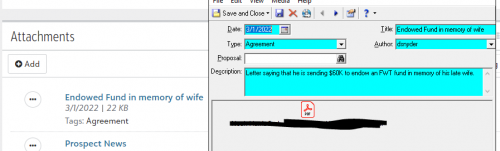
I agree with @Austen Brown to keep uploading in database view. I also am adding a screenshot with a media tab record next to the listing in attachments. We ended up making the title field required because that is what shows up in the attachment link in webview with the Type field in database view mapping to tags in webview.
 9
9 -
If you start using attachments in Webview then you have to merge your records in Webview or the attachments will be lost. Webview does not have the option to delete the second record during the merge and must be done seperately.
1 -
Seconding – or thirding – the recommendation to retain files in database view. The fact that webview does not transfer over to db view has major repercussions. It means that you
- cannot retrieve lost files during a data backup
- cannot perform a query on said records (ie, query: all donors with Planned Giving media files)
- can therefore not perform any data analysis on said attachments (ie, what ratio of donors have documented pledge contracts?)
- cannot export any info on said files if you ever chose to transfer data to a different platform
- cannot import any data, such as correcting titles, authors, dates, etc.
In other words, in webview you have NO data management capacity for attachments. They are really only useful for users who look up one donor record at a time – like Major Gift Officers.
3 -
9 out of 10 times, we just need to view the file. Going through the process of downloading is time consuming and creates a lot of file clutter. Why aren't we able to just view without saving to a location?
3 -
Hi @Diana Gray - The change has to do with the recent loss of Microsoft Office's integration in Database View. Check out the FAQ linked below for more information on this change and its impacts.
0 -
Thanks, Austen. But what about pdf's? All of our media tab data are in this format. It seems like we should be able to have a quick view without having to download and save somewhere.
1 -
Unfortunately, when BB made the update to the Media Tab in Patch 27 they decided to include PDFs in the change. See this KB Article for more info:
0 -
It is too time consuming to have to export items in the media tab so that you can see them. There is no point to storing items here if you can't easily access them. This truly is frustrating and should be fixed.
1 -
Hi @Sharon Hannaby - Welcome to BB Community! I recommend that you continue to add media attachments to the database via database view, see @Faith Murray's comment below for reasons why. As an alternative, you can open these files directly within Web View.
0 -
I think I've gone in the opposite way of many--we are extensively attaching media to records that cannot have media attached in database view (hello gift records!), and we are encouraging to the point of requiring people who are not on the gift entry team to use webview. So we have migrated our attachments over to webview.
A couple caveats:- These file being attached also live in dedicated spots on our server. If the worst happens, PDFs won't be our crisis (because if the worst happens, we are already dealing with another crisis).
- Sometimes this means that our gift entry team needs to have a webview window open to see, say, a grant proposal or something to verify restrictions, because we absolutely cannot add gifts in webview until they finish building this part of the tool.
0 -
As long as all tasks cannot be handled in NXT, including all operations tasks, it doesn't make sense to me to use NXT as the “database of record.” NXT is not, at this point, a replacement for the database view. Therefore we are entering attachments in the media tab in the database view, so they can be viewed in both. (Before we knew that NXT attachments wouldn't show up in database view, we attached dozens in NXT which now we can't see in DB view. A problem since many of these attachments are gift agreements and other documents pertaining to pledges that operations staff need to see.) This is one of the worst features of NXT.
0





















Categories
- All Categories
- 6 Blackbaud Community Help
- 211 bbcon®
- 1.4K Blackbaud Altru®
- 402 Blackbaud Award Management™ and Blackbaud Stewardship Management™
- 1.1K Blackbaud CRM™ and Blackbaud Internet Solutions™
- 15 donorCentrics®
- 360 Blackbaud eTapestry®
- 2.6K Blackbaud Financial Edge NXT®
- 656 Blackbaud Grantmaking™
- 577 Blackbaud Education Management Solutions for Higher Education
- 3.2K Blackbaud Education Management Solutions for K-12 Schools
- 941 Blackbaud Luminate Online® and Blackbaud TeamRaiser®
- 84 JustGiving® from Blackbaud®
- 6.7K Blackbaud Raiser's Edge NXT®
- 3.7K SKY Developer
- 248 ResearchPoint™
- 120 Blackbaud Tuition Management™
- 165 Organizational Best Practices
- 240 Member Lounge (Just for Fun)
- 34 Blackbaud Community Challenges
- 37 PowerUp Challenges
- 3 (Open) PowerUp Challenge: Grid View Batch
- 3 (Closed) PowerUp Challenge: Chat for Blackbaud AI
- 3 (Closed) PowerUp Challenge: Data Health
- 3 (Closed) Raiser's Edge NXT PowerUp Challenge: Product Update Briefing
- 3 (Closed) Raiser's Edge NXT PowerUp Challenge: Standard Reports+
- 3 (Closed) Raiser's Edge NXT PowerUp Challenge: Email Marketing
- 3 (Closed) Raiser's Edge NXT PowerUp Challenge: Gift Management
- 4 (Closed) Raiser's Edge NXT PowerUp Challenge: Event Management
- 3 (Closed) Raiser's Edge NXT PowerUp Challenge: Home Page
- 4 (Closed) Raiser's Edge NXT PowerUp Challenge: Standard Reports
- 4 (Closed) Raiser's Edge NXT PowerUp Challenge: Query
- 796 Community News
- 3K Jobs Board
- 54 Blackbaud SKY® Reporting Announcements
- 47 Blackbaud CRM Higher Ed Product Advisory Group (HE PAG)
- 19 Blackbaud CRM Product Advisory Group (BBCRM PAG)