Student Checklists





Hi all, Has anyone implemented student checklists for incoming students? I am hoping to implement this year and have been testing them out. So far on my list, I have a few school forms (transportation form, grandparent form), health forms, emergency alert sign up, etc. Would love to hear examples of what you have in your checklist and any hiccups you may have encountered. Thanks! Ashley
Comments
-
Hi Ashley, I will be using the student checklist for the Health Form only, since it also requires parents upload forms. I have not tried this yet so I am starting with the one department. I will follow what people have to say. Thanks for starting this thread! Coco
1 -
One hiccup in our planning process was that we do not provision incoming students their school email addresses or K12 logins until later in the summer, so we need to address all steps and forms to parents even if we'd like students to sign them. The other issue is having a digital AUP, where we run into basically the same issue. We haven't given them access to the system yet, and ideally they would sign the AUP before we hand them the keys to the proverbial castle. Looking forward to seeing how other schools utilize the student checklists!
2 -
Hi @Ashley Foltiny - we use them to collect athletic participation forms required by the Florida High School Athletic Association. These forms used to get emailed to the athletic trainer but now we assign the form to all the students so they can go ahead and upload them.
One thing that, I wish existed was the ability for parents to decline the checklists as they can do for school forms. Not, all students participate in athletics and the banner continues to appear for them until we inactivate the checklist or remove the student from it.
I put an idea in the bank for this if you'd like to vote for it -
1 -
Hi Ashley,
I started using them for both returning and incoming students last year. It makes it so much easier to just assign a checklist rather than individual forms. Especially when you have the one-off over the summer enrollments. I'm attaching an example of all of the checklists I use and also, an example of one checklist with the forms
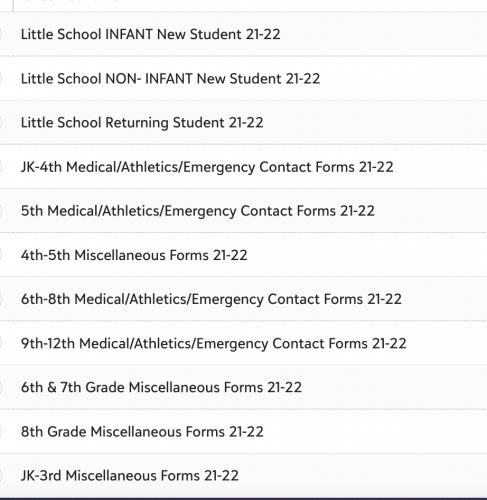
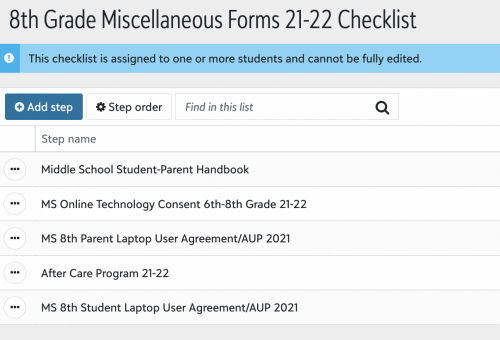
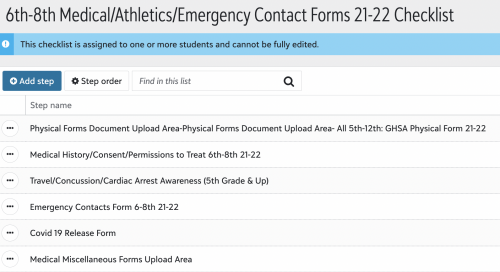 4
4 -
For candidates → incoming students, our current model has three phases.
The first phase is the EMS checklist, which gets the candidate through having their contract submitted. Once the contract has been processed, and the deposit received, they are enabled to the second phase (still in the EMS checklist). This phase has some Admissions oriented business, such as I-20 applications. Once the second phase is completed, then the candidate is available to be enrolled, and promoted to incoming student, at which point they are given access to phase three - the student checklist.
The third phase is where departments outside of EMS (Admissions) can have their respective school forms made available to the families. We have a few temporal requirements, such as a checklist step associated with the medical forms, that have to be completed within a specific time window, so those constraints are controlled within the checklist step due dates. Athletic forms, Academic forms and a link to our medical database are all presented through the student checklist for the family to work through before arriving on campus in the fall.
1 -
We give our Upper School students their email address before the start of school, but for Middle schoolers, we go over the AUP and handout laptops in person and have their login information for them at that time. Then they sign the AUP.
0 -
Coco,
I would suggest having a blank medical form or two so the parents can upload additional forms if needed. Once they upload say just the physical, and submit the form that is it.
Also, within the form, give multiple upload areas for the people that will upload separate pages.
Otherwise the form upload situation can turn into a nightmare.
2 -
Hi, Ashley. I highly recommend Student Checklists! Like, some of the others, I have different checklists for each group since there are differences in the forms they need to complete: New Students, Returning Students, Infant Program. Below is an example of our New Student Checklist and the types of forms used. I always date the checklists because once you assign a checklist, it can't be fully edited! The changes you are able to make will apply to everyone who has that checklist. We have rolling admissions, so I have new students all year long. When I really need to make a change to a checklist that I don't want to apply to everyone (as I did when we instituted Test and Stay), I make a copy of the checklist, add the date to the title, update the list, and use the new list going forward.
Being able to see who has and hasn't submitted forms and export all the information from the forms is invaluable.
I'm relatively new to K12, and there is still some functionality that I haven't figured out with regard to the Student Checklists (ie. due date nuances, resubmit feature), but I did learn this:
- When you create your forms, be sure to indicate one or two signatures required in the Signature Block. The default is two signatures. I typically only require 1. If you forget to change this block on a form and only one parent signs, the form status remains "Started," and the parents may continue to get reminders that they have an incomplete form. There is a "bulk complete" option for Student Checklist Steps, but without looking at each form individually, there's no way to know whose forms are truly ready to be submitted.
Best of luck!Linda
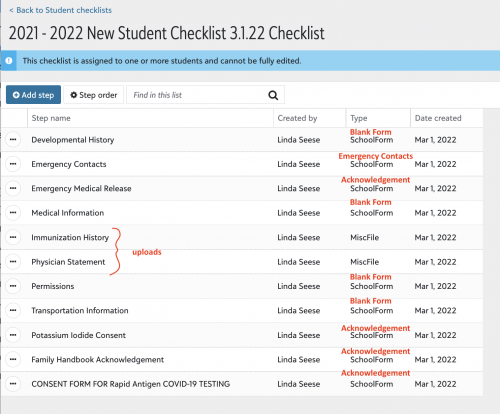 4
4 -
Josceline,
Thank you so much for the tip! I am going to meet with our nurses to make sure do that!
0 -
Thanks so much! Question about the link to your medical portal – I want to do that too, but how do you mark that step complete? Does your nurse go in and do that? We have a few tasks like that that I want people to complete but not sure how I would track that – Ex: linking people to our alert system to review their info. I don't necessarily know if they did review it if I just include a link.
0 -
So currently, we kind of have an issue with this. It used to be the Athletic Trainer that would collect the physicals and mark them off, but we have new trainers and new nurses and the process seems to have hit a speed bump. We have a new Director of Athletics coming in and hope to refine the process this year.
One down fall of the BBK12 system is that there isn't a notification that comes in with someone uploads the physical or other medical forms. The other issue, is that our parents like to email or drop off the forms and then we do no have a way to upload them to the nurse module.
Really hoping BBK12 gets on this soon.
1 -
For what it's worth, we use a dedicated platform (Magnus) to manage all of the medical forms, so there is only a link assigned to the student checklist that points the family to the portal. The step has type General, and contains the URL for the portal. (The Magnus system is integrated with BB K/12, so the family's record data is preserved across both platforms.)
One aspect of the checklist that I use is the ability to disable the checklist item. Because many of the medical forms are only valid for 12 months, I keep the checklist item to the medical portal disabled until late in the summer. That prevents parents from filling out the forms too early, and having them expire.
2 -
Question about using checklists with school forms… We have a number of school forms (located in Core and Academics) that parents and students complete. If we use a checklist to list the required school forms, does the system automatically mark the checklist step as completed when that particular school form is completed or does someone manually have to mark the completed school forms on the checklist? Thank you for any information you can provide.
0 -
@Sondra Berry checklist step with school forms complete when form is submitted. We love student checklist and now with the option to “Decline” forms that are optional - parents are able to complete a multiform student checklist. Our Back to school Paperwork checklist contains 9 forms and it's awesome to bulk assign the student checklist instead of having to load recipients on the forms. Hope this helps!
0 -
@Kathy Hannon that DOES sound wonderful! We gather so much information and documentation that I think checklists could be a solution. Thank you!
0 -
@Kathy Hannon (or anyone else who may have insight
 ) - I have found that our school or K12 medical forms that have the Decline option, don't necessarily get marked as Completed on the Checklists so have left optional forms off my checklists. Linda did mention that the signature block needs to only require 1 signature however, the school or medical forms that I'm referring to don't have the parent signature block included on the form at all. Anyone else run into the issue of a Declined form not being marked as complete on a checklist? (May run a test if I have time to see if I add the parent signature block, with 1 signature, if that solves the problem.)0
 -
@Mary Stanton we don't allow Decline on Medical forms but this is our 1st year giving the Decline option for a couple of our back to school forms so I too will be interested if they complete the checklist. I am thinking it won't now - school forms don't consider a Decline as a submission - hmm might have to rethink setting this option for Student Checklists. Thanks Mary
0 -
I don't believe if you set “Yes" for ”Allow user to decline form"? and the form is on a checklist it allows the user to decline it.
0 -
The parent can go to their Files & Forms and decline them; however, we are having major issues with the checklists right now
 . They are not working correctly. Developing engineers are working on our case.0
 -
@Kathy Hannon can you help me get started with checklists for RETURNING students? Do I still create the checklist in the Enrollment module? Is the checklist setup the same as what is done for candidates? Once assigned, where does the checklist appear for current parents? On their landing page? Resource Board? Somewhere else? Any information you can provide is VERY much appreciated!
0 -
@Josceline Reardon has the problem with the checklists been fixed for your school yet? I don't want to implement something that isn't working. Thank you!
0 -
@Josceline Reardon has the problem with the checklists been fixed for your school yet? I don't want to implement something that isn't working. Thank you!
Not to butt in, but no, the problem has not been fixed (we are having the same problems that Josceline is). It's been kind of a mess. In most cases, we have forms completed, but the checklist says they aren't finished, and it's led to a million emails. If you go ahead and implement them, be ready to explain to parents that the status will not update when a form is completed, in all likelihood. They will need to go to Files and Forms to confirm that the forms have been completed.
To answer your other question, yes, you will set up returning student checklists in Enrollment Management as well. Parents will access the checklist by clicking on the link in the yellow bar at the top of the page when they log in.
1 -
@Brian LeBlanc We have a fix for this going out next week on Tuesday.
@Sondra Berry here are some links you might find helpful.
Webinar:
Documentation:
2 -
We are using student checklists now and have fortunately had NO issues - all is running smoothly
0 -
@Sarah Bienvenue thank you! The webinars will be very helpful and I'm glad to hear there is a fix coming soon.
1 -
@Brian LeBlanc We have a fix for this going out next week on Tuesday.
Hooray - thank you!!!!!!!
0 -
@Sarah Bienvenue we are still having issues, where forms that were submitted during the window of all of the checklist issues, are still not marked as complete. The parent then trys to click on the form and it says there is an error, but then when you go to the actual form and look to see who has submitted the forms, they were submitted in late May and early June. So then we have to manually go to the checklist tab to mark as complete.
0 -
@Sarah Bienvenue we are still having issues, where forms that were submitted during the window of all of the checklist issues, are still not marked as complete. The parent then trys to click on the form and it says there is an error, but then when you go to the actual form and look to see who has submitted the forms, they were submitted in late May and early June. So then we have to manually go to the checklist tab to mark as complete.
Same here - did this fix actually go out or was it pulled back for some reason?
0 -
@Sarah Bienvenue, sorry that this may be a question about an old thread, but if I setup a school form as not required and give parents the ability to “decline” the form and then assign that form to a student checklist step, is the parent able to decline the form from the student checklist? I could be wrong, but it seems like accessing the form from the checklist goes directly to the form and doesn't make it obvious that you can decline. (If the parent goes to the files and forms screen, then a decline button next to the form makes it obvious.) I also seem to recall that parents that decline a form from the files and forms screen still have an associated student checklist item that stays awaiting. Is that correct or am I setting up something wrong?
0 -
Hi @Geoffrey Goodfellow - from the checklist they can decline the form as seen below.
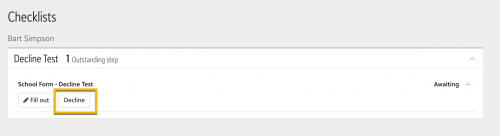
However, the checklist will continue to show “Awaiting” if it has a form on it that the parent declined. There is an idea about this in the bank https://blackbaudk12.ideas.aha.io/ideas/K12OB-I-2406
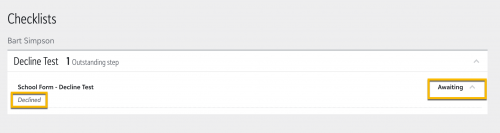
FYI - Sarah is no longer with Blackbaud @Kelsey Huijgen is now the Product Manager for EMS
0





















Categories
- All Categories
- 6 Blackbaud Community Help
- 213 bbcon®
- 1.4K Blackbaud Altru®
- 402 Blackbaud Award Management™ and Blackbaud Stewardship Management™
- 1.1K Blackbaud CRM™ and Blackbaud Internet Solutions™
- 15 donorCentrics®
- 360 Blackbaud eTapestry®
- 2.6K Blackbaud Financial Edge NXT®
- 656 Blackbaud Grantmaking™
- 576 Blackbaud Education Management Solutions for Higher Education
- 3.2K Blackbaud Education Management Solutions for K-12 Schools
- 939 Blackbaud Luminate Online® and Blackbaud TeamRaiser®
- 84 JustGiving® from Blackbaud®
- 6.6K Blackbaud Raiser's Edge NXT®
- 3.7K SKY Developer
- 248 ResearchPoint™
- 119 Blackbaud Tuition Management™
- 165 Organizational Best Practices
- 241 Member Lounge (Just for Fun)
- 34 Blackbaud Community Challenges
- 34 PowerUp Challenges
- 3 (Open) PowerUp Challenge: Chat for Blackbaud AI
- 3 (Closed) PowerUp Challenge: Data Health
- 3 (Closed) Raiser's Edge NXT PowerUp Challenge: Product Update Briefing
- 3 (Closed) Raiser's Edge NXT PowerUp Challenge: Standard Reports+
- 3 (Closed) Raiser's Edge NXT PowerUp Challenge: Email Marketing
- 3 (Closed) Raiser's Edge NXT PowerUp Challenge: Gift Management
- 4 (Closed) Raiser's Edge NXT PowerUp Challenge: Event Management
- 3 (Closed) Raiser's Edge NXT PowerUp Challenge: Home Page
- 4 (Closed) Raiser's Edge NXT PowerUp Challenge: Standard Reports
- 4 (Closed) Raiser's Edge NXT PowerUp Challenge: Query
- 793 Community News
- 2.9K Jobs Board
- 54 Blackbaud SKY® Reporting Announcements
- 47 Blackbaud CRM Higher Ed Product Advisory Group (HE PAG)
- 19 Blackbaud CRM Product Advisory Group (BBCRM PAG)