Power BI Connector - PowerBI opening sign in to Blackbaud in unsupported browser




I've created the Power BI Connector and am in Power BI trying to “get Data” from my connector. I choose the Blackbaud connector and then I get a pop up that is titled “Connect to your Blackbaud Environment” and it has a “Sign In" button. When I click that I get a browser pop up like this
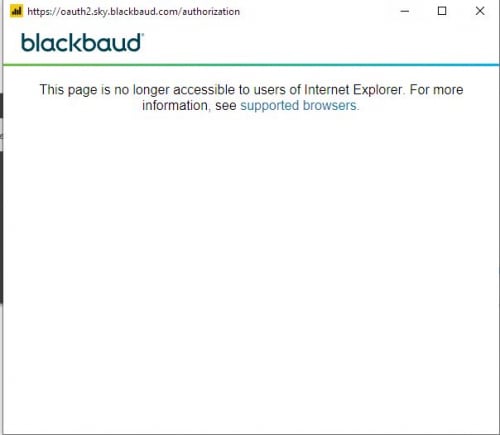
I've tried setting my default browser to Chrome, and also Firefox and Edge. Nothing works. I've made sure to uninstall Internet Explorer and reboot. But I still get this message. Does anyone know what to do? Thank you!
Comments
-
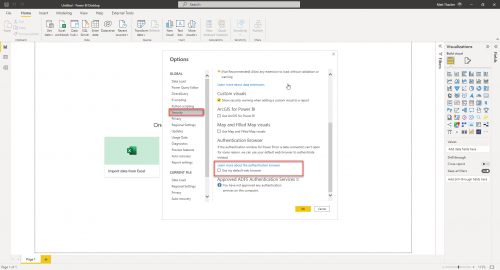
Hey @Kristen Hallock, in your settings of your Power BI Desktop, go to Options and settings => Options and on the Security tab toward the bottom, there will be a box you can click to use your computer's default browser for OAuth connection.
 1
1 -
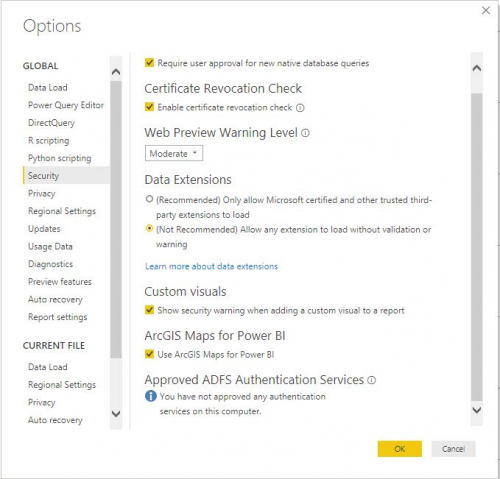
@Matt Thacker Hi Matt. I'm having trouble seeing your screenshot, the picture is just a little too small for me to read clearly, but I dont think I have the same options when I click on the Security tab. Here's what mine looks like, although I have this “Approved ADFS Authentication Services” thing at the bottom - maybe thats the issue? I am not sure how to approve an authentication service.
 0
0 -
I went out and got the latest Power BI Desktop download and re-installed it and now I am seeing the option that you pointed out. I clicked that and then tried using my Blackbaud Connector in Power BI and its working now. Thank you!!!
1 -
@Kristen Hallock @Matt_Thacker
Great post, very helpful thanks. For anyone else reading this I didn't reinstall Power BI as I already had the option - but it wasn't working (same error message). In the end I did reinstall it… and the magic happened - it worked!
0







Categories
- All Categories
- 6 Blackbaud Community Help
- 211 bbcon®
- 1.4K Blackbaud Altru®
- 402 Blackbaud Award Management™ and Blackbaud Stewardship Management™
- 1.1K Blackbaud CRM™ and Blackbaud Internet Solutions™
- 15 donorCentrics®
- 360 Blackbaud eTapestry®
- 2.6K Blackbaud Financial Edge NXT®
- 656 Blackbaud Grantmaking™
- 577 Blackbaud Education Management Solutions for Higher Education
- 3.2K Blackbaud Education Management Solutions for K-12 Schools
- 941 Blackbaud Luminate Online® and Blackbaud TeamRaiser®
- 84 JustGiving® from Blackbaud®
- 6.7K Blackbaud Raiser's Edge NXT®
- 3.7K SKY Developer
- 248 ResearchPoint™
- 120 Blackbaud Tuition Management™
- 165 Organizational Best Practices
- 240 Member Lounge (Just for Fun)
- 34 Blackbaud Community Challenges
- 37 PowerUp Challenges
- 3 (Open) PowerUp Challenge: Grid View Batch
- 3 (Closed) PowerUp Challenge: Chat for Blackbaud AI
- 3 (Closed) PowerUp Challenge: Data Health
- 3 (Closed) Raiser's Edge NXT PowerUp Challenge: Product Update Briefing
- 3 (Closed) Raiser's Edge NXT PowerUp Challenge: Standard Reports+
- 3 (Closed) Raiser's Edge NXT PowerUp Challenge: Email Marketing
- 3 (Closed) Raiser's Edge NXT PowerUp Challenge: Gift Management
- 4 (Closed) Raiser's Edge NXT PowerUp Challenge: Event Management
- 3 (Closed) Raiser's Edge NXT PowerUp Challenge: Home Page
- 4 (Closed) Raiser's Edge NXT PowerUp Challenge: Standard Reports
- 4 (Closed) Raiser's Edge NXT PowerUp Challenge: Query
- 796 Community News
- 3K Jobs Board
- 54 Blackbaud SKY® Reporting Announcements
- 47 Blackbaud CRM Higher Ed Product Advisory Group (HE PAG)
- 19 Blackbaud CRM Product Advisory Group (BBCRM PAG)