Luminate Online Enablement: Designing and Sending Luminate Online Email Just Got Easier





We're not kidding... it really is here! The NEW Luminate Online Email is here!
- Get a demo of the new email and learn what it can do today
- See how you can still use the old email tool in conjunction with the new email
- Learn more about future plans for Luminate Online Email
Session Slides: Designing and Sending Luminate Online Just Got Easier.pdf
New Luminate Online Email Demo: New LO Email Demo.mp4
Comments
-
@Kent Gilliam Questions about the responsive stationery. So, we cannot build a responsive header/footer stationery for the new email? Do we have to use the “blank responsive” option and then build the header and footer within the email tool each time?
I have a responsive stationery that I created for the current email tool from the template that was supplied and only use the responsive email templates from the kit, as we want every email that we send to be fully mobile responsive. It was not clear if I could use this stationery in the new tool or if I can only use the blank responsive option in the new tool in order to have a fully responsive email.
Thanks!!
0 -
@Martha Barbary You can use responsive stationery. I believe the default width for the content in the new experience is 640px. You'll want to make sure you're designing to that width.
0 -
@Kent Gilliam Questions about the responsive stationery. So, we cannot build a responsive header/footer stationery for the new email? Do we have to use the “blank responsive” option and then build the header and footer within the email tool each time?
I have a responsive stationery that I created for the current email tool from the template that was supplied and only use the responsive email templates from the kit, as we want every email that we send to be fully mobile responsive. It was not clear if I could use this stationery in the new tool or if I can only use the blank responsive option in the new tool in order to have a fully responsive email.
Thanks!!
Hi Martha…. Allison answered above but yes, you can use stationary as long as it is responsive. This is where so many clients will break the responsiveness of the new email so we are encouraging designing from the new email using the blank stationary. But you can definitely use existing ones.
0 -
I would say no matter what stationery you are using, testing before sending is super important.
1 -
Hi @Martha Barbary ! I wanted to chime in here to help with this question a bit.
For our new Email Experience, we do recommend that clients use the Blank Responsive Stationery because it was designed specifically for this new feature to deliver the best results.
However, if you do want to try using your existing stationery, you are welcome to test it out and see how it looks, but we can't guarantee that it will render as well as our stationery. As Allison said above, we always recommend sending a test email before sending your email to supporters, so that you can ensure that the message renders in the expected manner.
Another alternative is you can copy the Blank Responsive Stationery in Luminate, and then customize it. This is a great option to add your own branding and styling to our Blank Responsive stationery.
Please let us know if you have any further questions! We are happy to help ?.
1 -
@Kent Gilliam the demo and webinar were wonderful, thank you. Two questions
- Is there a mobile preview option while building emails?
- Will email on acid still be available to use to test out in the final stage?
0 -
@Kent Gilliam Hey Kent, What is the Site Setting to control the Default view or either Classic or drag and Drop? Our users want Classic for now since we do a lot of recurring messages.
Thanks!
0 -
@Bruce Baughman All they need to do is to click on the back to the Classic Experience link. Luminate Online will remember their preferences and start them in Classic when they log back in.
0 -
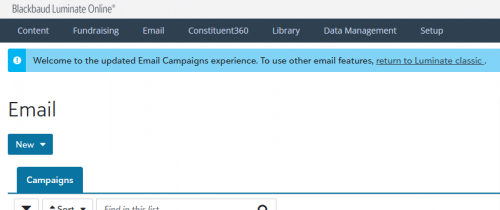
@Allison King are you referring to this link? It does not set this as my default. I have to select it every time I exit Email.
 0
0 -
Hi all - The default view is set with the EMAIL_CAMPAIGNS_USE_DRAG_AND_DROP_EDITOR Site Option.
It does require elevated administrator permissions to edit, so if you don't see it, contact Blackbaud Support to set that to FALSE. The setting applies to your site, not per administrator.
We've added this to the documentation. Thank you!0 -
@Patti Posey Just to add some more detail here, the blue banner at the top of our new experience is made to be “sticky”, meaning if you click it it will set your personal default experience. So, if you click the banner to return to Classic, when you navigate to Email>Email Campaigns again later on, it should default you to classic instead of the new experience.
The SDP mentioned in this thread by Colleen is a site-wide default. This will set your entire site's default to either Classic (if set to FALSE) or the new experience (if set to TRUE). This would control what every user of your site sees, as opposed to the banner toggle that is user-specific.
I hope that helps! We checked, and based on how we believe you are logging in, the blue banner should set your user preference correctly.
0 -
@Kent Gilliam the demo and webinar were wonderful, thank you. Two questions
- Is there a mobile preview option while building emails?
- Will email on acid still be available to use to test out in the final stage?
Bump.
0 -
@Jeremy Reynolds Hello Jeremy, I've discovered the answers to both questions is No. Unfortunately, combined with several other missing features, the new email builder is not something we'll be able to use at our Foundation. Looking forward to more updates down the road.
0 -
@Kent Gilliam Are there no bullets in the email editor? Or am I missing the icon? I'm also looking for the ‘undo changes'. Two pretty basic items.
0 -
@Kent Gilliam the demo and webinar were wonderful, thank you. Two questions
- Is there a mobile preview option while building emails?
- Will email on acid still be available to use to test out in the final stage?
Bump.
Hi Jeremy…
Sorry. Community emails started going in my junk folder.
So there is not a mobile preview right now. And Email On Acid is not currently slated to be added to the new email.
Kent
0 -
@Kent Gilliam Are there no bullets in the email editor? Or am I missing the icon? I'm also looking for the ‘undo changes'. Two pretty basic items.
Currently bullet and number lists are not possible in the new email. These are planned and should come pretty soon but until then you'll have to either code them in via html or open the email in classic email to add bullets/numbers.
Kent
0















Categories
- All Categories
- 6 Blackbaud Community Help
- 211 bbcon®
- 1.4K Blackbaud Altru®
- 403 Blackbaud Award Management™ and Blackbaud Stewardship Management™
- 1.2K Blackbaud CRM™ and Blackbaud Internet Solutions™
- 15 donorCentrics®
- 360 Blackbaud eTapestry®
- 2.6K Blackbaud Financial Edge NXT®
- 659 Blackbaud Grantmaking™
- 579 Blackbaud Education Management Solutions for Higher Education
- 3.2K Blackbaud Education Management Solutions for K-12 Schools
- 943 Blackbaud Luminate Online® and Blackbaud TeamRaiser®
- 84 JustGiving® from Blackbaud®
- 6.7K Blackbaud Raiser's Edge NXT®
- 3.8K SKY Developer
- 250 ResearchPoint™
- 120 Blackbaud Tuition Management™
- 165 Organizational Best Practices
- 241 Member Lounge (Just for Fun)
- 36 Blackbaud Community Challenges
- 37 PowerUp Challenges
- 3 (Open) PowerUp Challenge: Grid View Batch
- 3 (Closed) PowerUp Challenge: Chat for Blackbaud AI
- 3 (Closed) PowerUp Challenge: Data Health
- 3 (Closed) Raiser's Edge NXT PowerUp Challenge: Product Update Briefing
- 3 (Closed) Raiser's Edge NXT PowerUp Challenge: Standard Reports+
- 3 (Closed) Raiser's Edge NXT PowerUp Challenge: Email Marketing
- 3 (Closed) Raiser's Edge NXT PowerUp Challenge: Gift Management
- 4 (Closed) Raiser's Edge NXT PowerUp Challenge: Event Management
- 3 (Closed) Raiser's Edge NXT PowerUp Challenge: Home Page
- 4 (Closed) Raiser's Edge NXT PowerUp Challenge: Standard Reports
- 4 (Closed) Raiser's Edge NXT PowerUp Challenge: Query
- 798 Community News
- 3K Jobs Board
- 56 Blackbaud SKY® Reporting Announcements
- 47 Blackbaud CRM Higher Ed Product Advisory Group (HE PAG)
- 19 Blackbaud CRM Product Advisory Group (BBCRM PAG)