Budget on Transaction Codes



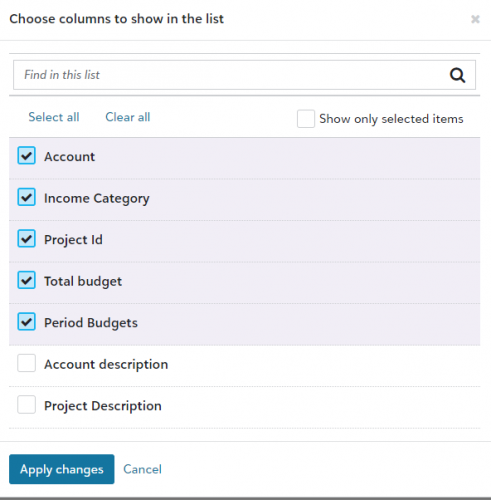
I am trying to add a different transaction code to this list. It is a listing of fields that I want to budget on. How do I add to this selections?
Comments
-
@Norman Gousy
to budget by a transaction code, FE let's you do this by 1 transaction code type, the one linked to the grant records in your grant FE >GL business rules. the type you link there, are the only ones you can budget by. After that the other 4 types can't be budgeted by. But otherwise, you enter the transaction code value in the the corresponding t code field in the budget or excel plug in.1 -
@Norman Gousy
Thanks Kevin. I'm new to FE. It would seem that I should be able to change the value in “Use values from the ‘Income Category’” to another transaction code , but it is not editable. Do you know how it can be changed if I am looking at the right place to make the change?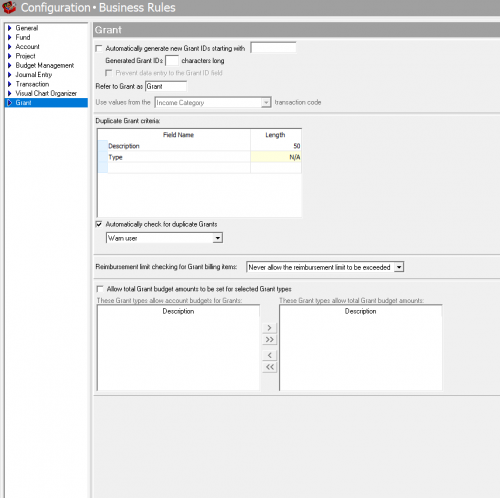 0
0 -
Glad you got an answer in our peer-to-peer community.
For your follow up question, I encourage you to contact Customer Support for “how to questions” about the product, so you can get a technical answer in a timely manner. (Click Help in the Main Navigation on the top of every community page.)
If this is not a current feature, please click Ideas, submit your idea, then return to this community to ask others to vote on your idea. The more votes, the more it stands out to our product managers and developers as important to our customers.
In harmony,
Elizabeth
Blackbaud Community Team
0








Categories
- All Categories
- 6 Blackbaud Community Help
- 213 bbcon®
- 1.4K Blackbaud Altru®
- 401 Blackbaud Award Management™ and Blackbaud Stewardship Management™
- 1.1K Blackbaud CRM™ and Blackbaud Internet Solutions™
- 15 donorCentrics®
- 360 Blackbaud eTapestry®
- 2.6K Blackbaud Financial Edge NXT®
- 655 Blackbaud Grantmaking™
- 576 Blackbaud Education Management Solutions for Higher Education
- 3.2K Blackbaud Education Management Solutions for K-12 Schools
- 939 Blackbaud Luminate Online® and Blackbaud TeamRaiser®
- 84 JustGiving® from Blackbaud®
- 6.6K Blackbaud Raiser's Edge NXT®
- 3.7K SKY Developer
- 248 ResearchPoint™
- 119 Blackbaud Tuition Management™
- 165 Organizational Best Practices
- 241 Member Lounge (Just for Fun)
- 34 Blackbaud Community Challenges
- 34 PowerUp Challenges
- 3 (Open) PowerUp Challenge: Chat for Blackbaud AI
- 3 (Closed) PowerUp Challenge: Data Health
- 3 (Closed) Raiser's Edge NXT PowerUp Challenge: Product Update Briefing
- 3 (Closed) Raiser's Edge NXT PowerUp Challenge: Standard Reports+
- 3 (Closed) Raiser's Edge NXT PowerUp Challenge: Email Marketing
- 3 (Closed) Raiser's Edge NXT PowerUp Challenge: Gift Management
- 4 (Closed) Raiser's Edge NXT PowerUp Challenge: Event Management
- 3 (Closed) Raiser's Edge NXT PowerUp Challenge: Home Page
- 4 (Closed) Raiser's Edge NXT PowerUp Challenge: Standard Reports
- 4 (Closed) Raiser's Edge NXT PowerUp Challenge: Query
- 791 Community News
- 2.9K Jobs Board
- 53 Blackbaud SKY® Reporting Announcements
- 47 Blackbaud CRM Higher Ed Product Advisory Group (HE PAG)
- 19 Blackbaud CRM Product Advisory Group (BBCRM PAG)