Gender / Pronouns





We don't really use the gender field much - and to be honest, it's impossible to be accurate. Has anyone changed their Gender field into Pronouns? We were thinking of making an attribute on a constituent record, but just replacing gender with pronouns altogether makes the most sense to me. Does anyone else have use-cases?
Comments
-
@Elizabeth Sarkady - I have tracked gender identity and pronouns in separate fields. Gender identity within the native Gender Field, and Pronouns within an Attribute/Custom Field. I recommend you keep the Gender Field as is, and repurpose another field on the Bio2 tab or utilize an attribute to track pronouns; I've heard of others tracking pronouns in an additional Add/Sal field, Title2 field, etc. While we're on the subject, I also recommend adding “Non-Binary” to your Gender Table, and “Mx.” to your Title Table (and make Mx. available on donation forms as an option for donors to choose), if you haven't already.
1 -
@Austen Brown I think I simultaneously agree and disagree. While I don't think the gender field is the most appropriate field to repurpose, I think an attribute is a really bad place for this information, primarily for one reason…location. Regardless of whether in DB view or web view, attributes are so far down the record that I would be afraid someone who needs that information would miss it. While gender is in a very appropriate place on the record (on Bio 1 and in constituent summary) I think it may be better to repurpose another field.
With that stated, if you use NXT, I think it would make sense to use a summary note for these. They would appear right under the constituent name, which is generally where pronouns are placed in email signatures and the like, so people are conditioned to look for them there.
3 -
@Dariel Dixon Good advice. We use a summary note for preferred pronouns.
0 -
@Elizabeth Sarkady, you've got a good point about whether the Gender category is really well utilized at most organizations. We ourselves have found it useful for public data appends (birth & death certificates) and demographic marketing analysis (targeted donor acquisition), both of which still rely on the traditional binary system. If you don't need the field for those purposes, though, then you could certainly repurpose it. However, I don't think you can remove or inactivate the automatic table entries that BB provides for the field. So you would have to train your staff to ignore those fields when entering data. If you DO repurpose it, be sure to re-name the field as well, under Config-Fields-Constituent. Change the “Display as” to “Pronouns” instead of “Gender”.
That being said, I do really think the best place to keep this data would be under custom Salutations. This shows up as “Other Name Formats” under webview, so right up top in the Bio 1 area where the nicknames show up. I don't think Summary Notes are very useful if you want to be able to export or merge them easily.
3 -
FYI, you can rearrange the order of all fields in NXT. So if your organization uses attributes a lot move this box to the top of your page. To move boxes simply click your mouse on the 3 boxes x 3 boxes icon , in the top right hand corner of the box, and drag it to the preferred page location.
 0
0 -
FYI, you can rearrange the order of all fields in NXT. So if your organization uses attributes a lot move this box to the top of your page. To move boxes simply click your mouse on the 3 boxes x 3 boxes icon , in the top right hand corner of the box, and drag it to the preferred page location.
While this is true, this is a user option. The boxes would have to be rearranged per user, which I think in this case wouldn't be ideal. Also, depending on how many attributes your organization uses, they would just be a list sorted alphabetically, and there are no other sort options.
1 -
@Austen Brown thanks for a great tip! I updated our RE tables to include Mx. however I'm not seeing it in the preview of our Online Express (OLX) forms. Is there a time lag or is that a separate change? Where do I update the fields available on OLX forms?
0 -
@Sherri Fresorger - You will also need to select it within the OLX Account Settings. Account > Integration Options > General > Titles Tab.
0 -
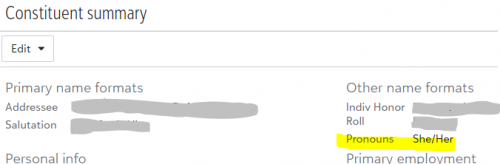
@Faith Murray We also have it as an “Other name format” so that it is grouped with the rest of the name and personal info the in the Constituent Summary widget. Working well so far.
 0
0



















Categories
- All Categories
- 6 Blackbaud Community Help
- 211 bbcon®
- 1.4K Blackbaud Altru®
- 402 Blackbaud Award Management™ and Blackbaud Stewardship Management™
- 1.1K Blackbaud CRM™ and Blackbaud Internet Solutions™
- 15 donorCentrics®
- 360 Blackbaud eTapestry®
- 2.6K Blackbaud Financial Edge NXT®
- 656 Blackbaud Grantmaking™
- 577 Blackbaud Education Management Solutions for Higher Education
- 3.2K Blackbaud Education Management Solutions for K-12 Schools
- 941 Blackbaud Luminate Online® and Blackbaud TeamRaiser®
- 84 JustGiving® from Blackbaud®
- 6.7K Blackbaud Raiser's Edge NXT®
- 3.7K SKY Developer
- 248 ResearchPoint™
- 120 Blackbaud Tuition Management™
- 165 Organizational Best Practices
- 240 Member Lounge (Just for Fun)
- 34 Blackbaud Community Challenges
- 37 PowerUp Challenges
- 3 (Open) PowerUp Challenge: Grid View Batch
- 3 (Closed) PowerUp Challenge: Chat for Blackbaud AI
- 3 (Closed) PowerUp Challenge: Data Health
- 3 (Closed) Raiser's Edge NXT PowerUp Challenge: Product Update Briefing
- 3 (Closed) Raiser's Edge NXT PowerUp Challenge: Standard Reports+
- 3 (Closed) Raiser's Edge NXT PowerUp Challenge: Email Marketing
- 3 (Closed) Raiser's Edge NXT PowerUp Challenge: Gift Management
- 4 (Closed) Raiser's Edge NXT PowerUp Challenge: Event Management
- 3 (Closed) Raiser's Edge NXT PowerUp Challenge: Home Page
- 4 (Closed) Raiser's Edge NXT PowerUp Challenge: Standard Reports
- 4 (Closed) Raiser's Edge NXT PowerUp Challenge: Query
- 796 Community News
- 3K Jobs Board
- 54 Blackbaud SKY® Reporting Announcements
- 47 Blackbaud CRM Higher Ed Product Advisory Group (HE PAG)
- 19 Blackbaud CRM Product Advisory Group (BBCRM PAG)