Creating an advance list reporting if there are students enrolled into the club



Hi all,
Looking for some insight on building an advance list.
I have a request to build a report to show any activity (clubs) do not have any students enrolled in them. I feel like I'm missing one specific object and I can't figure out which one this is.
I've tried the Activity Enrollment.Enrolled, and preview shows 1 as the outcome. I assume if the outcome is 0 it would mean there's no students enroll into that activity, however it populated 0 results.
Many thanks for the community assist
C
Comments
-
I don't think that's the right approach. An “Activity Enrollment” object exists for each student enrolled. If there are no students enrolled in an activity, then there would be none of these objects.
So, the approach I would take is to display all the activity groups and the enrollments [beneath them]. Any activity groups that do NOT show any students would be the ones with no students.
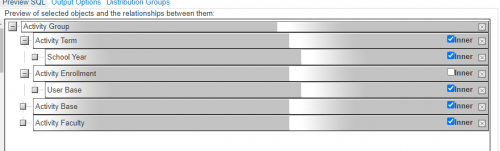
Notice that the inner box is unchecked on the Activity Enrollment. This is short for ‘inner join’, the default here. This means the list would not return a resultant activity group, say “Tiddlywinks, if there were no [student] enrollments in that activity. But you DO want to see Tiddlywinks in your result even if there are no student [enrollments], so you need to UNcheck inner, which tells the database something like “return everything you can [activity group, school year…] even if there are no activity enrollments". [this is called an ‘outer join’ in database-ese].
Below a snippet showing a separate record for each kid in Asian Culture Club but only a blank ‘kid’ in Billiards club. Thus, billiards shows up because there's an Activity Group with that activity base but there are no actual enrollments, so the DB returns the blanks.
viz.
 0
0 -
This is another option that may confuse some [and can therefore be ignored….] but..
See also below. We can arrange things so that the list itself shows the count.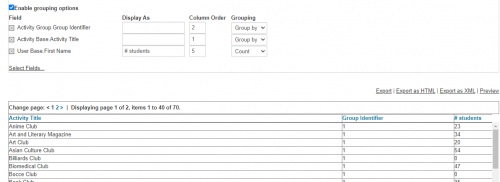
But note that ‘Billiards ’ shows up with 0 students, which we want. In order to get this and to be sure to avoid including any kids who might have been enrolled [and therefore created an enrollment object] and subsequently dropped, we need to add a' ‘dropped = 0’ to the filters. BUT, this filter has to go down below, in the object filters, so the outer join works.
1





Categories
- All Categories
- 6 Blackbaud Community Help
- 211 bbcon®
- 1.4K Blackbaud Altru®
- 402 Blackbaud Award Management™ and Blackbaud Stewardship Management™
- 1.1K Blackbaud CRM™ and Blackbaud Internet Solutions™
- 15 donorCentrics®
- 360 Blackbaud eTapestry®
- 2.6K Blackbaud Financial Edge NXT®
- 656 Blackbaud Grantmaking™
- 577 Blackbaud Education Management Solutions for Higher Education
- 3.2K Blackbaud Education Management Solutions for K-12 Schools
- 941 Blackbaud Luminate Online® and Blackbaud TeamRaiser®
- 84 JustGiving® from Blackbaud®
- 6.7K Blackbaud Raiser's Edge NXT®
- 3.7K SKY Developer
- 248 ResearchPoint™
- 120 Blackbaud Tuition Management™
- 165 Organizational Best Practices
- 240 Member Lounge (Just for Fun)
- 34 Blackbaud Community Challenges
- 37 PowerUp Challenges
- 3 (Open) PowerUp Challenge: Grid View Batch
- 3 (Closed) PowerUp Challenge: Chat for Blackbaud AI
- 3 (Closed) PowerUp Challenge: Data Health
- 3 (Closed) Raiser's Edge NXT PowerUp Challenge: Product Update Briefing
- 3 (Closed) Raiser's Edge NXT PowerUp Challenge: Standard Reports+
- 3 (Closed) Raiser's Edge NXT PowerUp Challenge: Email Marketing
- 3 (Closed) Raiser's Edge NXT PowerUp Challenge: Gift Management
- 4 (Closed) Raiser's Edge NXT PowerUp Challenge: Event Management
- 3 (Closed) Raiser's Edge NXT PowerUp Challenge: Home Page
- 4 (Closed) Raiser's Edge NXT PowerUp Challenge: Standard Reports
- 4 (Closed) Raiser's Edge NXT PowerUp Challenge: Query
- 796 Community News
- 3K Jobs Board
- 54 Blackbaud SKY® Reporting Announcements
- 47 Blackbaud CRM Higher Ed Product Advisory Group (HE PAG)
- 19 Blackbaud CRM Product Advisory Group (BBCRM PAG)