Gradebook interface question





We have a 2-semester schedule divided into 4 quarters (2 quarters = 1 semester)
In Core > School years & terms, we have it set up as 4 quarters, but I learned that usually schools do it in the reverse and set up Semesters in terms, then in Academics > Grading setup would define marking periods within the Semesters as Quarters so this is something we are planning for moving forward to have a consistent mester grade plan with Quarters 1 and 3 being more of a mid-semester progress grade.
My question is, would teachers in a Quarter 2 marking period see everything from Quarter 1 and have to scroll through all assignments/tests, or would it be another/blank gradebook for Quarter 2 (but still have the Quarter 1 weight into Semester 1 grade)?
Just wondering how the interface looks like for that kind of set up. The way we have it now, there are no marking periods within the terms we set up in Core, since it was just set up by quarters, but I want to ask if we have a Semester term and marking periods within, would it be all in one gradebook, or be separated (or is that something that can be changed, etc)?
Thanks!
Comments
-
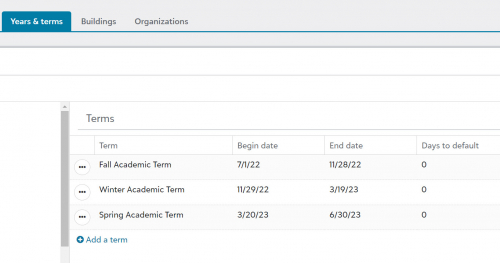
We have three terms (fall, winter, and spring) instead of quarters and semesters. Our Years & terms page is:
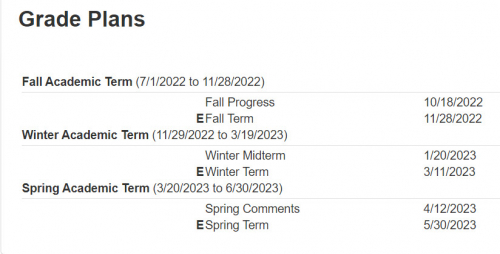
Our grade plans are:
Most of our classes are full-year courses (so the Length setting in the course record is 3). A few courses last one term (so the course length is 1).
The grade reported on the first report card each term (Fall Progress, Winter Midterm, Spring Comment) is not part of the calculation of the grades at the end of the term. They are just a snapshot in time that shows how the student is doing at that moment.
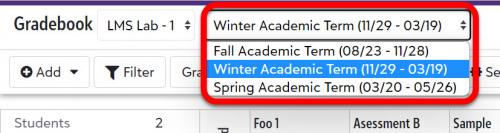
In the gradebook, the teacher sees all of the assignments and grades for the fall term throughout the term. At the start of the winter term, the fall grades are hidden and the teacher sees the winter term assignments and grades. The same happens at the start of the spring term.
The teacher can quickly switch back to see or change the fall term grades in the gradebook, by selecting it from a menu at the top of the gradebook window.
 0
0 -
@Brian Gray
Thank you for the reply!I guess I just have a follow up question--I presume those Fall Progress, Winter Midterm, Spring Comment are set up as marking periods within Grading setup > Gradebook settings > Marking period setup as well? (Besides Grading setup > School year setup).
And since it's a progress/mid-term snapshot that goes on report cards, the Fall term would have everything from before and after Fall Progress, just that a grade snapshot is posted to go on report cards, like how we would have Quarter 1 + 2 = Fall Semester; Quarter 1 being the mid progress and Quarter 2 being the final grade so the gradebook would include everything from Quarter 1 and 2, if I'm understanding that setup right.
Thanks again.
0 -
This discussion can get a bit tricky because some terminology has different meanings at different schools and within the SIS.
As you think about this, it may help to separate the idea of your terms and the idea of your report card schedule a bit.
We have three terms (and therefore three marking periods), but we have six report cards during the year. In each term, we have a report card that is published approximately half-way through the term, and we have another report card that is published at the end of the term. (Within the SIS, you can have as many report cards during a term as you want.)
Core > School information > Years and terms defines what terms you have (and when each term starts and ends).
The information in the lower right section on Academics > Grading Setup > School year setup is the schedule for report cards that are issued in each academic term.
At my school, we have three terms - Fall, Winter, and Spring. Each term includes a single marking period. Fall and Spring terms also have an exam (or other end-of-term assessment).
The marking period grade is based on all work done in the course during the term (but does not include the end-of-term exam). In the fall and spring, the term grade is calculated as a weighted average of the marking period grade and the exam grade. In the winter term, the term grade is the same as the marking period grade.
You said: I guess I just have a follow up question--I presume those Fall Progress, Winter Midterm, Spring Comment are set up as marking periods within Grading setup > Gradebook settings > Marking period setup as well? (Besides Grading setup > School year setup).
No - Fall Progress, Winter Midterm, and Spring Comments are the names of report cards. They are not marking periods or terms. In my mind (for my school) the difference is that the letter grade on the mid-term report cards are not used to calculate any subsequent report card grades.
Maybe the right way to decide how many terms you have (vs. how many report cards you will publish) is to think about how the grade on an individual assignment is used. In my school, an assignment from the first half of the fall term will be used directly to calculate the fall progress grade and the fall marking period grade at the end of the term. It will have no effect on the winter or spring term grades. Therefore, we have three terms and 6 report cards.
For your quarters/semesters calendar, there are at least two possible ways to use the grade for an assignment given in the first week of the fall semester:
- The assignment’s grade is used in the calculation of the Q1 grade. It is NOT used in the calculation of the Q2 grade. The Q1 grade and the Q2 grades are used to calculate the semester grade.
- The assignment’s grade is used in the calculation of the Q1 grade and ALSO the Q2 grade. The Q1 grade is ignored when calculating the semester grade.
I don’t want to say more about your setup of terms and report cards because I don’t know many of the details of how your grade calculations work, and I’ve only been involved in setting up my own structure.
My advice would be to talk with your implementation consultant or buy some consulting hours so that you can talk in detail about it with someone who knows more about it than I do.
1





Categories
- All Categories
- 6 Blackbaud Community Help
- 211 bbcon®
- 1.4K Blackbaud Altru®
- 402 Blackbaud Award Management™ and Blackbaud Stewardship Management™
- 1.1K Blackbaud CRM™ and Blackbaud Internet Solutions™
- 15 donorCentrics®
- 360 Blackbaud eTapestry®
- 2.6K Blackbaud Financial Edge NXT®
- 656 Blackbaud Grantmaking™
- 577 Blackbaud Education Management Solutions for Higher Education
- 3.2K Blackbaud Education Management Solutions for K-12 Schools
- 941 Blackbaud Luminate Online® and Blackbaud TeamRaiser®
- 84 JustGiving® from Blackbaud®
- 6.7K Blackbaud Raiser's Edge NXT®
- 3.7K SKY Developer
- 248 ResearchPoint™
- 120 Blackbaud Tuition Management™
- 165 Organizational Best Practices
- 240 Member Lounge (Just for Fun)
- 34 Blackbaud Community Challenges
- 37 PowerUp Challenges
- 3 (Open) PowerUp Challenge: Grid View Batch
- 3 (Closed) PowerUp Challenge: Chat for Blackbaud AI
- 3 (Closed) PowerUp Challenge: Data Health
- 3 (Closed) Raiser's Edge NXT PowerUp Challenge: Product Update Briefing
- 3 (Closed) Raiser's Edge NXT PowerUp Challenge: Standard Reports+
- 3 (Closed) Raiser's Edge NXT PowerUp Challenge: Email Marketing
- 3 (Closed) Raiser's Edge NXT PowerUp Challenge: Gift Management
- 4 (Closed) Raiser's Edge NXT PowerUp Challenge: Event Management
- 3 (Closed) Raiser's Edge NXT PowerUp Challenge: Home Page
- 4 (Closed) Raiser's Edge NXT PowerUp Challenge: Standard Reports
- 4 (Closed) Raiser's Edge NXT PowerUp Challenge: Query
- 796 Community News
- 3K Jobs Board
- 54 Blackbaud SKY® Reporting Announcements
- 47 Blackbaud CRM Higher Ed Product Advisory Group (HE PAG)
- 19 Blackbaud CRM Product Advisory Group (BBCRM PAG)