NXT Access to Payables Tab





I'm trying to set the security options so certain staff can access the Payables tab in FENXT, to view payable items (invoices, vendors). Right now I've accomplished giving those staff members access to the General Ledger and Expenses tab. Is there a secret combination of rights that gives them access? In NXT there isn't a clear security option for tabs. In database view I've granted view privileges to every option in the Accounts Payable component for the group.
Comments
-
@David Plotts
If you go under Control Panel>Security>Roles you should see this. I don't know if this will exactly be what you are looking for. I wish there was a way to be able to see the view that users have to check before rolling it out to them.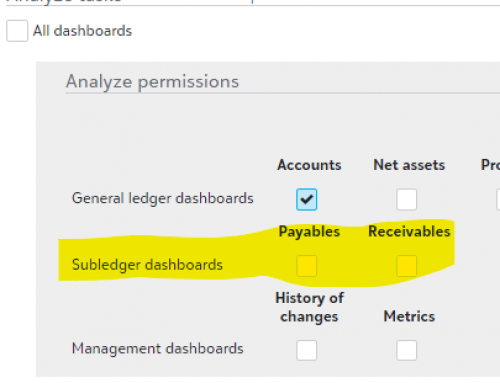 1
1 -
@David Plotts
That should be controlled by each group the user is in. To see the Paybles tab at least, they need AP checked marked. Then of course the records / rights you'd want them to have, would be based on the rights you allow for the records and areas of AP in the security groups. IF the users were logged into the system when you made the changes to the groups, make sure they logged out then logged back in. Each time a user logs back in FE checks for any updates/changes to their security rights.0 -
@Kevin Brazell This is how I have security configured in database view, all views are checked in Vendors and Invoices.
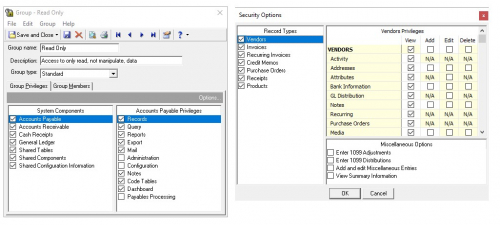
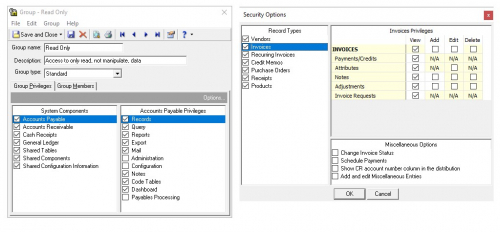 0
0 -
0
-
@David Plotts
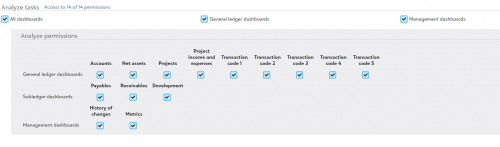
One thing I had to change to give users view-only access to payables in NXT was to make the user accounts “User Type” “Can Access The Financial Edge and Online Modules”2 -
Thank you to all our members for giving @David Plotts ideas to try. This is a great thread to learn about security options!
If you need troubleshooting help beyond their suggestions, I would recommend reaching out to Customer Support.
(Click Help in the Main Navigation on the top of every community page.)
In harmony,
Elizabeth
Blackbaud Community Team
#CustomerSupportTroubleshooting0 -
@MckenZie Walker
That was it, thank you!0









Categories
- All Categories
- 6 Blackbaud Community Help
- 213 bbcon®
- 1.4K Blackbaud Altru®
- 400 Blackbaud Award Management™ and Blackbaud Stewardship Management™
- 1.1K Blackbaud CRM™ and Blackbaud Internet Solutions™
- 15 donorCentrics®
- 360 Blackbaud eTapestry®
- 2.6K Blackbaud Financial Edge NXT®
- 655 Blackbaud Grantmaking™
- 576 Blackbaud Education Management Solutions for Higher Education
- 3.2K Blackbaud Education Management Solutions for K-12 Schools
- 939 Blackbaud Luminate Online® and Blackbaud TeamRaiser®
- 84 JustGiving® from Blackbaud®
- 6.6K Blackbaud Raiser's Edge NXT®
- 3.7K SKY Developer
- 248 ResearchPoint™
- 119 Blackbaud Tuition Management™
- 165 Organizational Best Practices
- 241 Member Lounge (Just for Fun)
- 34 Blackbaud Community Challenges
- 34 PowerUp Challenges
- 3 (Open) PowerUp Challenge: Chat for Blackbaud AI
- 3 (Closed) PowerUp Challenge: Data Health
- 3 (Closed) Raiser's Edge NXT PowerUp Challenge: Product Update Briefing
- 3 (Closed) Raiser's Edge NXT PowerUp Challenge: Standard Reports+
- 3 (Closed) Raiser's Edge NXT PowerUp Challenge: Email Marketing
- 3 (Closed) Raiser's Edge NXT PowerUp Challenge: Gift Management
- 4 (Closed) Raiser's Edge NXT PowerUp Challenge: Event Management
- 3 (Closed) Raiser's Edge NXT PowerUp Challenge: Home Page
- 4 (Closed) Raiser's Edge NXT PowerUp Challenge: Standard Reports
- 4 (Closed) Raiser's Edge NXT PowerUp Challenge: Query
- 791 Community News
- 2.9K Jobs Board
- 53 Blackbaud SKY® Reporting Announcements
- 47 Blackbaud CRM Higher Ed Product Advisory Group (HE PAG)
- 19 Blackbaud CRM Product Advisory Group (BBCRM PAG)