Organizing course content in Topics?





Currently, only using the LMS for attendance, conduct, schedules, parent/student info. We are planning to roll out the LMS for classes for next year. As we prepare, our administration wants to standardize the class pages and Topics content structure, making it easy to navigate different classes, as they'd be structured similarly. Not an easy task as teachers have varying amounts of course content. Current LMS uses nested folders. Teachers are a little overwhelmed with the thought of moving all their content and just how to organize it in the Topics structure.
Do any schools out there try to standardize the Topics content structure? Regardless of if you do, would you be willing to share some screenshots of some of your topics with me? I'd love to show them some examples of what other schools are doing.
Thank you.
Comments
-
@Kristin Heard
Screenshots from sections of History and Biology are below. My advice to teachers is:- arrange the topics to match your course outline.
- If you refer to Unit 1, Unit 2, etc then that's how you should name the topics
- If you have general themes that you return to several time during the year (grammar, punctuation, etc) then create topics for each of those
- arranging the topics in reverse chronological order makes it easier for students to get to the current topic - it's always at the top of the page. In the history class shown below, the students will have to scroll a lot to get to Unit 12 in May.
- in subsequent years, most teachers choose to make copies of each topic and edit the copy, so that the original version is preserved.
I have a fake “LMS Lab” class that teachers can use to experiment with. Teachers can sign in as a fake student in the fake class, so they can see it from the student's point of view. (Most parts of the LMS have a preview page button, but it's not quite the same.)
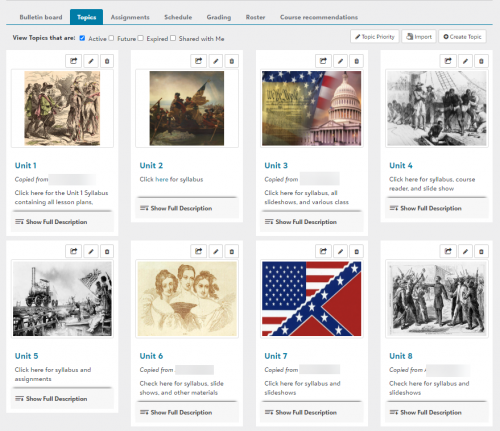
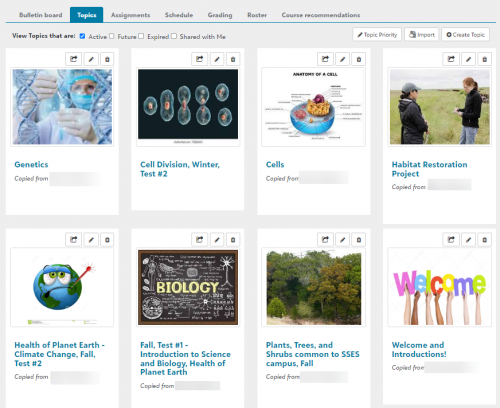 4
4 - arrange the topics to match your course outline.
-
@Brian Gray Thank you. I am actually looking for the content inside a topic. If I take for example one of our MS science classes in our current system. He has say Chapter 1 as a main folder - what I would think would be a Topic. Under that “folder” he has about 10 other folders, and then even some subfolders nested under some of those. I'm trying to find a way to sort of mimic folders and nested folders within a topic. But that seems a lot of work for a teacher to do. So, I'm looking for ways that teachers actually display and organize their content inside one of these topics. Make sense?
1 -
@Kristin Heard
We standardize(ish) the Bulletin Boards but not Topics. Topics are used in all sorts of different ways by our teachers and we want them to have the flexibility of what works best for their content area and teaching style. We're a MS/HS so if you're working with lower elementary, I could see some benefit to a bit of standardization.For Bulletin Boards, you can set up a “Bulletin Board Layout” for teachers to use. (Academics > Content > Class Pages > Bulletin Board Layout). Our teachers are free to add more than this to their Bulletin Boards but this is the bare minimum requirement.
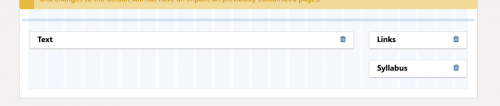
We use the “Text” area for a “Welcome Message” where teachers can talk a bit about the class, themselves, how to get in contact with them, office hours, etc. “Links” is used for the course syllabus (Google Doc) and any other “course level” links they want to include. “Syllabus" is only used if the teacher wants to upload a PDF of their syllabus. Here are some examples:


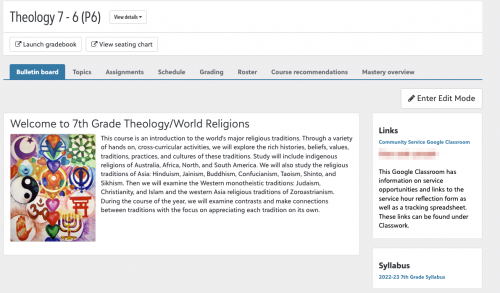
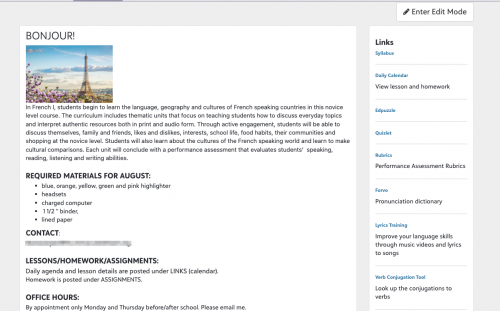
Here are some examples of how our teachers use Topics. I tried to find a variety in how they're organized and across grade levels/subject areas:
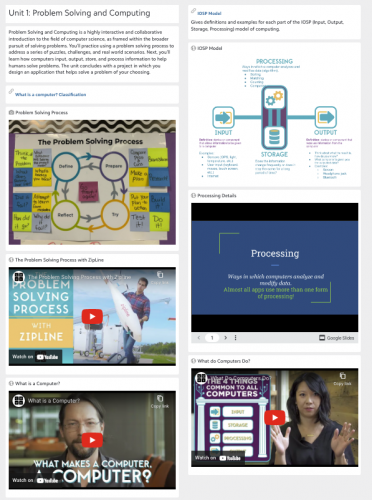
Organized by Unit and resources embedded 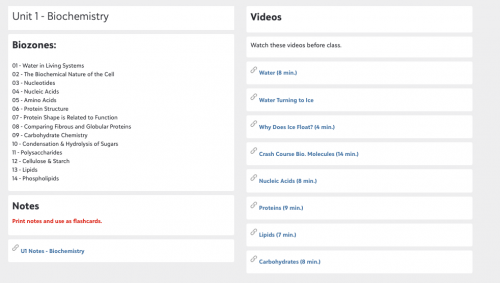
Organized by Unit and resources linked 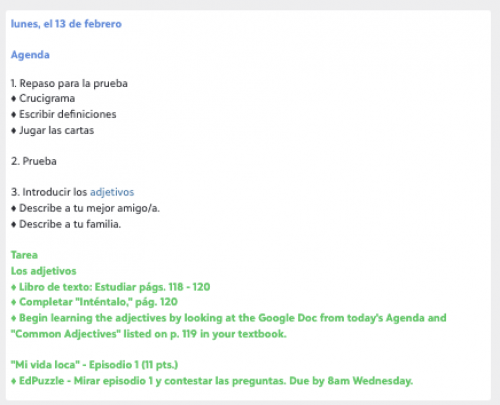
Organized by week and more of an agenda for the class period/homework 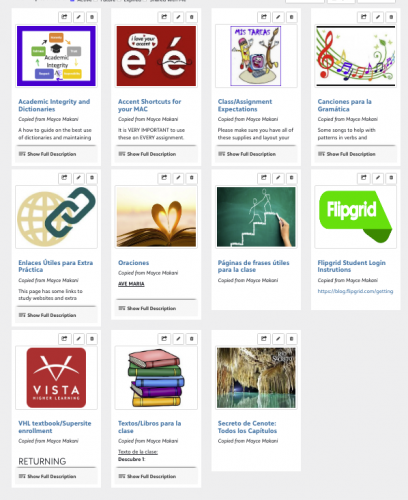
Organized by Topic/Type of resource Looking forward to seeing what other schools are doing as well!
2 -
@Kristin Heard
I just read your 2nd post…. I guess it would depend on what exactly your teachers have in those folders and subfolders? It might mean a different way of thinking about how the classes are structured.Here is how I introduce it to new teachers:
For the most part, anything a student needs to do becomes an assignment. Assignments could be homework assignments, classwork, a test coming up, or something as basic as “bring colored pencils to class on Tuesday”. Any resources directly related to an assignment (links to a video to watch, a website to visit, a Google doc to read, files, etc), are included in the assignment. Depending on what those resources are, sometimes teachers will also add them to a Topic.
3 -
@Megan Day This is fantastic! Exactly what I'm looking for. I appreciate the opinions and reasoning as well. I already see that our teachers organize their content on the current LMS very differently. Thank you!
2 -
Thank you for your insights. If, say, I had roughly 30 things to share with my high school students in AP World over the course of a mini unit—videos, PPTs, notes, links, sources, etc., my options within Blackbaud would be to……
- Put everything into a topic or
2. put everything into assignments?
Thank you for any help…
0 -
I think that Topics and Assignments both have their place. It's usually not an either-or decision.
I tell teachers at my school that Assignments tell students what they are supposed to do by specific dates, and Topics hold the materials they will use to complete the assignments.
Topics might be arranged as one Topic per chapter of the primary text, or one Topic per unit (that might include 2 or more chapters of the text), or one Topic for each "big idea" that is revisited several times during the year (Grammar, Vocabulary, etc).
0









Categories
- All Categories
- 6 Blackbaud Community Help
- 211 bbcon®
- 1.4K Blackbaud Altru®
- 403 Blackbaud Award Management™ and Blackbaud Stewardship Management™
- 1.2K Blackbaud CRM™ and Blackbaud Internet Solutions™
- 15 donorCentrics®
- 360 Blackbaud eTapestry®
- 2.6K Blackbaud Financial Edge NXT®
- 659 Blackbaud Grantmaking™
- 579 Blackbaud Education Management Solutions for Higher Education
- 3.2K Blackbaud Education Management Solutions for K-12 Schools
- 943 Blackbaud Luminate Online® and Blackbaud TeamRaiser®
- 84 JustGiving® from Blackbaud®
- 6.7K Blackbaud Raiser's Edge NXT®
- 3.8K SKY Developer
- 250 ResearchPoint™
- 120 Blackbaud Tuition Management™
- 165 Organizational Best Practices
- 241 Member Lounge (Just for Fun)
- 36 Blackbaud Community Challenges
- 37 PowerUp Challenges
- 3 (Open) PowerUp Challenge: Grid View Batch
- 3 (Closed) PowerUp Challenge: Chat for Blackbaud AI
- 3 (Closed) PowerUp Challenge: Data Health
- 3 (Closed) Raiser's Edge NXT PowerUp Challenge: Product Update Briefing
- 3 (Closed) Raiser's Edge NXT PowerUp Challenge: Standard Reports+
- 3 (Closed) Raiser's Edge NXT PowerUp Challenge: Email Marketing
- 3 (Closed) Raiser's Edge NXT PowerUp Challenge: Gift Management
- 4 (Closed) Raiser's Edge NXT PowerUp Challenge: Event Management
- 3 (Closed) Raiser's Edge NXT PowerUp Challenge: Home Page
- 4 (Closed) Raiser's Edge NXT PowerUp Challenge: Standard Reports
- 4 (Closed) Raiser's Edge NXT PowerUp Challenge: Query
- 798 Community News
- 3K Jobs Board
- 56 Blackbaud SKY® Reporting Announcements
- 47 Blackbaud CRM Higher Ed Product Advisory Group (HE PAG)
- 19 Blackbaud CRM Product Advisory Group (BBCRM PAG)