Application has insufficient scope




Hi,
I'm running into an issue that I can't figure out. I've created a new application, with full data access scope. My user has connected it to their environment.
I set up the authorization and it was successful however when the user went to authorize the application, they had a warning that the application wasn't compatible with any solutions in their blackbaud environment.
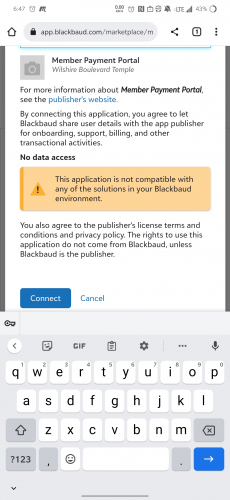
I assume this is where the process went wrong somehow, but not sure how. I will note this user is an administrator in their environment. I'm unsure how to add solutions to my application, or if the users account needs to do something on their end.
Anyway, we continued on, the /token POST call for “authorization_code” worked and I retrieved access and refresh tokens. The “refresh_token” call worked and I am able to retrieve refresh tokens and “access_tokens”.
Next, using the authorization_code as a Bearer auth I tried the /constituents endpoint and am met with this error:

I did see this error at the bottom of the common issues page while I was troubleshooting:
However the two suggestions are for either a missing or expired token, but the Bearer is present and I am refreshing it right before the test call. If I change the bearer to something random or remove it then I get a completely different error, so it doesn't seem to be missing.
Any ideas? I'm sure I just missed a step somewhere.
Comments
-
Hi @Joshua Morlan,
Can you ask the environment admin to go to the following page to see if they need to approve any scope changes for your application? https://app.blackbaud.com/marketplace/manage
From our data, I can see that your application was connected while the Access configuration was set to “No data access” (as your screenshot shows).
We require environment admins to approve of scope changes when they occur after the application has been connected. We do this so the application isn't automatically granted access beyond the comfort level of the environment admin. Once the admin approves your scope change, your application should have the access it needs.
The API error message you received has a link to our scope documentation, which includes documentation regarding scope changes: https://developer.blackbaud.com/skyapi/docs/applications/scopes#changing-scopes
I do see that the “Insufficient Scope” error documentation on our Common authorization issues page is a bit garbled and possibly incomplete. Thanks for pointing that out; we'll get that cleaned up.
1 -
@Chris Rodgers Thanks that worked! I don't remember changing the scope but approving all access resolved the issue.
1




Categories
- All Categories
- 6 Blackbaud Community Help
- 211 bbcon®
- 1.4K Blackbaud Altru®
- 402 Blackbaud Award Management™ and Blackbaud Stewardship Management™
- 1.1K Blackbaud CRM™ and Blackbaud Internet Solutions™
- 15 donorCentrics®
- 360 Blackbaud eTapestry®
- 2.6K Blackbaud Financial Edge NXT®
- 656 Blackbaud Grantmaking™
- 577 Blackbaud Education Management Solutions for Higher Education
- 3.2K Blackbaud Education Management Solutions for K-12 Schools
- 941 Blackbaud Luminate Online® and Blackbaud TeamRaiser®
- 84 JustGiving® from Blackbaud®
- 6.7K Blackbaud Raiser's Edge NXT®
- 3.7K SKY Developer
- 248 ResearchPoint™
- 120 Blackbaud Tuition Management™
- 165 Organizational Best Practices
- 240 Member Lounge (Just for Fun)
- 34 Blackbaud Community Challenges
- 37 PowerUp Challenges
- 3 (Open) PowerUp Challenge: Grid View Batch
- 3 (Closed) PowerUp Challenge: Chat for Blackbaud AI
- 3 (Closed) PowerUp Challenge: Data Health
- 3 (Closed) Raiser's Edge NXT PowerUp Challenge: Product Update Briefing
- 3 (Closed) Raiser's Edge NXT PowerUp Challenge: Standard Reports+
- 3 (Closed) Raiser's Edge NXT PowerUp Challenge: Email Marketing
- 3 (Closed) Raiser's Edge NXT PowerUp Challenge: Gift Management
- 4 (Closed) Raiser's Edge NXT PowerUp Challenge: Event Management
- 3 (Closed) Raiser's Edge NXT PowerUp Challenge: Home Page
- 4 (Closed) Raiser's Edge NXT PowerUp Challenge: Standard Reports
- 4 (Closed) Raiser's Edge NXT PowerUp Challenge: Query
- 796 Community News
- 3K Jobs Board
- 54 Blackbaud SKY® Reporting Announcements
- 47 Blackbaud CRM Higher Ed Product Advisory Group (HE PAG)
- 19 Blackbaud CRM Product Advisory Group (BBCRM PAG)