Batch template selected fields





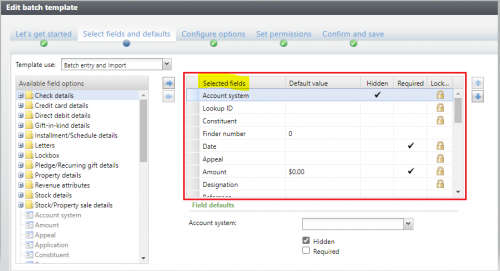
Has anyone figured out how to query the selected fields for a batch template (right side in the config UI)? The available XML includes all possible fields and I haven't found a way to identify the selected fields.
Comments
-
@Rob OConnell
This is what I came up with to see the selected fields…
select XML.node.value('@FieldID','nvarchar(max)')
from BATCHTEMPLATE BT
CROSS APPLY BT.FORMDEFINITIONXML.nodes('ns:FormMetaData/ns:FormFields/ns:FormField') AS XML(node)
where BT.ID = <BATCHTEMPLATEID>0 -
@Carrie Davis
Thanks Carrie. I am able to query the XML, but it includes all possible fields. For example, the batch template I'm testing shows 31 “selected fields”, but this query returns 164 fields for the same batch template. The only pattern I see is that the fields not shown in the UI are hidden (makes sense), however, selected fields can also be hidden. BB Support recommended a paid engagement to identify the batch template selected fields, so I was hoping someone else in the community might have figured it out.0 -
That query seemed to work for my needs. I was just looking to see if one field existed, not display all selected fields - I guess that's the difference. The XML does seem to have much more than what is selected.
I had created a new Address Field for the Constituent Update Batch as an extension. During the import process, I was able to use that query to see if the new address field existed in the batch template during import - if it wasn't in the template, I could ignore import processing I was doing for the new Address Field. Here is the full version:
ALTER function [dbo].[UFN_FIELDEXISTSINIMPORTBATCHTEMPLTE](
@FIELDNAME nvarchar(255),
@IMPORTID uniqueidentifier
)
returns bit
with execute as caller
as begin
declare @FIELD as varchar(255);
declare @DOESFIELDEXISTS bit = 0 ;
WITH xmlnamespaces ('bb_appfx_commontypes' AS [ns])
select top 1 @FIELD = XML.node.value('@FieldID','nvarchar(max)')
from BATCHTEMPLATE BT
inner join IMPORTPROCESS IMP on IMP.BATCHTEMPLATEID = BT.ID
CROSS APPLY BT.FORMDEFINITIONXML.nodes('ns:FormMetaData/ns:FormFields/ns:FormField') AS XML(node)
where IMP.ID = @IMPORTID
and XML.node.value('@FieldID','nvarchar(max)') = @FIELDNAME
if COALESCE(@FIELD, '') <> ''
set @DOESFIELDEXISTS = 1
else
set @DOESFIELDEXISTS = 0
return @DOESFIELDEXISTS
end0 -
@Carrie Davis and others,
I haven't confirmed for all batch templates, but for the one I was testing with, I was able to identify the selected fields using the BATCHTEMPLATE.ADDROWDATAFORMINSTANCEID's FORMUIXML excluding hidden fields. Hopefully this is helpful to others.
with xmlnamespaces ('bb_appfx_commontypes' as common)
selectbt.name,
dataform.fields.value('@FieldID', 'nvarchar(max)') FieldID,
dataform.fields.value('@Caption', 'nvarchar(max)') Caption
from BATCHTEMPLATE BT
join DATAFORMINSTANCECATALOG dfc on dfc.id=bt.ADDROWDATAFORMINSTANCEID
cross apply dfc.FORMUIXML.nodes('common:FormMetaData/common:FormFields/common:FormField') as dataform(fields)
where BT.NAME='[ENTER BATCH TEMPLATE NAME]'
and dataform.fields.value('@Hidden', 'nvarchar(5)') IS NULL -- data form fields that are NOT HIDDEN0



Categories
- All Categories
- 6 Blackbaud Community Help
- 211 bbcon®
- 1.4K Blackbaud Altru®
- 402 Blackbaud Award Management™ and Blackbaud Stewardship Management™
- 1.1K Blackbaud CRM™ and Blackbaud Internet Solutions™
- 15 donorCentrics®
- 360 Blackbaud eTapestry®
- 2.6K Blackbaud Financial Edge NXT®
- 655 Blackbaud Grantmaking™
- 576 Blackbaud Education Management Solutions for Higher Education
- 3.2K Blackbaud Education Management Solutions for K-12 Schools
- 941 Blackbaud Luminate Online® and Blackbaud TeamRaiser®
- 84 JustGiving® from Blackbaud®
- 6.7K Blackbaud Raiser's Edge NXT®
- 3.7K SKY Developer
- 248 ResearchPoint™
- 120 Blackbaud Tuition Management™
- 165 Organizational Best Practices
- 240 Member Lounge (Just for Fun)
- 34 Blackbaud Community Challenges
- 37 PowerUp Challenges
- 3 (Open) PowerUp Challenge: Grid View Batch
- 3 (Closed) PowerUp Challenge: Chat for Blackbaud AI
- 3 (Closed) PowerUp Challenge: Data Health
- 3 (Closed) Raiser's Edge NXT PowerUp Challenge: Product Update Briefing
- 3 (Closed) Raiser's Edge NXT PowerUp Challenge: Standard Reports+
- 3 (Closed) Raiser's Edge NXT PowerUp Challenge: Email Marketing
- 3 (Closed) Raiser's Edge NXT PowerUp Challenge: Gift Management
- 4 (Closed) Raiser's Edge NXT PowerUp Challenge: Event Management
- 3 (Closed) Raiser's Edge NXT PowerUp Challenge: Home Page
- 4 (Closed) Raiser's Edge NXT PowerUp Challenge: Standard Reports
- 4 (Closed) Raiser's Edge NXT PowerUp Challenge: Query
- 796 Community News
- 3K Jobs Board
- 54 Blackbaud SKY® Reporting Announcements
- 47 Blackbaud CRM Higher Ed Product Advisory Group (HE PAG)
- 19 Blackbaud CRM Product Advisory Group (BBCRM PAG)