HELP - How to properly script authentication in Blackbaud API




I'm attempting to pull together a Python script to make API calls to our FE NXT environment to get transaction history for Power BI reporting. I know about the older Power BI add-on but that is not what I am looking to use as I believe it only works on desktops.
Here is the problem I don't understand how programmatically you can get around OAth2 requiring manual authorizations each time it makes a call over an hour apart when the token expires. This means that pop-up that says "authorize' when you test in the Blackbaud API docs.
How are you all scripting around that? I find it hard to believe every script people uses requires someone to manually click authorize each time. I must be missing something.
Please advise.
Comments
-
@Robert Derby
there are may topics on this, here's one I was helping the OP with and talked about how to handle without user “authorizing”0 -
@Alex Wong Thank you--let me review those links. If I can get this working with a Power Automate process that would be ideal for me. My attempts so far didn't work with the OAth2 restrictions. I will go over what you suggest.
0 -
@Robert Derby
if you are planning to use Power Automate, then you don't need to do this 99% of times.If you directly use the Power Automate Blackbaud connector, it does a good percentage of all API endpoint calls. For what you cannot do, you can use the Blackbaud Add-in Send HTTP Request action, which also only need to authorize ONCE when you use the action.
The only restriction right now is, you can't do a PATCH call using Send HTTP Request action by Blackbaud Add-in connector.
0 -
@Alex Wong My goal is to build a table in probably in dataverse that has all of our FE account transactions for certain budgets updated hourly so I can run Power BI reports with the data. I did not know the Power Automate Blackbaud connector worked with FE.
0 -
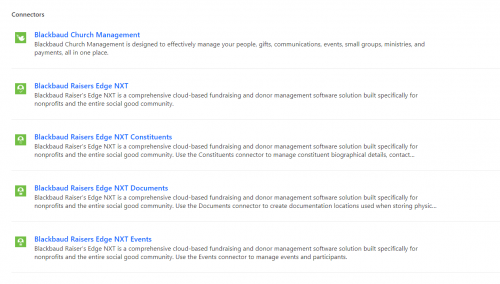
@Alex Wong when I look at the list of Blackbaud connectors in Power Automate I don't see anything for Financial Edge NXT. Am I missing where it is or can they work for FE as well as RE?
 0
0 -
@Robert Derby
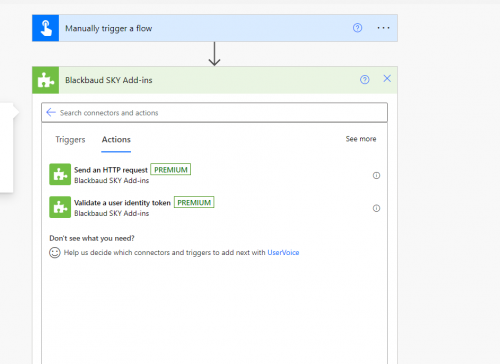
the one you will use is Blackbaud SKY Add-ins connector, action Send an HTTP request.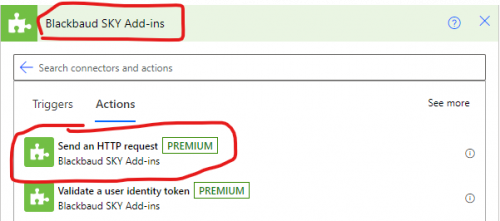
Using this, you can call ANY SKY API endpoint (EXCEPT calls that do PATCH, it is currently still an error on Blackbaud/Microsoft to fix).
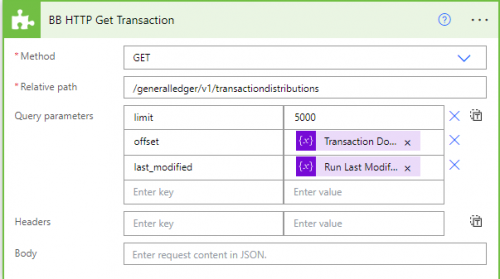
This is how you use it:
 0
0 -
@Robert Derby
Here's a detail post about how to use Send an HTTP request0 -
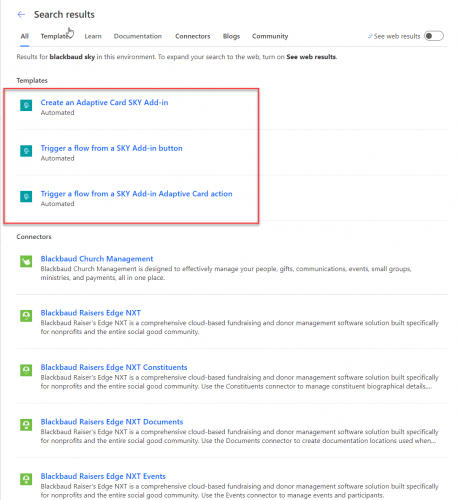
@Alex Wong This is strange but I do not see a Blackbaud SKY API ADD-IN connector. I see some templates but none of them have the same interface you show in your screen shot. Do you know if there is anything special we need to do in order to get that connector in our Microsoft 365 environment??
 0
0 -
@Robert Derby
I can't tell from your screenshot where you're searching, but you should be able to find it within a flow itself, just by adding a new step and searching for Blackbaud.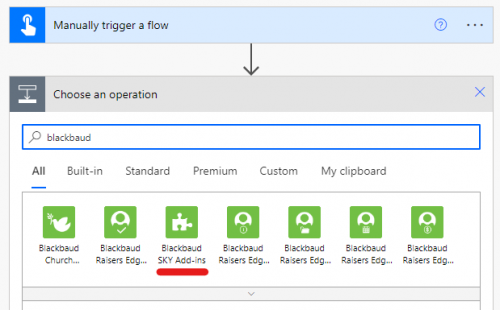 0
0 -
0








Categories
- All Categories
- 6 Blackbaud Community Help
- 211 bbcon®
- 1.4K Blackbaud Altru®
- 402 Blackbaud Award Management™ and Blackbaud Stewardship Management™
- 1.1K Blackbaud CRM™ and Blackbaud Internet Solutions™
- 15 donorCentrics®
- 360 Blackbaud eTapestry®
- 2.6K Blackbaud Financial Edge NXT®
- 655 Blackbaud Grantmaking™
- 576 Blackbaud Education Management Solutions for Higher Education
- 3.2K Blackbaud Education Management Solutions for K-12 Schools
- 941 Blackbaud Luminate Online® and Blackbaud TeamRaiser®
- 84 JustGiving® from Blackbaud®
- 6.7K Blackbaud Raiser's Edge NXT®
- 3.7K SKY Developer
- 248 ResearchPoint™
- 120 Blackbaud Tuition Management™
- 165 Organizational Best Practices
- 240 Member Lounge (Just for Fun)
- 34 Blackbaud Community Challenges
- 37 PowerUp Challenges
- 3 (Open) PowerUp Challenge: Grid View Batch
- 3 (Closed) PowerUp Challenge: Chat for Blackbaud AI
- 3 (Closed) PowerUp Challenge: Data Health
- 3 (Closed) Raiser's Edge NXT PowerUp Challenge: Product Update Briefing
- 3 (Closed) Raiser's Edge NXT PowerUp Challenge: Standard Reports+
- 3 (Closed) Raiser's Edge NXT PowerUp Challenge: Email Marketing
- 3 (Closed) Raiser's Edge NXT PowerUp Challenge: Gift Management
- 4 (Closed) Raiser's Edge NXT PowerUp Challenge: Event Management
- 3 (Closed) Raiser's Edge NXT PowerUp Challenge: Home Page
- 4 (Closed) Raiser's Edge NXT PowerUp Challenge: Standard Reports
- 4 (Closed) Raiser's Edge NXT PowerUp Challenge: Query
- 796 Community News
- 3K Jobs Board
- 54 Blackbaud SKY® Reporting Announcements
- 47 Blackbaud CRM Higher Ed Product Advisory Group (HE PAG)
- 19 Blackbaud CRM Product Advisory Group (BBCRM PAG)