Standard Donation Forms or Optimized Donation Forms and why?





We just received access to the new Optimized Donation Forms application. After looking through the process for using the new optimized option, I was curious why one would choose one over the other. I am assuming that it has to do with the ability to create the Branding Cards and make it a little prettier, but other than that, anything else that stands out that would give us a reason to take the time to create new forms?
Comments
-
@Whitney Shelton
For the record, we don't use neither. We use Luminate Online donation functionalities.However, having tested the form, the big no-no for the Optimaized form is the inability to select the giving amount. You can only provide a max and min and let the form “think" for you on what the selectable amount should be, for our org, specific amount means something and we don't want a randomly AI-ed selection.
9 -
@Whitney Shelton - Check out this recent blog post, it discusses the differences between the two forms and why an org might choose one over the other: https://community.blackbaud.com/blogs/13/9388
3 -
@Whitney Shelton I'm very disappointed in the "Optimized" forms. I just created a test form today. No way to take an old form and “update” it to an “Optimized” form. There is reduced functionality from the donor relations standpoint as there are less options to capture donor information or intent using this form. No custom fields, not even an option to require information be collected other than an email. Couldn't find Tributes at all.
You can tell they put some effort into how it looks, but it just doesn't match the flexibility that other modern payment solutions like Fundraise Up or even GiveButter are putting out there. I think Blackbaud had a chance to take the lead on this or at least catch up and whiffed. ?♂️
4 -
@Lee Grisham
I could see an organization using both regular and optimized forms. From a data standpoint, yes – it's worrying not to be able to require contact info beyond an email. If a donor hasn't previously had an email in RE, then how do we match existing donors? What if a donor has moved?And yet, from a donor conversion stance, that's precisely why optimized forms are beneficial. By asking the gift info first and only requiring email, it creates less steps for a donor to “turn away”. There's a ton of best practice articles out there about how the less fields a donor has to fill in, the more likely they are to follow through with a gift.
In my mind, you might use both kinds of forms. You'd have your standard donation form on your main “donate” page, where a donor could select designation, tribute, and custom fields. The optimized forms will shine best on your “push pages”, ie landing pages for email marketing campaigns. These donors already have an email address in your system, they've responded to a call to action and their impulse gift is intended for one specific designation.
The only reason we don't begin using them right now is that we're waiting until recurring gifts are improved more in NXT. We don't want recurring gifts coming in as NXT-only processing until all the bugs are worked out.
7 -
@Faith Murray
This is such and incredibly helpful comment! Thank you so very much for taking the time to explain how they can be beneficial. Your idea of how and when to use each one is wonderful so thank you!!0 -
@Lee Grisham
I'm also trying a test form and I'm not loving that I can't chose a transparent background for my logo. Unless I'm missing it, I have to chose a color and then it's a block of color behind my logo.0 -
@Janya Mekelburg You can change the logo transparency on the branding card through the slider indicated below next to the red arrow:
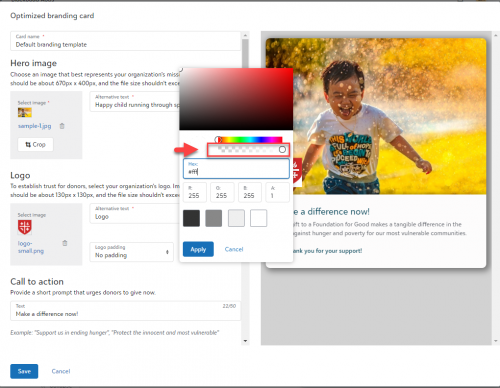
Give that a try and let me know if that does what you need, or if not, how you'd like your logo to look on top of the image (with examples, if possible!)Samantha McGuin
Sr. Principal Product Manager
Blackbaud0 -
@Samantha McGuin slide all the way to the right or left?
0 -
@Janya Mekelburg To the left. Make sure your logo is set to ‘no padding’ then open up the logo background color, and slide it to the left to make the logo background more transparent.
0 -
@Samantha McGuin ? Perfect! That worked! I probably should have known this, but appreciate you helping me out.
1 -
@Whitney Shelton hi! There was a recent webinar that you might find helpful on this topic: Optimized, Standard, or Online Express Donation Forms, Oh My!
2 -
I arrived at this party late, LOL. I wanted to know if anyone is now using the RENXT New Donation forms rather the RENXT OLX donation forms? What if any side affects are you experiencing?
0



















Categories
- All Categories
- 6 Blackbaud Community Help
- 211 bbcon®
- 1.4K Blackbaud Altru®
- 403 Blackbaud Award Management™ and Blackbaud Stewardship Management™
- 1.2K Blackbaud CRM™ and Blackbaud Internet Solutions™
- 15 donorCentrics®
- 360 Blackbaud eTapestry®
- 2.6K Blackbaud Financial Edge NXT®
- 659 Blackbaud Grantmaking™
- 579 Blackbaud Education Management Solutions for Higher Education
- 3.2K Blackbaud Education Management Solutions for K-12 Schools
- 943 Blackbaud Luminate Online® and Blackbaud TeamRaiser®
- 84 JustGiving® from Blackbaud®
- 6.7K Blackbaud Raiser's Edge NXT®
- 3.8K SKY Developer
- 250 ResearchPoint™
- 120 Blackbaud Tuition Management™
- 165 Organizational Best Practices
- 241 Member Lounge (Just for Fun)
- 36 Blackbaud Community Challenges
- 37 PowerUp Challenges
- 3 (Open) PowerUp Challenge: Grid View Batch
- 3 (Closed) PowerUp Challenge: Chat for Blackbaud AI
- 3 (Closed) PowerUp Challenge: Data Health
- 3 (Closed) Raiser's Edge NXT PowerUp Challenge: Product Update Briefing
- 3 (Closed) Raiser's Edge NXT PowerUp Challenge: Standard Reports+
- 3 (Closed) Raiser's Edge NXT PowerUp Challenge: Email Marketing
- 3 (Closed) Raiser's Edge NXT PowerUp Challenge: Gift Management
- 4 (Closed) Raiser's Edge NXT PowerUp Challenge: Event Management
- 3 (Closed) Raiser's Edge NXT PowerUp Challenge: Home Page
- 4 (Closed) Raiser's Edge NXT PowerUp Challenge: Standard Reports
- 4 (Closed) Raiser's Edge NXT PowerUp Challenge: Query
- 798 Community News
- 3K Jobs Board
- 56 Blackbaud SKY® Reporting Announcements
- 47 Blackbaud CRM Higher Ed Product Advisory Group (HE PAG)
- 19 Blackbaud CRM Product Advisory Group (BBCRM PAG)