Error when viewing media files - Active X component cant create object





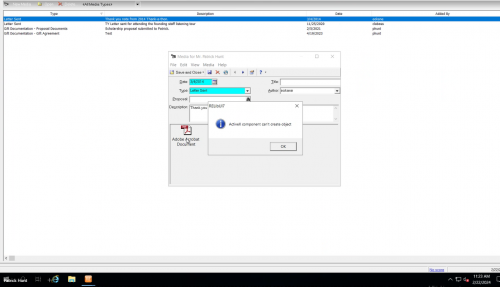
Hello, I wanted to see if anyone knows who to fix an issue we have. When viewing media files on a const record we get the error Active X component cant create object.
I have searched the knowledgebase and have not find anything of much help that fixed the problem. I thought I would post on here to see if anyone knows of a solution. Thank you in advance.
The screenshot is from a test const record.
Comments
-
@Mark Kosier I could be wrong but I think this is related to the break between RE and Microsoft products. I don't get that error - I get nothing. You can no longer open a media file directly from the menu like one could in the past.
If you click “File” on that window, you can select “Export Media File” it will allow you to export the file and then open it.
2 -
@JoAnn Strommen
Yes, it's related the Microsoft office situation.when trying to open a media file, it will try to open the file in the file association application for the extension. a pdf, would have open in a pdf read, a docx would have open in microsoft word. The issue is, Blackbaud locked all ability to open ANY file in any native appliation due to security concerns. you can't even open a csv file in notepad for example.
there is no workaround, you just have to get the file off Blackbaud hosted RE, download to your local computer to open.
2 -
@JoAnn Strommen
thank you for the reply. That is what we are trying to do. When we click “Export Media File” we get that active X error message.0 -
@Alex Wong
thank you for the reply. That is what we are trying to do. When we click “Export Media File” we get that active X error message.0 -
@Mark Kosier
I just tried to make sure it is still working as expected: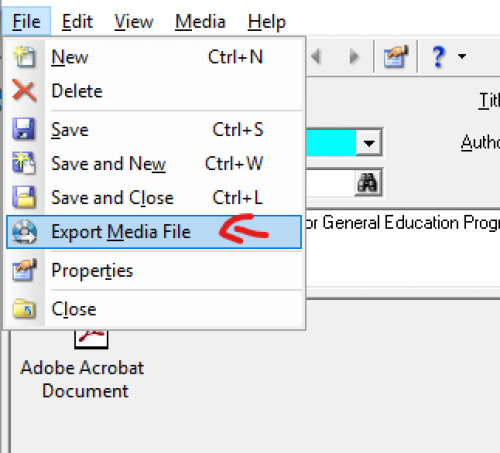
After clicking Export Media File, I get a file explorer to save the file to the remote file hosting (or directly to my local drive via mapped drive. No errors.
Do you get the file explorer to select saving folder? if not, then you may want to check your user option to make sure that your default save location is a valid folder to save to.
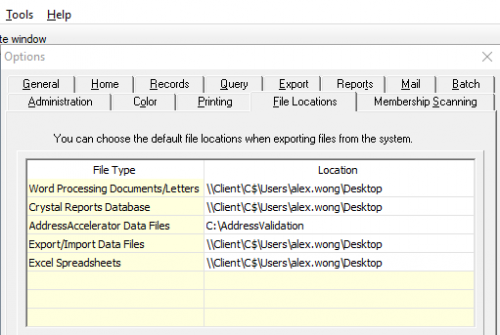
If you still have error then support will have to help.
1 -
@Mark Kosier - In this case, I recommend trying to view the attachment from within Web View. It'll open it on a new tab rather than forcing you to download the file.
1










Categories
- All Categories
- 6 Blackbaud Community Help
- 211 bbcon®
- 1.4K Blackbaud Altru®
- 402 Blackbaud Award Management™ and Blackbaud Stewardship Management™
- 1.1K Blackbaud CRM™ and Blackbaud Internet Solutions™
- 15 donorCentrics®
- 360 Blackbaud eTapestry®
- 2.6K Blackbaud Financial Edge NXT®
- 656 Blackbaud Grantmaking™
- 577 Blackbaud Education Management Solutions for Higher Education
- 3.2K Blackbaud Education Management Solutions for K-12 Schools
- 941 Blackbaud Luminate Online® and Blackbaud TeamRaiser®
- 84 JustGiving® from Blackbaud®
- 6.7K Blackbaud Raiser's Edge NXT®
- 3.7K SKY Developer
- 248 ResearchPoint™
- 120 Blackbaud Tuition Management™
- 165 Organizational Best Practices
- 240 Member Lounge (Just for Fun)
- 34 Blackbaud Community Challenges
- 37 PowerUp Challenges
- 3 (Open) PowerUp Challenge: Grid View Batch
- 3 (Closed) PowerUp Challenge: Chat for Blackbaud AI
- 3 (Closed) PowerUp Challenge: Data Health
- 3 (Closed) Raiser's Edge NXT PowerUp Challenge: Product Update Briefing
- 3 (Closed) Raiser's Edge NXT PowerUp Challenge: Standard Reports+
- 3 (Closed) Raiser's Edge NXT PowerUp Challenge: Email Marketing
- 3 (Closed) Raiser's Edge NXT PowerUp Challenge: Gift Management
- 4 (Closed) Raiser's Edge NXT PowerUp Challenge: Event Management
- 3 (Closed) Raiser's Edge NXT PowerUp Challenge: Home Page
- 4 (Closed) Raiser's Edge NXT PowerUp Challenge: Standard Reports
- 4 (Closed) Raiser's Edge NXT PowerUp Challenge: Query
- 796 Community News
- 3K Jobs Board
- 54 Blackbaud SKY® Reporting Announcements
- 47 Blackbaud CRM Higher Ed Product Advisory Group (HE PAG)
- 19 Blackbaud CRM Product Advisory Group (BBCRM PAG)