Recording Constituent Preferred Pronouns and Name Pronunciations





Hello, everyone! I'm wondering if the community could share their organization's best practices for recording constituent preferred pronouns and name pronunciations. In the past, my organization has put the pronouns in Aliases, but I want this to be somewhere that is easily accessible in both DB view and web view. Any ideas would be greatly appreciated.
Comments
-
@Sara Niemiec
we don't put neither of these in our database, so no direct experience on what's better, however, as fundraiser is more likely to be on webview, a good location is the Constituent Summary Note that appears at the top of the constituent webview page.in database view, it does appear in the “NOTE” tab as a special note type, so not as readily viewable.
2 -
@Sara Niemiec - I've seen pronouns tracked in an number of locations, but with your stipulation of a central place for both database view and web view - I recommend the following:
- Keep it where you have it in Alias.
- In Database View, add a business rule to constituent records so there is a pop-up when folks open a record that has a pronoun alias, telling them what that is or how to locate that information.
- In Web View, Alias information appears on the Constituent Summary tab, typically located at the top of records unless someone has re-arranged their tiles.
3 -
@Sara Niemiec We don't record the pronunciations, but include name preferences and pronouns in the attribute/custom fields area.
We also ask students if the information is okay to share with their parents or not. If not okay to share, an annotation is added to the record to make sure the correct information is used.
4 -
@Sara Niemiec
I like Austen's recommendations. We don't track pronouns, but we do have some donors with very hard-to-pronounce names. We add a Constituent Note with their name pronunciation. I recognize, though, that Notes tend to get buried in webview – and while I will stress that a fundraiser should either 1) know the donors well enough to know their pronunciations without reading a Note, or else 2) thoroughly review all Notes and Actions before making contact – for the sake of frontline fundraisers who may miss these basic procedures, the Alias and Summary Note fields are probably your best options.3 -
@Sara Niemiec For pronunciation, you can speak their name into your computer or phone's recording app and save that file in attachments.
Please drop the “preferred” and just use “pronouns" when labeling the pronouns for your constituent wherever you put them.
3 -
@Sara Niemiec
we don't put neither of these in our database, so no direct experience on what's better, however, as fundraiser is more likely to be on webview, a good location is the Constituent Summary Note that appears at the top of the constituent webview page.in database view, it does appear in the “NOTE” tab as a special note type, so not as readily viewable.
We track both of these and use the RE NXT Summary Note as Alex is recommending here.
This is our template for how we use this note. All RE users know they should refer to this before personalized outreach.
Address as: Only if the preference is known and differs from standards or is very strong*
Pronouns: If shared (Agree with @Sunshine Reinken Watson these are their pronouns not a preference)
Pronunciation: If known
Contact Request: e.g. Don't call between 4 & 6 p.m. - include Observe Request info here
-Legacy Circle: (I plan to move this to membership as they are building this out in web view)
-Connections
Constituent Essentials: 3-5 Sentences or what one needs to know - Write important things here that would help when you are on the phone . . .:
-
-
-On the records the explanations of how to use the headings is not included.
3 -
@Sara Niemiec
We track pronouns as an additional addressee. In NXT it displays in Constituent summary and it is easy to import and manage in database view.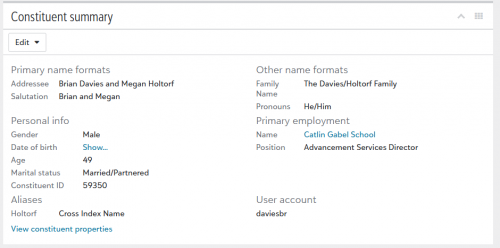 3
3


















Categories
- All Categories
- 6 Blackbaud Community Help
- 211 bbcon®
- 1.4K Blackbaud Altru®
- 403 Blackbaud Award Management™ and Blackbaud Stewardship Management™
- 1.2K Blackbaud CRM™ and Blackbaud Internet Solutions™
- 15 donorCentrics®
- 360 Blackbaud eTapestry®
- 2.6K Blackbaud Financial Edge NXT®
- 659 Blackbaud Grantmaking™
- 580 Blackbaud Education Management Solutions for Higher Education
- 3.2K Blackbaud Education Management Solutions for K-12 Schools
- 943 Blackbaud Luminate Online® and Blackbaud TeamRaiser®
- 84 JustGiving® from Blackbaud®
- 6.7K Blackbaud Raiser's Edge NXT®
- 3.8K SKY Developer
- 250 ResearchPoint™
- 120 Blackbaud Tuition Management™
- 165 Organizational Best Practices
- 241 Member Lounge (Just for Fun)
- 36 Blackbaud Community Challenges
- 37 PowerUp Challenges
- 3 (Open) PowerUp Challenge: Grid View Batch
- 3 (Closed) PowerUp Challenge: Chat for Blackbaud AI
- 3 (Closed) PowerUp Challenge: Data Health
- 3 (Closed) Raiser's Edge NXT PowerUp Challenge: Product Update Briefing
- 3 (Closed) Raiser's Edge NXT PowerUp Challenge: Standard Reports+
- 3 (Closed) Raiser's Edge NXT PowerUp Challenge: Email Marketing
- 3 (Closed) Raiser's Edge NXT PowerUp Challenge: Gift Management
- 4 (Closed) Raiser's Edge NXT PowerUp Challenge: Event Management
- 3 (Closed) Raiser's Edge NXT PowerUp Challenge: Home Page
- 4 (Closed) Raiser's Edge NXT PowerUp Challenge: Standard Reports
- 4 (Closed) Raiser's Edge NXT PowerUp Challenge: Query
- 798 Community News
- 3K Jobs Board
- 56 Blackbaud SKY® Reporting Announcements
- 47 Blackbaud CRM Higher Ed Product Advisory Group (HE PAG)
- 19 Blackbaud CRM Product Advisory Group (BBCRM PAG)